
A Warehouse Management System (WMS) connects your inventory and orders across multiple sales platforms like Shopify, Amazon, and eBay. This keeps your stock levels accurate, prevents overselling, and ensures customers always see up-to-date information. Here’s why it matters and how it works:
- Avoid costly errors: Real-time syncing prevents issues like overselling or mismatched stock data.
- Boost customer trust: Accurate prices and availability improve satisfaction and reduce support tickets.
- Stay competitive: Quickly adjust prices or inventory across platforms.
- Save time: Automation removes repeated manual entry, which is where most sync errors come from.
A note on what changed here. This article previously quoted several percentages – error reductions, revenue uplift for multi-channel sellers, forecast accuracy gains from AI-enabled middleware – none of which could be traced to a study or a vendor’s published data. They have been removed rather than restated with vaguer credit. Nothing in the advice depended on them.
Key Features of WMS Data Sync
- APIs: Enable real-time updates between systems.
- Event-Driven Architecture: Instant updates when stock changes.
- Middleware Solutions: Bridge systems that don’t naturally integrate.
Benefits and Challenges
| Benefits | Challenges |
|---|---|
| Accurate inventory tracking | Complex system integration |
| Reduced manual effort | Initial setup and maintenance costs |
| Lower operational costs | Risk of data errors during setup |
| Improved customer experience | Ongoing system updates required |
To get started, focus on WMS features like real-time tracking, platform compatibility, and scalability. Test the system before launch, train your team well, and monitor performance regularly. Tools like BizBot can help you find the right WMS and keep track of your software stack.
How Warehouse Management Systems Sync Data Across Channels
A Warehouse Management System (WMS) connects inventory, orders, and shipping details across platforms like Shopify, Amazon, and WooCommerce using a mix of technical methods. Here is how APIs, event-driven architecture, and middleware make that synchronization work.
API Integration for Real-Time Updates
Application Programming Interfaces (APIs) are what link your WMS to e-commerce platforms and shipping providers, passing structured data between systems that were never designed to know about each other.
Here’s how it works: when a customer places an order on Shopify, the WMS retrieves the order details through an API, checks inventory levels, identifies the best warehouse for fulfillment, and generates picking lists. Once the order is shipped, the WMS sends the tracking number back to Shopify (and any other linked platforms) via API. Customers get current order information without anyone re-keying it.
The mechanism worth understanding is where the errors go. Every manual re-entry between two systems is a chance to transpose a SKU or a quantity, and those mistakes surface later as a stockout on one channel and phantom availability on another. API sync removes the re-entry step. It does not remove errors introduced at the source, and a wrong count in the WMS now propagates everywhere at once – which is the trade you are making.
Event-Driven Architecture for Instant Updates
APIs handle the plumbing; event-driven architecture decides when the plumbing runs. Instead of polling for changes on a schedule, the system reacts the moment a stock level changes.
When a shipment arrives at your warehouse, inventory updates across all connected platforms immediately. When an item sells out, every channel stops accepting orders for it at the same time rather than at the next fifteen-minute sync.
That difference matters most on fast-moving SKUs and during promotions – exactly when overselling is most expensive and most visible. For a slow catalogue, scheduled polling is usually fine and considerably cheaper to run.
Middleware Solutions for Connecting Platforms
Middleware does the work when systems do not speak the same language. It converts data formats and bridges databases or APIs that are not directly compatible – most often an older ERP or a niche marketplace with no native connector.
Point-to-point connections are gradually giving way to API-first platforms that manage many integrations through one interface. That is genuinely easier to maintain, but it also concentrates risk: when the middleware has an outage, every channel goes down together.
Keep integrations current. E-commerce platforms deprecate API versions on their own schedule, and an integration that has not been touched in two years is usually one deprecation notice away from breaking silently. Some middleware now adds machine learning for demand forecasting and picking optimisation. Those features can be worth having, but ask the vendor for measured results from a customer of your size before you pay extra for them – the published figures in this space are almost all unattributed.
Benefits and Challenges of WMS Data Sync
Multi-channel synchronization has clear advantages and real costs. Being aware of both helps set realistic expectations.
Benefits of Using WMS for Multi-Channel Businesses
- Improved inventory accuracy: A WMS helps avoid stockouts and overselling, which leads to happier customers.
- Boosted efficiency: By automating updates, employees can focus on tasks that add more value to the business.
- Cost savings: Optimized inventory levels mean lower carrying costs, and fewer errors reduce expenses tied to fixing mistakes.
- Better customer experience: Real-time updates keep information consistent across channels, which reduces customer service inquiries.
Challenges to Expect During Implementation
- Technical complexity: Integrating multiple data formats and APIs often requires custom development and careful planning.
- Higher integration costs: Beyond initial software fees, businesses should budget for customization, training, and ongoing maintenance.
- Risk of data errors: Misconfigurations during setup can cause product information to become inconsistent across platforms.
- Employee training needs: Teams must learn new workflows and understand how data flows between systems.
- Dependence on APIs: Platform updates can disrupt integrations, requiring regular monitoring and adjustments.
Comparison Table: Benefits vs. Challenges
Here’s a quick look at how the benefits stack up against the challenges:
| Benefits | Challenges |
|---|---|
| Accurate inventory tracking to reduce stock issues | Complex integration of different systems |
| Increased efficiency by cutting down on manual tasks | Costs for customization and maintenance |
| Lower operational costs through optimized stock levels | Risk of data mismatches from setup errors |
| Real-time, consistent updates for customers | Need for comprehensive employee training |
| Fewer errors in operations | Potential disruptions from platform updates |
Implementing a WMS for multi-channel sync takes planning and a phased approach. Start with your most critical channels, make sure your team is confident using the system, and leave time for the problems that will surface in the first month.
Best Practices for Selecting and Implementing a WMS
Picking the right Warehouse Management System means understanding your own requirements and finding a solution that grows with you while keeping all your sales channels connected.
Key Features to Consider in a WMS
When evaluating WMS options, focus on these:
- Platform Compatibility: Look for direct integrations with major e-commerce platforms like Shopify, Amazon, eBay, and WooCommerce. This eliminates the need for custom development.
- Real-Time Inventory Tracking: Choose a system that updates stock levels across all channels when a sale happens, without manual intervention.
- Scalability: Opt for a WMS that can handle more orders, more channels, and a larger catalogue. Cloud-based systems generally scale more easily than on-premise ones.
- Automated Order Processing: Routing orders, generating picking lists, and updating tracking details automatically removes the manual steps where errors accumulate.
- Returns Management: The WMS should process returns, update inventory automatically, and report on return reasons by SKU.
- Mobile Accessibility: Phone or tablet support matters in smaller operations where the same person picks, packs, and handles the office work.
- Reporting and Analytics: Customizable dashboards and exportable reports, so you can answer questions the vendor’s default views do not.
Those features are the foundation. The rollout is where implementations usually go wrong.
Steps for a Smooth Implementation
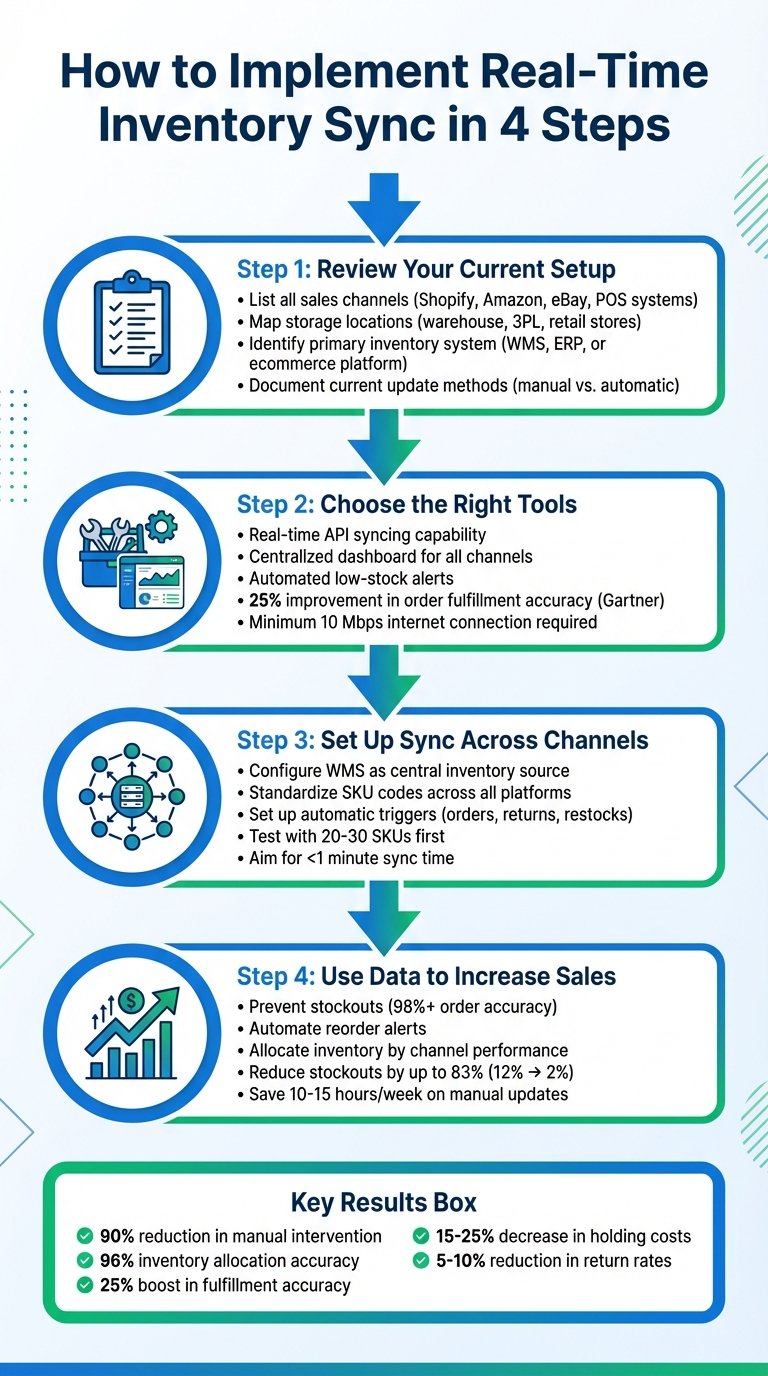
- Assess Your Needs: Document your order volumes, SKU count, sales channels, and current pain points. Start with your highest-volume channel to limit risk.
- Test Before Launch: Build a test environment and push real test orders through every channel to confirm inventory updates and order flows behave as expected.
- Train Your Team: Run the new system in parallel with the old one for a period, so problems surface while there is still a fallback.
- Monitor Performance: For the first month, track order processing time, inventory accuracy, and error rates closely.
- Plan for Maintenance: E-commerce platforms change their APIs regularly. Budget for ongoing integration maintenance rather than treating go-live as the end of the project.
How BizBot Can Simplify Your WMS Search
BizBot is a directory, not a WMS. It groups solutions by the kind of business they suit, alongside other operational software like accounting and HR systems, so you can see how a WMS fits with the rest of the stack.
You can filter by budget, integration options, and business size. Listings include user reviews where they exist.
BizBot also has a subscription management tool for tracking software costs. That becomes useful once you are paying for a WMS, a middleware layer, and channel-specific add-ons at the same time, which is the usual end state.
Conclusion: Improving E-Commerce with WMS
A well-integrated Warehouse Management System reduces manual handling of inventory and order data, which is where overselling and stockouts originate.
Key Insights
A WMS acts as a single source of truth for inventory, keeping sales channels updated as stock moves. APIs and event-driven architecture are the mechanisms that make that happen without someone editing spreadsheets.
Implementation takes planning and testing. The realistic outcomes are better order accuracy, less time spent on manual reconciliation, and fewer customer complaints about items that turned out not to be in stock. How much better depends on how bad your current process is, which is why the generic percentage improvements quoted around this category are worth ignoring.
Train your team, define the workflows, keep the system updated, and monitor the sync rather than assuming it is working. Silent integration failures are the common failure mode, not loud ones.
How BizBot Can Help
BizBot’s directory narrows the search, with solutions aimed at small businesses and growing companies. Beyond WMS, it covers accounting software and outsourced finance services.
The focus is on tools that do not require a technical team to run. The subscription management feature tracks what you are spending as the stack grows, which is worth doing before renewal season rather than after.
FAQs
How does a Warehouse Management System (WMS) sync inventory and orders across e-commerce platforms like Shopify and Amazon?
A WMS keeps inventory and order data consistent across platforms using real-time updates and automated integrations, so product details, stock levels, and order statuses stay aligned. That is what prevents overselling and mismatched inventory records.
The underlying tools are API connections, data mapping between each platform’s field names, and a synchronization schedule or event trigger. Centralising the data means one place to correct a count instead of four.
What challenges do businesses face when using a WMS to sync data across e-commerce channels, and how can they resolve them?
Common problems are inventory mismatches, overstocking or stockouts, and sync delays that look like real-time tracking until they aren’t. Each of these disrupts operations and generates customer complaints.
The fixes are unglamorous: automated real-time updates rather than scheduled batch jobs on fast-moving lines, integrations that cover every sales channel so no data silo remains, and periodic cycle counts to catch drift between physical stock and the system record. Audits matter more than most vendors admit, because sync only propagates whatever number the WMS holds – correct or not.
What key features should businesses look for in a WMS to support their e-commerce operations and future growth?
Prioritise real-time inventory tracking to keep stock levels accurate across platforms, and automated order management to remove manual fulfillment steps. Scalability matters too: the system should handle higher order volumes and additional warehouses without a re-platform.
Beyond that, check how the vendor handles API deprecations on the channels you sell through. That is the maintenance cost nobody quotes you upfront.
More on this topic
Browse all 86 articles on Business Operations, or jump straight to our buying guide: Best Productivity Tools for Small Teams.



![Marketplace Integration: Strategies, APIs, Platforms [2024]](https://bizbot.com/wp-content/uploads/2026/08/6663a6870f868443fbd9ecc7-2e760a36d379e419d5ed87be721c7d75.png "Marketplace Integration: Strategies, APIs, Platforms [2026]")