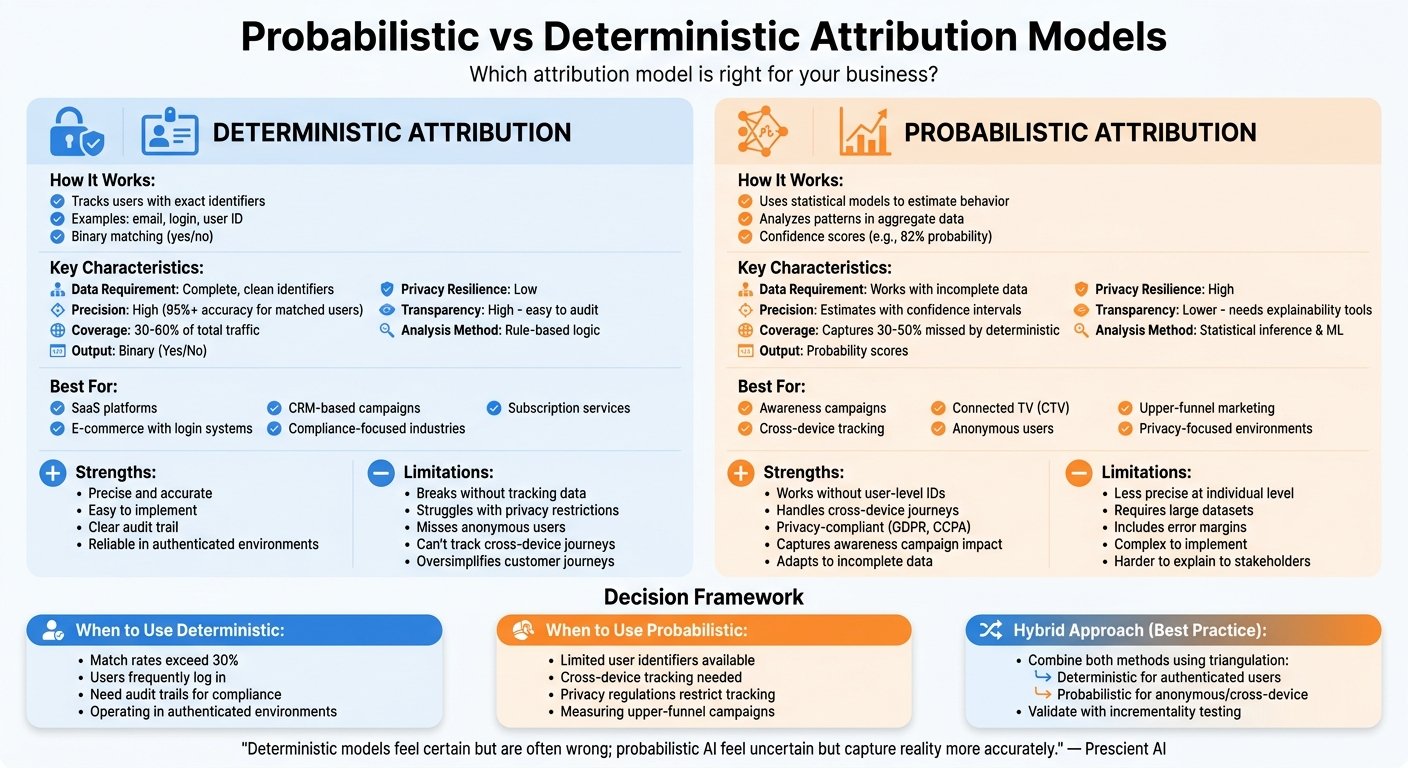
Server-side tracking allows you to collect and manage data on your server before sending it to analytics and marketing platforms. This approach improves data accuracy, enhances privacy compliance, and reduces reliance on browser-based tracking, which is often disrupted by ad blockers and poor connections.
Key Benefits of Server-Side Tracking:
- Improved Accuracy: Avoids data loss caused by ad blockers or slow connections.
- Privacy Control: Enables filtering and anonymizing data to comply with GDPR and CCPA.
- Better Performance: Reduces browser strain, leading to faster page load times.
- Reliable Conversion Tracking: Essential for high-value transactions and marketing attribution.
What You Need to Get Started:
- Technical Setup: Access to a server or cloud hosting with administrative privileges, SSL certificates, and database capacity.
- Tools: Popular options include Google Tag Manager Server-Side, Meta Conversions API, and privacy-focused platforms like Matomo or Plausible.
- Development Expertise: Skilled developers to configure APIs, secure endpoints, and manage server infrastructure.
- Privacy Compliance: Consent management systems and data retention policies to meet legal requirements.
Steps to Set Up:
- Deploy a server-side tracking solution (e.g., Google Tag Manager Server-Side) on your server or cloud platform.
- Configure your website’s data layer to send user events to your server.
- Set up secure API endpoints for data collection and processing.
- Connect your server to third-party platforms like Google Analytics or Meta.
- Test your setup thoroughly to ensure accurate and secure data flow.
Server-side tracking is an investment in reliable data and privacy compliance, especially as third-party cookies are phased out. While it requires technical resources, its advantages make it a smart choice for businesses prioritizing accuracy and user trust. All prices in this article were checked against the vendors’ own pricing pages in August 2026 and should be confirmed before you budget.
Requirements and Tools for Server-Side Tracking Setup
Technical Requirements
Setting up server-side tracking requires solid technical groundwork. First, you’ll need access to a dedicated server, VPS, or cloud hosting with administrative privileges. This ensures you have the control necessary to configure your setup effectively.
API integration is a key component, as server-side tracking depends on linking various platforms through their application programming interfaces. Your development team should be well-versed in working with REST APIs and managing HTTP requests to move events reliably between your server and marketing platforms.
To comply with privacy regulations, SSL certificates and HTTPS are non-negotiable. These ensure secure data transmission, while sufficient database capacity is necessary to handle, temporarily store, and back up user data safely.
Finally, having a developer skilled in server administration and API integrations is crucial. This expertise lays the foundation for smoothly integrating tracking tools into your infrastructure.
Tools and Platforms You’ll Need
Once your technical setup is ready, the next step is selecting tools that fit your needs. Google Tag Manager Server-Side (sGTM) is a popular choice for managing server-side tracking. While the tool itself is free, you’ll need to account for hosting costs as it requires deployment on your server or a cloud platform. Acting as a central hub, Google’s server container collects data from your website and distributes it to various marketing tools.
For businesses advertising on Facebook or Instagram, the Meta Conversions API is the one to start with. It sends conversion data directly from your server to Meta, bypassing the browser, which is where ad blockers and browser privacy settings do their damage. A recovery percentage previously quoted here has been removed: we could not source it to Meta or to anyone else. How much you actually recover depends on your traffic mix, so measure it by running both for a fortnight and comparing.
If you need advanced tools for unifying customer data, platforms like Twilio Segment are worth considering. Segment no longer publishes a rate: Twilio lists a 14-day free trial for Connections and directs everything else to sales, with volume-based billing on monthly tracked users. The free-tier limit and the $120 per month figure this article previously gave could not be confirmed on Twilio’s own pricing page, so both have been removed. These platforms are useful for consolidating customer data from various touchpoints and distributing it to your marketing stack, but budget for a sales conversation rather than a self-serve signup.
For those looking to simplify server-side tracking, especially in e-commerce, tools like TrackBee, Tracklution, and EasyInsights are designed to reduce technical complexity. These platforms are particularly helpful for businesses using Shopify.
Privacy-focused analytics tools such as Matomo, Fathom, and Plausible provide server-side tracking while prioritizing user privacy. The “$9 to $14 per month” range this article previously gave for all three was wrong. Checked in August 2026: Plausible starts at $9 per month for 10,000 monthly pageviews on its Starter plan. Matomo Cloud starts at €29 per month for 50,000 hits — a euro price — while Matomo On-Premise Community is free forever if you host it yourself. Fathom’s cheapest plan is $45 per month for up to 500,000 pageviews. They are not interchangeable on price, and the allowances differ by a factor of fifty, so compare on your own pageview volume.
| Tool Category | Examples | Best For | Starting Price |
|---|---|---|---|
| Tag Management | Google Tag Manager Server-Side | Central data distribution | Free (plus hosting costs) |
| Social Media APIs | Meta Conversions API | Facebook/Instagram advertising | Free |
| Customer Data Platforms | Twilio Segment, Tealium EventStream | Enterprise data unification | Quote only |
| Specialized Platforms | TrackBee, EasyInsights | E-commerce simplification | Varies |
| Privacy Analytics | Matomo, Fathom, Plausible | Privacy-compliant tracking | Plausible from $9/mo; Matomo Cloud from €29/mo (free self-hosted); Fathom from $45/mo |
Data Privacy and Compliance Setup
Privacy compliance is a cornerstone of server-side tracking. Tools like Google Consent Mode v2 help businesses using Google Ads and Analytics ensure that no data is collected without proper user consent.
Regulations like GDPR and CCPA demand consent management systems that empower users to control their data. This involves setting up consent banners, managing user preferences, and ensuring tracking only begins after explicit consent is obtained. Your server-side setup should also include mechanisms to honor user requests for data deletion or anonymization.
One advantage of server-side tracking is the ability to filter and anonymize data before sharing it with third-party platforms. Unlike client-side tracking, where data flows directly to external systems, server-side tracking allows you to strip out personally identifiable information or aggregate sensitive data for added privacy.
As third-party cookies phase out, privacy compliance has become a top priority. A statistic about the share of marketers who adopted server-side tracking in 2024 previously appeared here; it had no source and has been removed. The practical point stands: if you are moving collection to your own server, that is the moment to build consent handling in, not later.
To streamline compliance, tools like Usercentrics automate consent management. Its server-side tagging product has a free tier covering 20,000 requests per month, then €16 per month for 500,000 requests on the Growth plan and €49 for three million on Scale. Note the currency: those are euros, not dollars, and the article previously gave the mid tier as “$17”. Checked in August 2026. These platforms ensure your tracking system adapts automatically based on user preferences.
Your compliance framework should also include essential features like data retention policies to automatically delete user data after specific periods, audit trails to document data collection and sharing, and user access controls that let customers view, modify, or delete their information. These measures aren’t just best practices – they’re legal requirements in many regions, and ignoring them can lead to hefty fines.
How to Set Up Server-Side Tracking
Setting Up Server-Level Tracking
To begin server-side tracking, you’ll need to configure your server to capture user interactions before they are sent to third-party platforms. Start by installing your chosen server-side tracking solution on your hosting environment. For example, if you’re using Google Tag Manager Server-Side, deploy the server container to your cloud platform or VPS. This acts as a bridge between your website and the marketing tools you use.
Next, set up your data layer to capture key user events such as page views, purchases, form submissions, and other custom interactions. Unlike traditional tracking, server-side tracking collects data through backend processes. Modify your website’s code so that event data is sent to your server endpoint instead of directly to analytics platforms.
You’ll also need to configure API endpoints on your server to collect and process incoming data from your website. These endpoints serve as collection points where user interaction data is gathered, processed, and prepared for distribution. Make sure these endpoints are secure by enabling proper authentication, rate limiting, and HTTPS.
After that, establish connections between your server and the marketing platforms you want to send data to, like Google Analytics 4 or Meta Conversions API. This step involves configuring API credentials, authentication tokens, and webhook settings specific to each platform.
Finally, set up a subdomain (e.g., tracking.yourdomain.com) to host your server-side tracking infrastructure. Using a subdomain helps maintain first-party data status, which is critical for bypassing ad blockers and ensuring reliable data collection.
These steps form the foundation of a secure and efficient server-side tracking setup.
Processing and Protecting Data
Once your server-side tracking is in place, the next step is processing and securing the data. Start by applying data transformation rules to standardize the information you collect. For instance, you might convert timestamps to UTC, normalize currency values to USD, or ensure consistent naming conventions for custom events.
Implement data filtering mechanisms to protect user privacy. This includes removing or anonymizing personally identifiable information (PII) before sending data to external platforms. For example, hash email addresses, strip IP addresses, and exclude sensitive form data that shouldn’t be shared.
To improve the quality of your data, set up data enrichment processes. This might include adding geographic information based on IP addresses, calculating customer lifetime value, or appending product category details to purchase events. Server-side processing provides the flexibility to refine and enhance data before sending it out.
Use conditional logic to respect user consent preferences. For users who haven’t opted into marketing cookies, your server should only send essential analytics data and block connections to advertising platforms. This ensures compliance with privacy regulations while maintaining basic tracking functionality.
Lastly, implement data validation to maintain accuracy. Build checks to verify that incoming data is complete, formatted correctly, and logically consistent. For example, ensure that purchase events include necessary details like transaction IDs, product information, and monetary amounts before sending them to conversion tracking APIs.
After processing and securing your data, thoroughly test your setup to ensure everything works as intended.
Testing Your Setup
Testing is a critical step to confirm your server-side tracking is functioning properly. Start by enabling debug mode, such as Google Tag Manager Server-Side preview, to monitor real-time event capture and processing. This helps verify that events are being collected and forwarded correctly to the destination platforms.
Use browser developer tools to inspect network requests and confirm that your website is routing data to your server endpoints instead of sending it directly to third-party platforms. Check the Network tab for POST requests to your tracking domain and confirm that the event data payloads are accurate.
Set up logging on your server to track incoming events, data transformations, and outgoing API calls. Logs provide visibility into potential bottlenecks, errors, or data quality issues that might affect your tracking.
Cross-reference data between your server logs and the reports from platforms like Google Analytics and Facebook Ads Manager. Compare metrics such as conversion counts, revenue, and user engagement to identify and resolve any discrepancies.
To ensure long-term reliability, implement automated monitoring using tools like Google Cloud Monitoring or AWS CloudWatch. These tools can track server performance, API response times, and error rates. Set up alerts for issues like API failures, high latency, or unusual traffic patterns that could impact your data collection.
Finally, simulate various scenarios, such as high traffic, network interruptions, or API rate limiting, to test how well your setup handles these challenges. Include user acceptance testing by having team members perform typical website interactions to identify any integration issues.
Full Google Analytics 4 Server Side Tracking Set Up (From Scratch)
Best Practices for Server-Side Tracking
Once you’ve set up your server-side tracking and outlined data processing steps, fine-tuning your system with these best practices can boost accuracy, security, and reliability.
Maintaining Data Accuracy and Quality
To ensure your data remains clean and actionable, a few key practices can make all the difference:
- Filter Duplicate Events: Avoid duplicate entries by setting up rules based on unique identifiers like transaction IDs, user sessions, or timestamps. For example, use order numbers to prevent double-counting revenue when users refresh confirmation pages or when multiple tracking systems trigger simultaneously.
- Validate Event Context: Make sure every event includes the necessary details. For e-commerce tracking, this means checking for product SKUs, quantities, prices in USD, and valid customer IDs. Missing information can lead to attribution errors or skewed metrics, so verifying these details before sending data to marketing platforms is crucial.
- Monitor Data Freshness: Late or stale events can distort your daily reports. Set up timestamp thresholds to flag events delayed beyond 24 hours, ensuring your data reflects real-time activity as closely as possible.
- Enforce Data Schemas: Use strict schemas for each event type to reject malformed requests. This helps maintain consistent and clean data across all endpoints.
- Sample High-Volume Events: For non-critical events like page views, consider sampling (e.g., tracking only 10%) to reduce server load while ensuring conversions are fully tracked for essential insights.
Security and Privacy Protection
Protecting user data is non-negotiable. These measures will help you safeguard information and maintain compliance:
- Secure API Endpoints: Use token-based authentication methods like OAuth 2.0 and enforce rate limits to protect against abuse.
- Encrypt Data: Apply TLS 1.3 for all communications between your website and tracking servers. For stored data, use AES-256 encryption to protect sensitive information, even in the event of a breach.
- Handle PII Carefully: Hash or remove personally identifiable information (PII) before further processing. For GDPR compliance, set data retention policies to automatically delete user data after a specified period, such as 26 months.
- Integrate Consent Management: Ensure tracking is limited to users who have given explicit consent. Build logic into your server to check consent status before forwarding data to advertising platforms. For users opting out, send data only to essential analytics tools.
- Restrict Access: Use role-based permissions to limit who can modify tracking configurations. Implement audit logs to track changes and maintain accountability.
- Address Regional Privacy Laws: Adapt your tracking to comply with regional regulations. For example, provide data deletion capabilities for California users under CCPA and ensure explicit consent for European users under GDPR before initiating non-essential tracking.
Monitoring and Regular Checks
Once your system is set up and secure, regular monitoring ensures everything runs smoothly over time. Here’s how to stay on top of things:
- Set Up Real-Time Alerts: Detect issues early with notifications for server downtime, API failures, or unusual traffic spikes. For instance, alert your team if third-party APIs like Google Analytics or Facebook experience delays exceeding 5 seconds.
- Conduct Data Reconciliation Audits: Compare your server-side data with platform reports weekly. Check for alignment in conversion counts, revenue, and user metrics to identify potential API issues or data transformation errors.
- Track Performance Metrics: Monitor server resources like CPU, memory, and disk space. Configure auto-scaling to handle peak loads and prevent system slowdowns.
- Verify API Health: Test authentication tokens regularly, monitor API rate limits, and document any version changes from platforms like Google or Meta to ensure uninterrupted service.
- Back Up Configurations: Keep version control for your tracking setup and automate backups before making changes. This allows for quick rollbacks if new configurations disrupt data collection.
- Review Compliance: Conduct quarterly audits of your data handling practices to ensure compliance with evolving privacy regulations. Update consent management logic as needed and document processing activities for regulatory reviews.
- Monitor Costs: Keep an eye on cloud infrastructure expenses as your tracking volume grows. Watch for API usage costs from platforms that charge per event and optimize data forwarding to stay within budget. Set billing alerts to avoid unexpected charges from traffic spikes or configuration errors.
Pros and Cons of Server-Side Tracking
Server-side tracking offers a way to improve data accuracy and privacy control, but it also introduces added complexity and costs. Here’s a detailed look at its benefits and challenges to help you weigh your options.
Advantages and Drawbacks
To decide if server-side tracking fits your needs, it’s important to understand both the positives and negatives. Here’s a breakdown:
| Benefits | Drawbacks |
|---|---|
| Enhanced Data Accuracy: Avoids browser-based issues like ad blockers and cookie restrictions, enabling more reliable conversion tracking compared to client-side methods. | Technical Complexity: Demands advanced development expertise and consistent maintenance, often requiring dedicated engineering support. |
| Better Privacy Control: Lets you process data on your own servers, making it easier to comply with privacy laws and build trust with users. | Higher Implementation Costs: The upfront setup and ongoing server expenses can be substantial. |
| Improved Page Speed: Reduces the load of client-side JavaScript, leading to faster page performance and a better user experience. | Longer Development Time: Setting up server-side tracking typically takes more time than simpler client-side solutions. |
| Platform Independence: Less reliance on third-party cookies and tracking pixels makes your analytics more adaptable to changing browser policies. | Limited Real-Time Debugging: Troubleshooting can be trickier without the instant feedback provided by browser developer tools. |
| Reduced Data Loss: Server-to-server communication is generally more reliable, especially in areas with unstable connectivity, like mobile networks. | Increased Server Load: Handling and forwarding tracking data adds pressure to your servers during high-traffic periods. |
| Enhanced Security: Storing tracking data on your own servers reduces exposure to vulnerabilities on the client side. | Vendor Lock-In Risk: Custom setups can make it harder to switch analytics platforms later. |
| Better Attribution: More accurate tracking across devices and sessions improves marketing attribution and ROI calculations. | Compliance Responsibility: Full control of data means you’re responsible for meeting legal and regulatory requirements, which may need ongoing monitoring. |
The decision to use server-side tracking depends on factors like your organization’s technical expertise, budget, and need for precise data. If you’re struggling with data accuracy or adapting to privacy regulations, server-side tracking could be a worthwhile investment in strengthening your analytics infrastructure. However, it’s essential to assess your team’s capacity to manage the setup and maintenance before diving in.
Conclusion
Server-side tracking represents a major shift in how businesses collect and analyze data in today’s privacy-conscious digital world. With the rise of ad blockers and stricter browser limitations on third-party cookies, traditional client-side tracking is becoming less dependable. Many marketers have already embraced server-side tracking to ensure their data remains accurate and aligns with privacy regulations.
Three statistics previously appeared in this paragraph: an uplift range for enhanced conversions attributed to Google, a page-speed conversion multiple, and a figure for critical incidents at companies with strong data observability. None could be traced to a published source, so all three have been removed. The honest version is simpler. Server-side tracking mainly buys you back events that the browser would have dropped, and it moves the processing off the user’s device. Whether that is worth the infrastructure cost depends on how much traffic you lose to ad blockers today, which you can estimate by comparing your analytics numbers against your order count.
While setting up server-side tracking can be technically complex and may require extra resources, as discussed in the technical requirements section, its advantages in ensuring privacy compliance and maintaining data accuracy make it essential. The move toward first-party data collection isn’t just a passing trend – it’s quickly becoming a must-have strategy as privacy laws tighten and third-party cookies phase out.
For businesses focused on controlling their data, meeting privacy standards, and maintaining reliable analytics, server-side tracking offers a clear edge. The key question is not whether to adopt it but how quickly you can implement it to stay ahead in this privacy-first digital age. It is a practical step for keeping your analytics usable as browsers keep tightening.
FAQs
What is the difference between server-side and client-side tracking, and why should businesses switch to server-side tracking?
The key distinction between server-side and client-side tracking lies in where the data is handled. With client-side tracking, data is collected directly from a user’s browser. However, this method can be disrupted by ad blockers, browser limitations, or even slow-loading pages, which often leads to gaps or inaccuracies in the data. In contrast, server-side tracking processes the data on a secure server. This approach gives businesses greater control, improved data accuracy, and better alignment with privacy requirements.
Adopting server-side tracking can help businesses achieve more reliable data, enhanced security, and compliance with privacy laws like GDPR and CCPA. As a result, companies can gain dependable marketing insights, refine customer targeting, and streamline their operations for better overall performance.
How can businesses stay compliant with privacy laws like GDPR and CCPA when using server-side tracking?
To comply with privacy laws like GDPR and CCPA, businesses need to ensure they handle data responsibly and within legal boundaries. This means processing data only when there’s a valid reason – such as obtaining explicit user consent or proving legitimate interests. It’s also critical to filter and anonymize data before it reaches the server, collecting only the information that’s absolutely essential.
Transparency is another cornerstone of compliance. Clearly explain to users how their data will be used, and consider using tools like consent management platforms to handle permissions efficiently. These tools can give users greater control over their personal data. Prioritizing secure data handling and avoiding unnecessary data collection are essential steps in aligning with these regulations.
What challenges and costs should businesses expect when setting up server-side tracking, and how can they address them?
Implementing server-side tracking isn’t without its hurdles. It often introduces added complexity, requires a higher level of technical expertise, and can lead to increased infrastructure costs. Businesses need to budget for things like server hosting, cloud services, and regular maintenance, making the process more demanding compared to client-side tracking.
To tackle these challenges, companies can consider hybrid tracking strategies, which blend the best of both client-side and server-side tracking. Investing in skilled professionals or providing training for existing teams can also make a significant difference. Additionally, optimizing infrastructure can help manage costs effectively. With thoughtful planning and the right tools, businesses can work through these challenges and get server-side tracking paying for itself.
More on this topic
Browse all 53 articles on Data & Analytics.