Disclosure: This page contains commercial links. BizBot may earn a commission from qualifying purchases. Paid placements do not buy a better ranking. Read our affiliate disclosure.
Managing inventory across multiple sales channels can be a headache. Without accurate, up-to-date stock information, you risk overselling, canceled orders, and unhappy customers. Real-time inventory synchronization solves these problems by automatically updating stock levels across all platforms as sales, returns, and restocks happen. Here’s what you’ll gain:
- Accurate stock tracking: Prevent overselling and stockouts by syncing inventory instantly.
- Improved efficiency: Eliminate manual updates and reduce errors.
- Better sales performance: Keep popular items available and allocate stock deliberately.
An editorial note. This article previously carried a statistic attributed to Gartner – a 25% improvement in order fulfillment accuracy from inventory automation – repeated three times, once at second hand via a software vendor’s blog. The link labelled “Gartner” pointed at Gartner’s homepage rather than at any research. We could not find the underlying study, so the figure has been removed. Also gone: a case study about an unnamed seller who supposedly cut stockouts from 12% to 2% for $5,000 a month, and several percentage ranges for holding cost, return rate and revenue recovery that had no source. The method below is unchanged; the promises attached to it were not ours to make.
This guide explains how to set up real-time inventory sync, choose the right tools, and use data to grow your business. Whether you sell on Shopify, Amazon, or a mix of channels, syncing inventory in real time is what keeps you from selling stock you do not have.
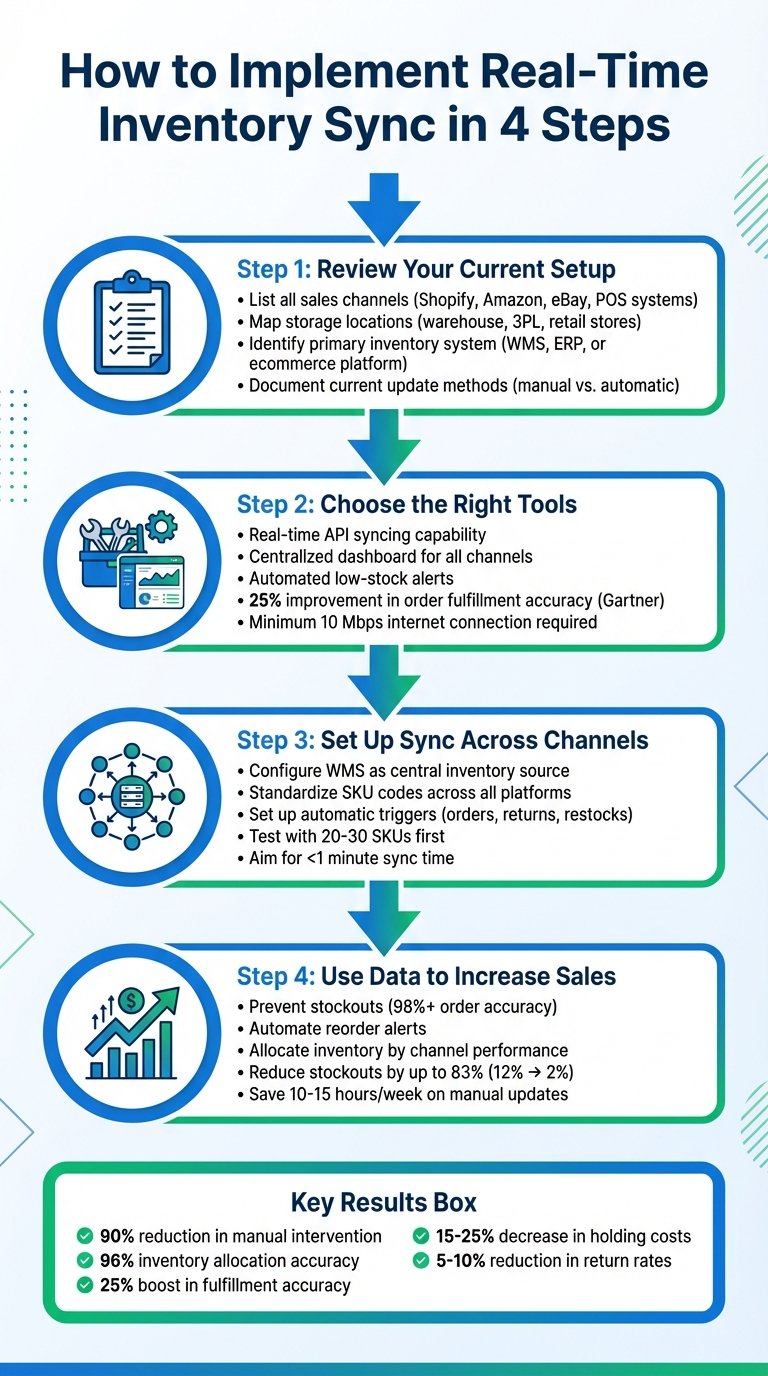
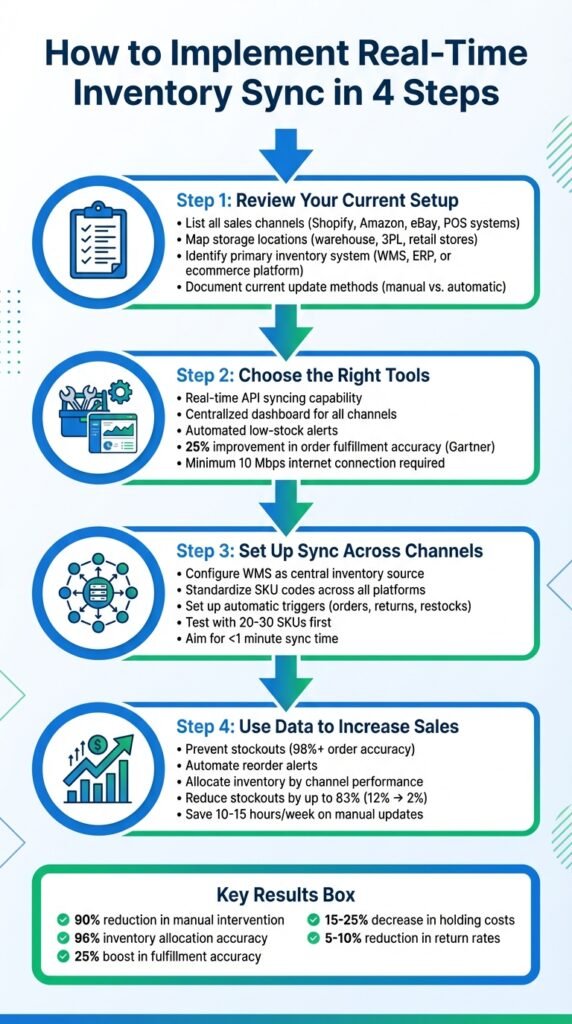
4-Step Real-Time Inventory Sync Implementation Process for Multi-Channel Sellers
Step 1: Review Your Current Inventory and Sales Setup
Before syncing anything, map where stock sits and how it moves. Without that groundwork, sync rules end up encoding assumptions that turn out to be wrong.
List All Sales Channels and Storage Locations
Document every sales channel and storage location. Channels include ecommerce platforms like Shopify or WooCommerce, marketplaces such as Amazon Seller Central, Walmart Marketplace, eBay, and Etsy, plus point-of-sale systems like Square or Clover. Include wholesale portals and orders taken by phone or email – those are the ones that get forgotten and then oversell. On the storage side: main warehouse, third-party logistics providers, retail backrooms, pop-up shops, micro-fulfillment sites, and drop-ship vendors.
A spreadsheet is enough. One row per channel or location, capturing name, URL or account ID, fulfillment method, physical address, time zone, daily order volume, the SKUs sold, and whether inventory is tracked by location or as a global pool. The map shows you where syncing matters most and which channels currently update too slowly.
Identify Your Primary Inventory System
Your primary system is the single source of truth for stock quantities. It might be a warehouse management system (WMS), an ERP, your ecommerce platform, or your POS. For smaller businesses it is sometimes a spreadsheet, which works until it doesn’t – spreadsheets have no audit trail and no way to reject an impossible value.
To find yours, ask which system gets corrected first when counts disagree, and where receiving, returns and cycle-count adjustments are recorded. That is your primary system, even if its reporting is the worst of the set. Smaller U.S. businesses often use Shopify or Square in this role; larger operations with lot or location tracking use a dedicated WMS or ERP. Confirm which of your systems has native marketplace integrations before you decide, because that choice constrains everything downstream.
Review How You Currently Update Inventory
For each channel and location, note whether updates are automatic (API, barcode scanning, POS transactions) or manual (spreadsheets, marketplace dashboards). Record who does them, how often, and what triggers them.
Pay particular attention to returns, cancellations and damages. If those are reconciled weekly rather than immediately, you have a standing discrepancy that grows with volume – and it is the usual cause of overselling that appears to come from nowhere.
Watch for cancellations due to unfulfillable orders, SKU quantity mismatches between systems, and customers reporting items unavailable after purchase. Track cancellation rate, stockout rate, and time from sale to update by channel. Those three numbers tell you which channels need fixing first.
If you are reviewing more than inventory, directories like BizBot list tools for accounting, management and subscription tracking that integrate with inventory systems.
Step 2: Choose Tools for Real-Time Inventory Sync
Key Features in Inventory Management Tools
The core requirement is real-time syncing: stock levels updating across Amazon, Shopify, eBay and your POS whenever there is a sale, return or restock. That depends on API quality on both sides, so check which of your channels the tool supports natively rather than “via our API”. A centralized dashboard matters too – the point of the exercise is one place to look.
Useful automation: continuous stock tracking, low-stock alerts, and built-in handling of returns, cancellations and reorders without manual adjustment.
Be sceptical of demand forecasting claims. Vendors advertise models analysing large numbers of variables; ask instead what accuracy they achieve on a catalogue like yours, and whether they will show you a customer reference with comparable seasonality. A forecast that is confident and wrong costs more than no forecast.
System Requirements for Synchronization
Standardize SKU naming across all channels first. If Shopify lists “LAV-CANDLE-01” and Amazon lists “Lavender-Candle”, the sync has nothing to match on. This is dull work and it is the single most common cause of failed implementations.
You need a connection reliable enough for cloud systems to stay current – reliability matters more than raw speed here, and warehouses are frequently the buildings with the worst coverage. Check that your tool handles U.S. conventions for date format (MM/DD/YYYY), currency, measurement units and time zones. Time zone mismatches between a marketplace and your WMS produce sync errors that are genuinely hard to diagnose.
If you run multiple warehouses or use IoT sensors, confirm the tool integrates with your WMS and supports location-based tracking rather than a single pooled quantity.
Using BizBot to Simplify Your Search

BizBot is a directory covering inventory, accounting, HR and subscription tools, aimed at freelancers, small businesses and growing companies. Filters let you narrow by integration support and features like real-time sync before you start booking demos.
Step 3: Set Up Real-Time Inventory Sync Across Channels
Configure Your WMS as the Central Inventory Source
Import all products into the WMS with standardized SKU codes, and make every platform use the same codes.
Map every location holding stock – main warehouse, retail stores, 3PLs, Amazon FBA. Define them in the WMS so it can calculate availability per channel. You might, for instance, reserve a portion of warehouse stock for in-store pickup rather than exposing all of it online.
Connect the WMS to each channel by API or certified app. Shopify, Amazon and Walmart all offer direct integrations. Once linked, a purchase on Amazon reduces stock centrally and propagates to Shopify, eBay and the POS.
Set Up Inventory Update Rules and Triggers
Configure triggers so stock adjusts on every event: reduce on order placement, add back on a sellable return, increase on goods receipt.
Set safety stock buffers. Hiding an item once it drops to two units leaves headroom for a damaged unit or a returns discrepancy, and is cheaper than the cancellation it prevents.
Allocation rules let you prioritise channels – useful where one marketplace penalises cancellation rates harder than others.
For bundles and kits, availability should be calculated from the component with the lowest stock. For multi-location operations, the system should route orders to the right warehouse and update either pooled or location-specific counts.
Test and Monitor Your Sync Setup
Pilot before you commit. Pick 20-30 SKUs including best sellers and anything with a bundle or variant structure. Enable sync on one or two channels and run real test orders, returns and receipts.
During the pilot, track overselling incidents, time from sale to channel update, and daily reconciliation differences between WMS and channel counts. Set your own target for update latency – under a minute is achievable with most modern integrations – and hold the vendor to whatever they promised.
Set alerts for sync failures, negative stock and delayed updates. Schedule a daily comparison report flagging mismatches. Run the pilot for at least two weeks with few errors before expanding channel by channel. Enabling everything at once is how a sync problem becomes a company-wide problem.
Step 4: Use Real-Time Inventory Data to Increase Sales
Keep Products in Stock and Avoid Shortages
Accurate availability across channels means customers see what you can actually ship. Items can be hidden or marked out of stock automatically at zero or at a threshold. For backorders, give a concrete date – “Ships by 03/15/2026” – rather than “soon”. Some systems can surface alternatives when a primary item is unavailable, which recovers part of the sale.
Set minimum stock thresholds with automated reorder alerts so best sellers do not lapse. Most stockouts on fast-moving lines are a reordering problem, not a forecasting one.
Demand Forecasting and Restocking
Sales data across all channels shows what moves and what sits. Combine it with historical trends, seasonality and your promotional calendar to set reorder points, and refine them using lead times and sales velocity per channel.
Review reports on top sellers, frequently out-of-stock items, aging inventory, and forecast accuracy. That last one matters most and is the one people skip: a forecast you never check against outcomes will not improve.
U.S. retailers typically tie this to calendar events – Black Friday, back-to-school – and to regional weather patterns where the product is weather-sensitive.
Fine-Tune Inventory Allocation by Channel
Seeing total stock and its distribution in one place lets you move it toward demand. If a product starts moving on one marketplace, you can shift allocation from slower channels.
Channel-specific caps expose only part of your stock per platform, adjustable as sales patterns change. This is also a hedge: a cap limits the damage when one channel’s sync fails.
Dashboards show products that underperform on one channel and sell well on another. For U.S. sellers, balancing stock between East and West Coast fulfillment centres cuts shipping cost and transit time.
Synchronized data also supports channel-specific promotions – discounting overstocked lines on slower channels while holding price on your own site.
Conclusion: Measuring the Results of Real-Time Inventory Sync
Compare Performance Before and After Implementation
Measure before you change anything. Track order accuracy, stockout rate, overselling incidents, and fulfillment time for a period before go-live, then compare over the following 30 to 90 days.
Also measure time spent on manual inventory updates, in hours per week, before and after. That is the easiest saving to quantify and the one finance will accept.
Then calculate the financial effect from your own numbers: fewer cancelled orders, fewer stockouts on lines you know the margin on, lower carrying cost. Published averages for this category are not reliable – as the note at the top of this article records, several that used to appear here did not survive being looked up. Your own before-and-after is worth more than any of them.
Main Benefits for Multi-Channel Sellers
Real-time inventory sync does three things:
- Reduces lost sales: fewer stockouts on lines you could have sold, and fewer cancellations from overselling.
- Removes manual work: no more reconciling spreadsheets between channels.
- Protects marketplace standing: Amazon and Walmart both penalise cancellation and late-shipment rates, and a suspended listing costs far more than the software.
That third point is underrated and is often the real business case. Accuracy is not just a customer experience matter when your marketplace account depends on it.
If you are assembling a wider stack, BizBot lists inventory, accounting and subscription tools for small and growing businesses.
FAQs
How do I make sure my inventory system works with real-time syncing tools?
Confirm it supports API integration with the channels you sell on, uses consistent data formats, and can handle your update frequency without rate-limiting. Test the connection to each sales platform and reconcile counts regularly – integrations fail quietly more often than loudly.
BizBot’s business administration listings can help you find tools that integrate with what you already run.
How does real-time inventory syncing benefit multi-channel sales?
The main benefit is accurate stock tracking. Real-time updates prevent overselling and unnoticed stockouts, which protects both customer trust and your standing with marketplaces that measure cancellation rates.
It also removes the manual reconciliation work that consumes time and introduces its own errors. The larger your SKU count and channel count, the more that matters – the reconciliation burden grows with the product of the two, not the sum.
What should I look for in an inventory management tool to support my business?
Prioritise real-time synchronization, native integration with the channels you actually sell on, and an interface your warehouse staff can use without training every new hire from scratch. Check it scales to your expected SKU and order volume.
Also check how it handles the awkward cases before you buy: bundles, variants, multi-location stock, and partial returns. Those are where inventory tools differ, and where the demo usually doesn’t go.
More on this topic
Browse all 86 articles on Business Operations, or jump straight to our buying guide: Best Productivity Tools for Small Teams.