Disclosure: This page contains commercial links. BizBot may earn a commission from qualifying purchases. Paid placements do not buy a better ranking. Read our affiliate disclosure.
Securing company data matters more with remote and hybrid work now normal in most industries. Business VPNs provide encrypted, secure access to corporate networks, protecting sensitive information like passwords and files from interception.
Key Takeaways:
- Purpose: Business VPNs secure remote access to company data, unlike consumer VPNs, which focus on anonymity.
- Centralized Management: IT teams can control user accounts, permissions, and credentials through a single dashboard.
- Security Features: Look for AES-256 encryption, kill switches, multi-factor authentication, and Zero Trust Network Access (ZTNA).
- Scalability: Modern solutions support hundreds of users, with features like split tunneling and cloud-based infrastructure for better performance.
- Compliance: Essential for meeting standards like HIPAA, GDPR, or SOC 2.
Quick Comparison: Business vs. Personal VPNs
| Feature | Personal VPN | Business VPN |
|---|---|---|
| Primary Goal | Anonymity, unblocking | Secure corporate access |
| Management | Individual settings | Centralized admin control |
| IP Type | Shared dynamic IP | Dedicated/static IP |
| Connections | Limited devices | Scalable for teams |
| Billing | Individual plans | Corporate billing |
Pro Tip: Choose a VPN tailored to your business size. Small businesses should prioritize affordability and ease of use, while larger companies require advanced security and compliance features.
Key Features to Look for in a Business VPN
When evaluating a business VPN, focus on security features, scalability and performance, and ease of management. These elements work together to protect sensitive data while keeping day-to-day work running.
Security Features
Strong security is the backbone of any reliable VPN. Look for AES 256-bit encryption, a kill switch to protect data during dropped connections, multi-factor authentication (MFA), and DNS and IP leak protection. Advanced options like Zero Trust Network Access (ZTNA) and post-quantum cryptography (PQC) are worth considering for businesses handling sensitive information.
MFA is the one to get right. Verizon’s 2024 Data Breach Investigations Report found that “most breaches (68%), whether they include a third party or not, involve a non-malicious human element” – errors and susceptibility to social engineering. Requiring a second factor at the admin level blocks access even when a password has been given away.
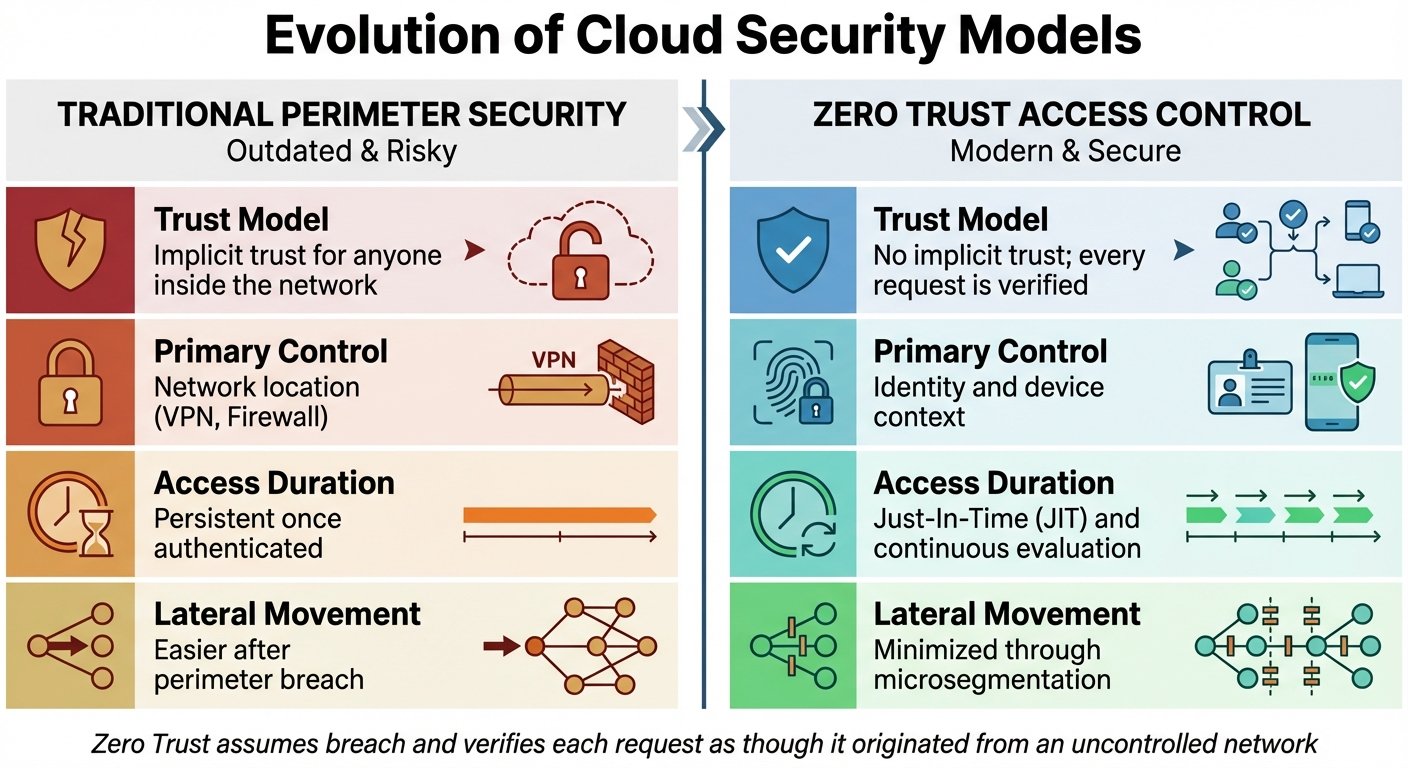
ZTNA goes further by verifying every connection and limiting access to only what’s necessary. For businesses with high-stakes data, providers offering PQC hedge against future decryption of traffic captured today.
Privacy features matter too. RAM-only servers, which erase all data on reboot, and no-logs policies verified through third-party audits are now expected by organisations with strict requirements. If your industry requires compliance with HIPAA, GDPR, or SOC 2, check that the provider meets those standards rather than assuming.
Once security is settled, consider speed and scalability.
Scalability and Performance
A VPN that noticeably slows connections will get switched off by employees, which defeats the point. Measure your baseline speed, then measure it again through the tunnel during a trial. Any published figure about typical speed loss is guesswork; your own test takes five minutes and is specific to your network.
Look for providers with servers near where your people actually work, since latency is mostly a function of distance. Dedicated IPs help with whitelisting, and split tunneling lets only sensitive business traffic pass through the VPN while video calls and streaming bypass it, reducing bandwidth pressure.
Vendors quote high per-server bandwidth figures for enterprise tiers. Those are marketing numbers from the vendor’s own testing; ask what is contractually guaranteed instead, which is usually an uptime SLA rather than a throughput one. For high availability, look for active-active clustering and a documented availability commitment of 99.9% or better.
Modern protocols like WireGuard or proprietary variants such as NordLynx are faster and lower-latency than older options like PPTP or OpenVPN.
Ease of Management
A well-designed VPN should simplify administration. A centralized management dashboard lets IT teams control user accounts, set permissions, and manage credentials in one place, which is where most human error gets removed.
Integration with Single Sign-On (SSO) providers like Google Workspace, Okta, Azure AD, or AWS streamlines access, and Mobile Device Management (MDM) support covers remote devices.
An always-on VPN setting connects devices automatically whenever they reach the internet, which removes the “I forgot to turn it on” failure mode. Role-based access control (RBAC) assigns permissions by role so users only reach what they need.
Automated onboarding and offboarding matter more than they sound: a leaver’s account that stays active is a standing vulnerability, and manual removal is the step teams forget. For smaller IT teams, managed solutions such as NordLayer handle backend maintenance and configuration.
Choosing the Right Business VPN for Your Company
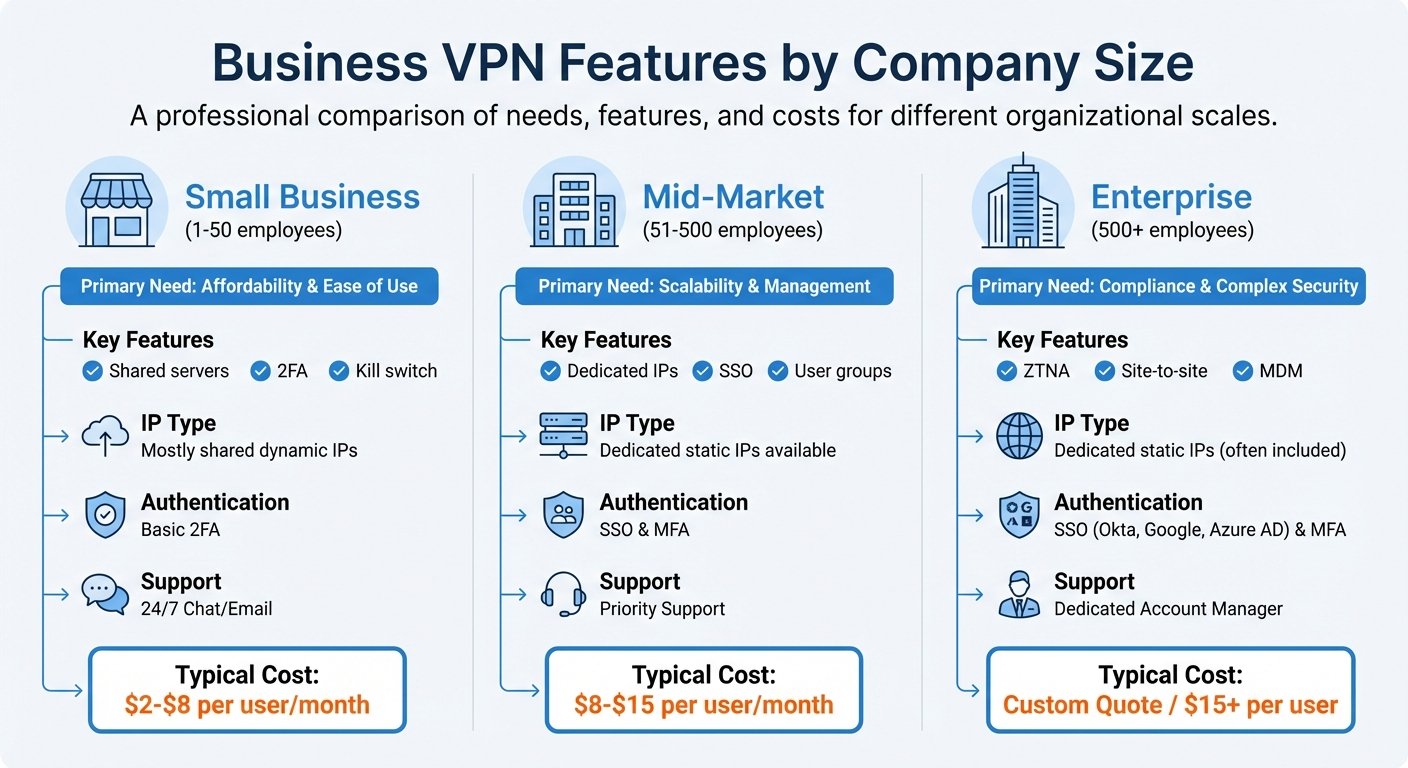
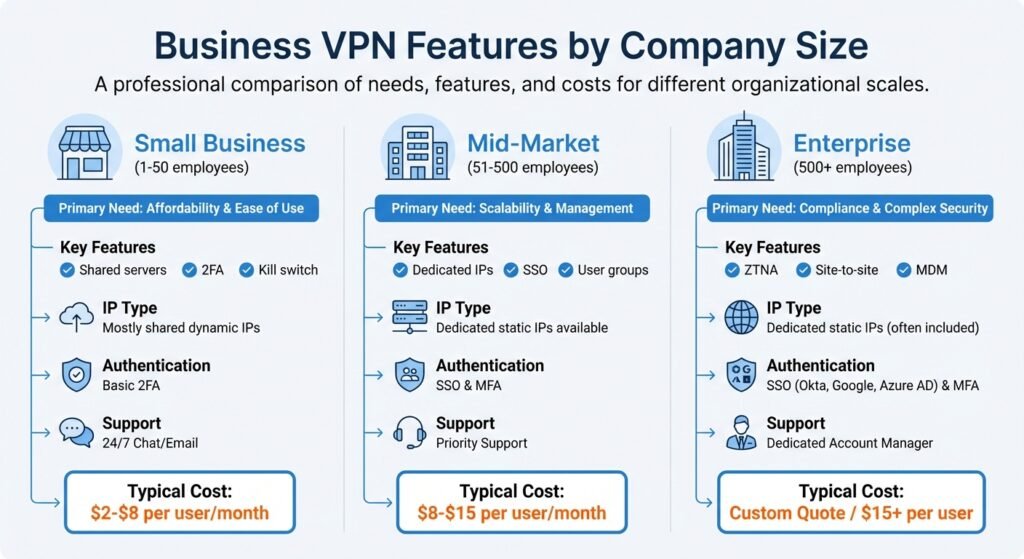
Business VPN Features Comparison by Company Size 2025
Match the solution to your company’s size, technical capability, and operational needs. Paying for advanced features you don’t need wastes money; skimping on security exposes data. Below we break down options by business size.
VPN Solutions for Small Businesses
For small businesses (1–50 employees), affordability and simplicity are what matter. Many have no dedicated IT staff, so choose something straightforward to set up and run.
Look for low entry costs and no minimum user requirements. Centralized dashboards, strong encryption, kill switches, and MFA are the must-haves. Some providers bundle antivirus, which removes a separate subscription.
An earlier version of this article carried a quote about VPNs being a low-cost preventative measure, attributed to a named writer at a named publication. We could not find that person at that publication or the quote anywhere. It has been removed. The point it was making is true enough to stand without borrowed authority: a VPN subscription costs less than one incident.
Shared servers are usually sufficient at this size. Unless you specifically need static IPs for whitelisting, do not pay extra for dedicated ones.
VPN Options for Mid-Market and Enterprise Companies
Mid-market companies (51–500 employees) and enterprises (500+) have more complex needs: scalability, compliance, and stronger controls. VPNs should integrate with existing identity and management systems rather than sitting beside them.
For larger companies, Zero Trust Network Access is becoming standard. It verifies every connection individually, so no user or device is automatically trusted. This matters most for organisations with several offices or regulated data.
Key features at this size include site-to-site connectivity to link branches, SSO integration with Okta or Azure AD, and role-based access control. Compliance with HIPAA, SOC 2, or GDPR is not optional if you are in scope. Choose a provider with an independently audited no-logs policy, and read the audit rather than the press release about it.
Cloud-based VPNs can reduce congestion by splitting traffic intelligently, avoiding the bottleneck of routing everything through an on-premises concentrator.
Comparison Table: VPN Features by Business Size
| Feature | Small Business (1–50 employees) | Mid-Market (51–500 employees) | Enterprise (500+ employees) |
|---|---|---|---|
| Primary Need | Affordability & Ease of Use | Scalability & Management | Compliance & Complex Security |
| Key Features | Shared servers, 2FA, Kill switch | Dedicated IPs, SSO, User groups | ZTNA, Site-to-site, MDM |
| IP Type | Mostly shared dynamic IPs | Dedicated static IPs available | Dedicated static IPs (often included) |
| Authentication | Basic 2FA | SSO & MFA | SSO (Okta, Google, Azure AD) & MFA |
| Support | 24/7 Chat/Email | Priority Support | Dedicated Account Manager |
| Pricing model | Published per-user list price | Published price, volume discounts | Custom quote, negotiated annually |
The per-user price ranges this table used to give were unsourced, and business VPN pricing changes often enough that any figure in an article ages badly. Every major provider publishes current per-user pricing on its own site; check three and compare on the same term length and user count.
Use the trial period to test in your own network, and watch upload speed specifically. Most speed testing focuses on download, but the thing that hurts a distributed team is slow uploads to cloud storage.
Deployment and Best Practices for Business VPNs
Implementation Strategies
Start by assessing your security needs: number of users, device types, and locations. That decides between remote-access and site-to-site VPNs. For most companies with staff working from home, remote-access is the answer.
Before rolling out, remove outdated VPN software to avoid conflicts, and confirm your routers are compatible with the new provider. Vendors advertise very short deployment times; those assume a clean environment and no existing configuration to unpick, which is rarely the case.
Match the protocol to the need: WireGuard for speed, OpenVPN for maturity and broad compatibility, or IKEv2/IPsec for mobile users switching between Wi-Fi and cellular. Install clients on all employee devices across Windows, macOS, Linux, iOS, and Android. On company-owned hardware, pre-install the client, enable MFA, and turn on the kill switch.
Management and Optimization
After deployment, configure for the balance between security and usability. Use network segmentation to enforce least-privilege access, so employees reach only the applications they need rather than the whole network. This improves security and performance at the same time.
Split tunneling reduces load by letting low-sensitivity traffic bypass the VPN. Configure it carefully; a badly scoped split tunnel is a security gap that looks like a performance optimisation. Update VPN software promptly, and train employees on secure login and basic troubleshooting, which cuts support tickets as much as it cuts risk.
Compliance and Security Considerations
Use strong encryption such as AES-256 for data in transit. Prefer providers with independently verified no-logs policies. For healthcare and finance, HIPAA and SOC 2 compliance is a requirement rather than a feature.
This section previously carried a quote from a named executive at a VPN vendor about distributed workforces and cybersecurity. The executive is real; the quote could not be found in any interview, press release or article. We removed it.
If you operate internationally, check local law before deploying. Several countries restrict VPN use, and the rules change: Russia has tightened its restrictions repeatedly in recent years, and China permits only state-approved providers, which by definition are not suitable for confidential business traffic. Verify the current position with local counsel for each jurisdiction where you have staff, and plan alternative access for those regions.
Conclusion: Investing in the Right VPN
Key Points Recap
Choosing a business VPN comes down to security, scalability, and ease of management. Look for AES-256 encryption, modern protocols like WireGuard or OpenVPN, and no-logs policies verified by independent audit. Dedicated IPs, centralized dashboards, and multi-factor authentication are what stop unauthorised access in practice.
On scalability, prioritise server coverage where your people are and the ability to add users without renegotiating. If you are in a regulated industry, confirm HIPAA, SOC 2, or ISO 27001 alignment before you shortlist rather than after.
Performance matters because a slow VPN gets bypassed. Managed always-on solutions suit businesses without dedicated IT staff, since they remove the requirement for employees to remember anything.
Next Steps
Audit your current and expected security requirements. Decide whether your workforce will stay hybrid, go fully remote, or return on-site, since that determines whether you need a simple client-based VPN or site-to-site links. Use free trials before signing anything annual.
Verify provider claims against third-party audits rather than marketing pages. For other tools, BizBot maintains directories covering accounting, HR, and management software for small and growing companies.
FAQs
How do business VPNs help meet compliance requirements like HIPAA and GDPR?
They protect data in transit, which is one specific requirement among many. AES-256 encryption, no-logs policies, and regular independent audits address the confidentiality of traffic between users and systems.
Be clear about the limit, though. A VPN does not make you HIPAA or GDPR compliant. It handles one control in a framework that also covers access management, breach notification, data retention, and vendor agreements. Anyone selling a VPN as a compliance solution is overselling it.
What makes a business VPN different from a personal VPN?
A business VPN is built for organisations: centralized management, user access controls, audit logs, and administrative provisioning. The point is that an administrator controls it, not the end user.
A personal VPN is built for one person and optimises for privacy, secure browsing on untrusted networks, and getting around content restrictions. Both encrypt traffic; only one gives you control over who can connect to what.
What features should I look for in a VPN to suit my business needs?
Start with size and operations. Useful business features include dedicated IP addresses, centralized management, secure remote access, and user role management.
On security, look for AES-256, WireGuard or OpenVPN, kill switches, DNS leak prevention, and multi-factor authentication. If you are subject to sector regulation, check the provider’s compliance position specifically rather than trusting a badge on a pricing page.
Smaller businesses should prioritise simplicity and cost. Larger ones need management tooling and scale. Either way, test on your own network before committing; the difference between providers on paper is much smaller than the difference in practice.
More on this topic
Browse all 79 articles on Security & Compliance.