Disclosure: This page contains commercial links. BizBot may earn a commission from qualifying purchases. Paid placements do not buy a better ranking. Read our affiliate disclosure.
Wireless networks extend beyond physical office spaces, making them vulnerable to attacks like rogue access points, Evil Twin attacks, and MAC address spoofing. For small and medium-sized businesses (SMBs), managing these threats with limited business administration resources is challenging. Wireless Intrusion Detection Systems (WIDS) monitor wireless activity and detect suspicious behavior, filling gaps left by traditional security tools like firewalls.
Here’s a quick look at five tools that get named in this category, and what we found when we checked them in August 2026:
- OpenWIPS-NG: Open-source WIPS for Linux with active threat blocking. Free, but effectively abandoned — the project site still lists 0.1 beta 1 and its news stops in 2012. Do not build a 2026 deployment on it.
- Kismet: Passive wireless monitoring tool supporting Wi-Fi, Bluetooth, and Zigbee. Free and actively maintained.
- Snort: Widely used intrusion prevention system with rule-based detection. Software and Community Ruleset are free; the Subscriber Ruleset is $399 per sensor for a one-year subscription on the Business tier.
- Suricata: Multi-threaded system for high traffic volumes, inspecting encrypted metadata. Free and open-source.
- Security Onion: A Linux-based platform combining multiple tools (Snort, Suricata, Zeek) with a Kibana dashboard. Free, and the closest thing here to an all-in-one starting point.
Quick Comparison
| Tool | Deployment Type | Pricing | Wireless Detection | Ease of Setup | Scalability |
|---|---|---|---|---|---|
| OpenWIPS-NG | Linux software | Free (unmaintained since 2012) | High | Low | Low (1 sensor only) |
| Kismet | Multi-platform | Free | High (Wi-Fi, Bluetooth) | Medium | Medium (Modular) |
| Snort | Multi-platform | Free / $399 per sensor per year for the Subscriber Ruleset | Medium (via rules) | Low | High |
| Suricata | Multi-platform | Free | Medium (via rules) | Medium | High |
| Security Onion | Linux distribution | Free | Medium (integrated tools) | Medium | High |
All prices in this article were checked against the vendors’ own pages in August 2026 and should be confirmed before you budget. Consider your team’s technical skills, hardware compatibility, and compliance needs when choosing a WIDS. Testing through free trials or demos is the only way to find out whether the alert volume is something your team can actually live with.
Best Wireless Intrusion Detection Tools for SMBs
Small and medium-sized businesses (SMBs) need effective and budget-friendly tools to tackle modern wireless security threats. These tools fill the gaps in traditional defenses, offering features like wireless monitoring and network security. Many of them are open-source, which suits SMBs with tight budgets. Here are the five options that come up most often, with an honest note on which are still alive.
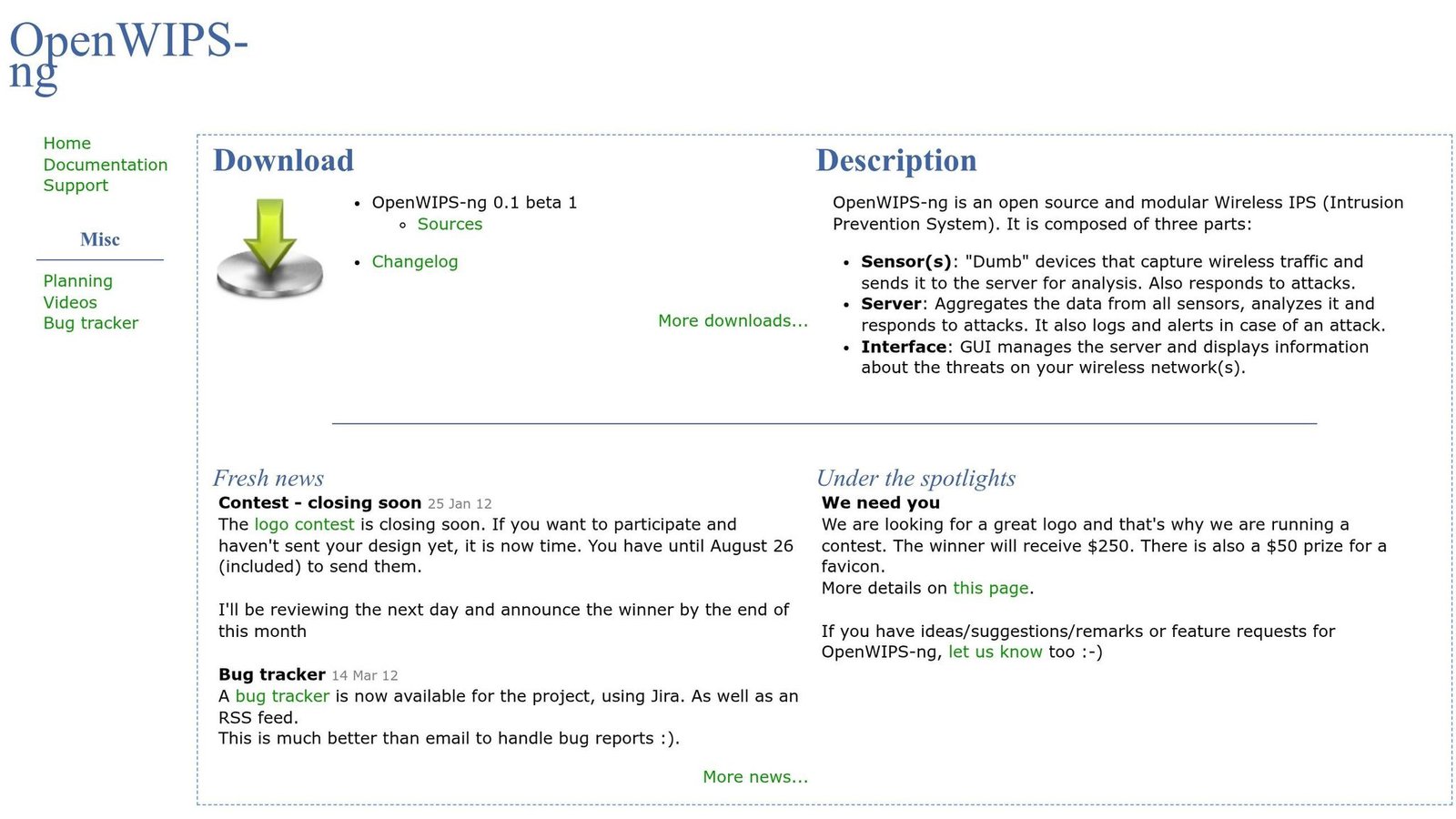
OpenWIPS-NG is a wireless intrusion prevention system (WIPS) built to secure wireless networks. Unlike passive tools, it actively blocks threats by intercepting rogue access points or unauthorized devices. Its modular, open-source design allows flexible deployment, though it is limited to a single sensor per installation and requires a Linux setup.
Read this before you shortlist it. The project appears to be dead. The official site still offers 0.1 beta 1 and its news page stops in 2012. It is listed here because old shortlists and roundups keep recommending it, and you should know why not to follow them: an unmaintained WIPS gets no signature updates and no fixes for the drivers and kernel interfaces it depends on. If you want active blocking rather than passive detection, look at a maintained option instead — Suricata in inline mode, or the wireless features built into your access point vendor’s controller.
Pricing: Free and open-source.

Kismet takes a passive approach to wireless monitoring. It operates as a network detector and sniffer, analyzing wireless activity without transmitting packets, so it does not announce itself to an attacker. The 2025-09-R1 release, dated 4 September 2025, brought a new device view UI, better CPU and memory use, and bugfixes. Kismet also monitors Bluetooth, Zigbee, and RF sensors alongside Wi-Fi. For best results, use a wireless adapter that supports monitor mode and packet injection.
Pricing: Free and open-source.

Snort is one of the most widely used intrusion prevention systems in the world. Snort.org claims “over 5 million downloads and over 600,000 registered users” — that is the vendor’s own figure, not an independent count. While primarily a network IPS, it can also be pointed at wireless traffic once that traffic is on the wire. Snort’s rule-based model lets it function as a packet sniffer, a logger, or a full IPS. Snort 3 was officially released in January 2021, and Cisco published further end-of-life dates for older Snort 2 and Snort 3 versions in January 2026, so check that the build you install is still supported.
Pricing: The software and the Community Ruleset are free. The Subscriber Ruleset, which gets rules roughly a month ahead of the community set, is a one-year subscription: $29.99 for the Personal tier (home or educational use only) and $399 per sensor for the Business tier. Per sensor matters — three sensors is three subscriptions. Checked on snort.org in August 2026.

Suricata handles high traffic volumes with multi-threaded processing. Like Snort, it offers strong application-layer visibility and works in both inline and passive modes. It supports Windows, Linux, and macOS. As a free and open-source tool, it carries no licensing cost — only the cost of the hardware and the person tuning it.
Pricing: Free and open-source.

Security Onion combines several open-source tools, like Suricata and Zeek, into one platform. According to ClearNetwork, Inc:
Security Onion is a Linux IDS that can monitor both the host and the network… incorporating aspects of Snort, Suricata, Zeek, and other popular open-source security tools.
Bundling is the point: you get the sensors, the log pipeline and a Kibana dashboard without assembling them yourself. That is a real saving for a team with no dedicated security engineer. It is still a Linux platform you have to run, patch and size correctly.
Pricing: Free and open-source.
Feature Comparison Table
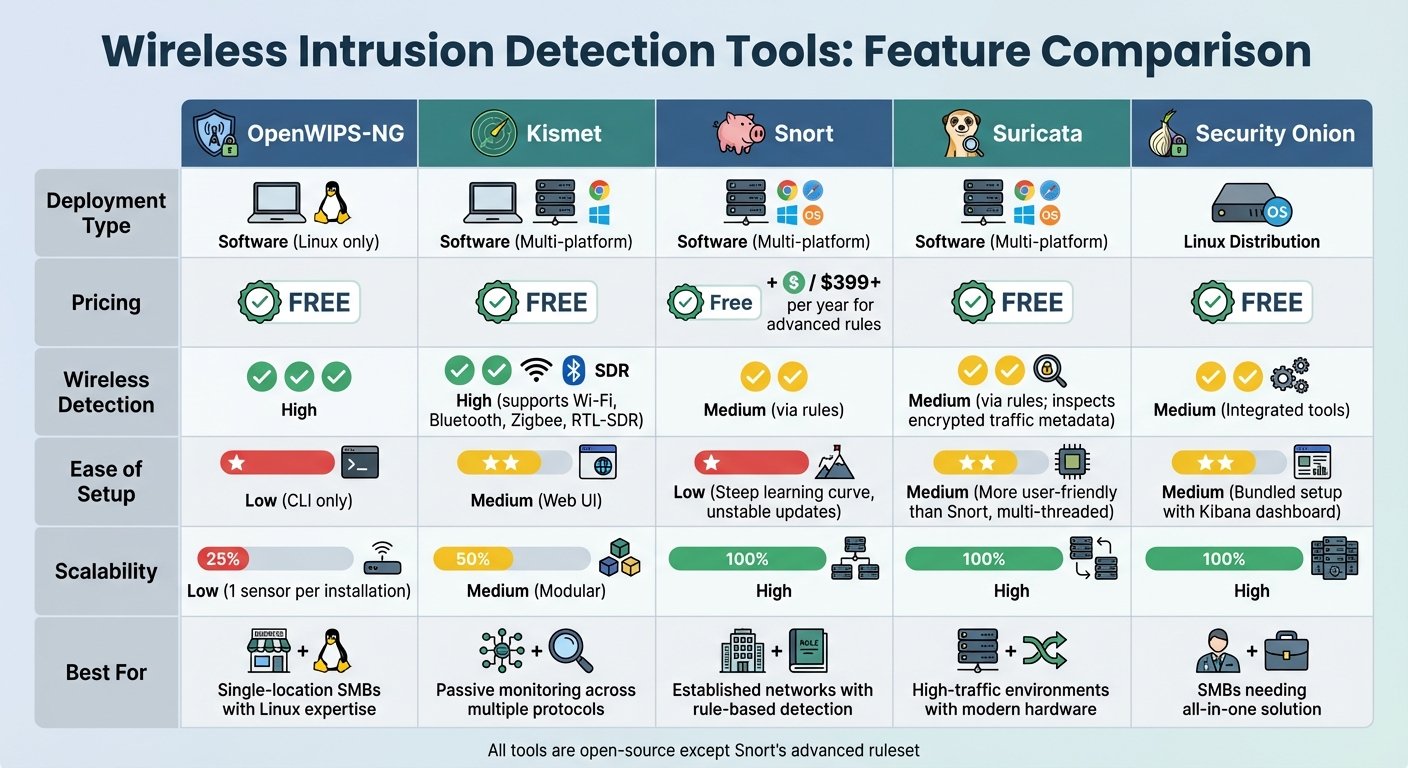
Wireless Intrusion Detection Tools Comparison for SMBs
Feature Comparison
Compare tools by deployment type, pricing, detection, setup ease, and scalability.
| Tool | Deployment Type | Pricing | Wireless Detection | Ease of Setup | Scalability |
|---|---|---|---|---|---|
| OpenWIPS-NG | Software (Linux only) | Free (unmaintained since 2012) | High | Low (CLI only) | Low (1 sensor per installation) |
| Kismet | Software (Multi-platform) | Free | High (supports Wi‑Fi, Bluetooth, Zigbee, RTL‑SDR) | Medium (Web UI) | Medium (Modular) |
| Snort | Software (Multi-platform) | Free / $29.99 per year Personal, $399 per sensor per year Business | Medium (via rules) | Low (Steep learning curve) | High |
| Suricata | Software (Multi-platform) | Free | Medium (via rules; inspects encrypted traffic metadata) | Medium (More user-friendly than Snort, multi‑threaded) | High |
| Security Onion | Linux Distribution | Free | Medium (Integrated tools) | Medium (Bundled setup with Kibana dashboard) | High |
This table helps small and medium businesses (SMBs) evaluate tools based on their specific security needs. Below is a closer look at each tool’s features and limitations.
OpenWIPS‑NG: Designed exclusively for Linux, this tool requires solid command-line skills to operate. Its single-sensor limitation means you would need multiple Linux installations to cover a larger network — and, as above, it has not been updated since 2012.
Kismet: Known for its web interface, Kismet supports a variety of hardware beyond Wi‑Fi, including Bluetooth, Zigbee, and RTL‑SDR. Performance on large networks depends heavily on the capture hardware you give it.
Snort: Supported by Cisco, Snort has a large library of pre-built detection rules. It also has a steep learning curve, and wireless-specific detection is something you build out of rules rather than something it does for you. Budget engineer time, not just licence cost.
Suricata: With its multi-threaded architecture, Suricata processes traffic efficiently, even on modest hardware. It also inspects encrypted traffic metadata, which is useful when the payload itself is off limits.
Security Onion: This Linux distribution bundles several tools into one package. Its Kibana dashboard shortens the gap between installing something and seeing anything useful.
For useful results, make sure your network adapters support monitor mode. Snort and Suricata both need time spent tuning detection rules to keep false positives manageable. Suricata’s deep packet inspection is CPU-hungry, so size the box accordingly.
How to Choose the Right Tool for Your SMB
Choosing here is about more than picking from a list. It requires an honest look at your team’s skills, your hardware, and your budget.
Key Factors to Consider
Assess your team’s technical expertise. Kismet and Snort both demand a working understanding of Linux and network protocols. If nobody on the team has that, a managed cloud service like Wazuh Cloud or Blumira shifts the operational burden — at a real cost. Wazuh publishes its cloud rates: the Small tier starts at $571 per month for up to 100 active agents, Medium at $923 per month for up to 250, and Large at $1,467 per month for up to 500, with a Custom tier quoted on request. Those are monthly figures, checked on wazuh.com in August 2026.
Check hardware compatibility. Open-source solutions, such as Kismet, require specific wireless adapters that support monitor mode and packet injection. Commercial tools like UniFi CyberSecure depend on running a supported Ubiquiti gateway. Verify your hardware is on the supported list before committing.
Understand performance trade-offs. Turning on a large signature set costs throughput, sometimes a lot of it, because every packet gets inspected. We removed a specific percentage figure here because we could not source it; test it on your own hardware instead, with your own traffic mix. As a rule of thumb, buy a gateway whose rated IPS throughput comfortably exceeds your sustained line rate rather than matching it. Some products offer a reduced signature set for memory-constrained devices.
Plan your deployment carefully. Treat a Wi-Fi hardware refresh as a security project, not just a speed upgrade: new bands and new authentication modes change what you are monitoring. Start in an observability or detection-only mode to learn baseline traffic patterns, so you do not break production the day you turn on blocking. Deploy agents to critical systems first, such as domain controllers and identity servers, rather than everywhere at once.
These considerations cover the technical side. Cost and features matter too.
Balancing Cost and Features
Free tools are not free. Suricata and Snort have no licensing fees, but they need real time and expertise to tune and to work the alert queue. Commercial products automate more of the response, which is worth money to a two-person IT team. Ubiquiti sells UniFi CyberSecure as a subscription tied to a supported gateway, but it does not publish the rate in its own documentation, and we could not confirm a figure from a Ubiquiti page — so the per-year prices previously printed here have been removed. Get the current price from the Ubiquiti store or your reseller before budgeting.
Plan for storage needs. Self-hosted SIEM tooling generates a lot of log data per agent per day, and storage is the cost that surprises people. We removed a specific daily volume figure as unsourced; measure it on a handful of agents for a week and extrapolate. To control costs, forward only the channels you actually use, such as Security and System, and leave out Debug. Cloud platforms roll storage into a higher flat fee, which removes the risk of undersizing it.
Match features to regulatory requirements. For healthcare and finance, compliance drives the shortlist. Wazuh offers File Integrity Monitoring, which maps to PCI DSS requirements, and WPA3 is mandatory for 6 GHz operation. If compliance is not a factor, a smaller signature set and a cheaper tool will do.
Use free trials and demo periods. Wazuh Cloud, for example, offers a 14-day trial with no credit card. Use the trial to measure the false positive rate and to find out whether your team can keep up with the alert volume. A tool nobody reads the alerts from is not protecting anything.
Conclusion
Final Thoughts
Wireless intrusion detection covers ground that firewalls and endpoint tools cannot reach: the radio space around your building, where an attacker does not need to touch your cabling. As Meter puts it:
A wireless intrusion detection system watches the space around your enterprise Wi-Fi – but not in the way you might expect. It picks up signs that something’s off, even when everything looks normal on the surface.
The solutions above sit at different points on the expertise and budget scale, and one of them — OpenWIPS-NG — should be struck off any current shortlist. Start by mapping your wireless environment and identifying high-risk zones. PCI DSS and HIPAA both expect wireless monitoring, so pick a system that flags rogue access points, scans, and probes before a connection is established, and that produces an alert volume your team can actually work through.
FAQs
Do I need special Wi‑Fi hardware to run a WIDS?
Many Wireless Intrusion Detection Systems (WIDS) monitor wireless activity using the network hardware you already have. Some need dedicated sensors or access points for better coverage, and open-source sniffers such as Kismet need an adapter that supports monitor mode. Check the adapter list before you buy anything.
How do I reduce false positives in wireless alerts?
Tune the rules. Start by adjusting the IDS rule set and alert thresholds to match your network, and keep signature databases current so old noise drops out.
Throttle and burst settings cap the alert rate so a single noisy event does not bury everything else. Define what counts as a false positive in your environment, then disable the rules that do not apply to you at all — rules for services you do not run are pure noise.
What’s the best way to deploy sensors across multiple sites?
For multiple locations, passive wireless sensors such as Kismet work well for monitoring the air and spotting rogue access points. Place them at entry points, high-traffic zones, and sensitive data locations.
Then feed them into a central platform, such as a cloud-managed controller, so you get one place to look and one place to set policy. That is what makes multi-site coverage manageable rather than five separate jobs.
More on this topic
Browse all 79 articles on Security & Compliance.