Is a chatbot worth the investment? The honest answer is that it depends on your support volume and how repetitive your queries are, and you can work it out from your own numbers in an afternoon. This guide shows how.
A warning about chatbot statistics first. An earlier version of this article claimed chatbots handle up to 70% of customer inquiries. We could not trace that figure to a source, so it has been removed, along with two other unsourced claims. Be sceptical of the deflection and saving percentages that circulate in this field: they are almost all published by chatbot vendors, drawn from self-selected customers, and rarely define what counted as a resolved query. Your own ticket data is worth more than any of them.
- Cost Savings: Measure agent hours saved, query resolution rates, and reduced operating expenses.
- Customer Satisfaction: Track response times, issue resolution rates, and satisfaction scores.
- Revenue Growth: Focus on lead generation, conversion rates, and average order value.
How to Calculate ROI:
ROI = [(Total Benefits – Total Costs) / Total Costs] × 100
The detail that decides whether the answer means anything is counting both sides over the same period, with recurring costs included. See the worked example below.
Before you calculate anything
Run this check first, because it determines whether the rest is worth doing. Export a few months of support tickets and count how many fall into your ten most common question types.
- If most of your volume is those ten questions, a chatbot has something to deflect and the numbers will probably work.
- If your volume is long-tail, with most tickets being different from each other, there is little to automate and the project will disappoint regardless of the product you buy.
This one query predicts chatbot ROI better than any industry benchmark.
ROI Measurement Metrics
Cost Reduction Metrics
| Metric | Focus | How to Measure |
|---|---|---|
| Agent Hours Saved | Reduction in customer service time | Multiply hours saved by fully loaded hourly cost, not base wage |
| Query Resolution Rate | Share of issues genuinely closed by the chatbot | Count only conversations with no follow-up contact within a week |
| Operating Expenses | Overall support cost change | Track monthly staffing and tooling costs before and after |
Two cautions that decide whether these numbers are real:
Count a resolution only if the customer did not come back. A conversation the bot ended is not the same as a problem it solved. Measuring repeat contact within seven days is the cheapest way to tell the difference, and it usually reduces the headline deflection rate substantially.
Saved hours only become saved money if something changes. If your team size and hours are unchanged, you have created capacity, not savings. That capacity may be genuinely valuable, but do not book it as a cost reduction in a business case unless you can point to the headcount you did not hire or the overtime you stopped paying.
Customer Satisfaction Metrics
| Indicator | What to do with it | Impact |
|---|---|---|
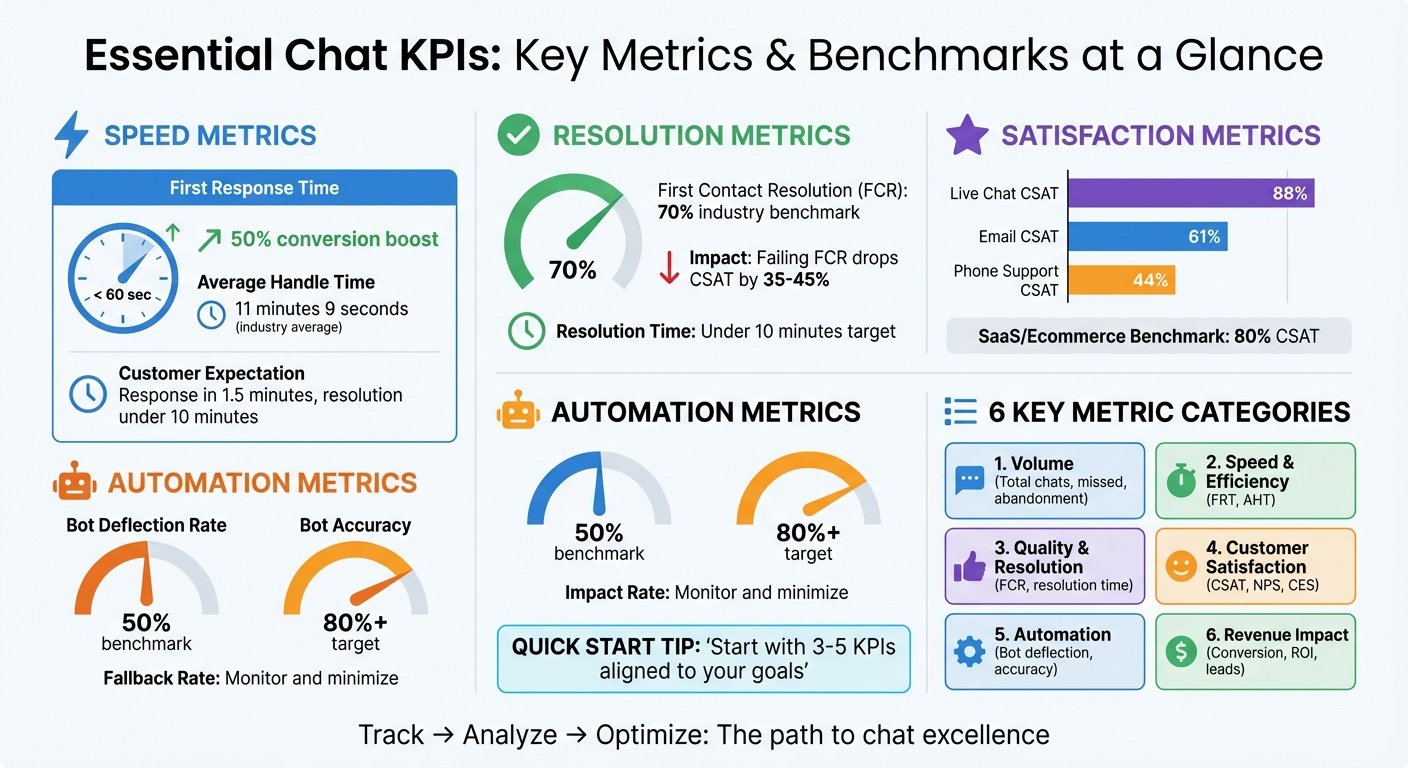
| Response Time | Compare against your own pre-chatbot baseline | First response is where chatbots reliably win |
| First-contact Resolution | Track separately for bot and human conversations | Shows what the bot is actually closing |
| Customer Satisfaction Score | Measure bot conversations and escalated ones separately | A blended score hides a failing bot |
| Escalation Rate | Watch it, do not suppress it | A bot that never escalates is trapping people |
We have removed the target ranges an earlier version gave for these, since they were presented as benchmarks without a source. Set targets from your own pre-launch baseline instead; that comparison is the only one that tells you whether the chatbot improved anything.
Sales Performance Metrics
| Metric | How to Measure | Business Impact |
|---|---|---|
| Lead Generation | Qualified leads originating in chat | Revenue potential |
| Conversion Rate | Sales completed with chatbot involvement | Direct revenue contribution |
| Average Order Value | Order size with and without chatbot assistance | Revenue per interaction |
Attribution warning: customers who engage with a chatbot are already more engaged than those who do not, so they would convert at a higher rate anyway. Comparing chatted against non-chatted sessions will overstate the effect, often dramatically. If the revenue case matters, run the chatbot for a portion of traffic and compare against a holdout.
ROI Calculation Methods
ROI = [(Total Benefits – Total Costs) / Total Costs] × 100
The formula is trivial. Getting the inputs right is not.
Costs people forget
- Subscription or usage fees, which for AI-based products are often billed per resolution or per message rather than per seat, so they scale with success
- Implementation and integration with your helpdesk, CRM, and order systems
- Content creation: writing and structuring the answers the bot draws on
- Ongoing maintenance: someone must own it, review transcripts, and update content as products change. This is a permanent part-time job, not a launch task.
- Staff time during implementation and training
Sample Calculation
The figures below are an invented illustration with round numbers, not a real company’s results. They show the method. Substitute your own.
Suppose a business spends $30,000 in year one on setup: $15,000 implementation, $5,000 training, $10,000 integration. It also pays $18,000 a year in subscription fees and allocates $12,000 a year of staff time to maintaining content and reviewing transcripts.
Year one total costs: $30,000 + $18,000 + $12,000 = $60,000
Suppose annual benefits are $90,000: $45,000 in labour cost avoided, $25,000 in additional sales, $20,000 in other operational savings.
Year one ROI = [($90,000 – $60,000) / $60,000] × 100 = 50%
In year two the setup cost is gone, so costs fall to $30,000 and, assuming benefits hold:
Year two ROI = [($90,000 – $30,000) / $30,000] × 100 = 200%
A previous version of this article reported the 200% figure for year one by comparing a one-off $30,000 setup cost against a full year of benefits and omitting recurring costs entirely. That is the most common error in chatbot business cases and it makes almost any project look good. Count both sides over the same period, and include what the thing costs to keep running.
Measurement Tools
| Tracking Area | Key Metrics | Measurement Frequency |
|---|---|---|
| Cost Savings | Labour hours saved, reduced expenses | Monthly |
| Revenue Impact | Sales conversions, average order value | Weekly |
| Customer Service | Resolution rates, response times, repeat contacts | Daily |
| Overall ROI | Full cost-benefit analysis | Quarterly |
Take your baseline measurements before launch. Once the chatbot is live you cannot go back and find out what your resolution times used to be, and a business case with no baseline is an assertion.
BizBot can help keep track of the subscription costs feeding into this calculation, which is the side of the equation businesses most often lose sight of.
Improving ROI Results
Enhancing Performance
- Use AI to improve response quality and keep answers grounded in your own documentation
- Offer multilingual support where you have the audience for it, and test each language before advertising it
- Automate workflows so a chat can trigger the actual action, not just describe it
The highest-return improvement is usually unglamorous: read the transcripts of conversations the bot failed, find the three questions it fails most often, and write proper answers for them. This beats most feature upgrades.
Managing Costs
- Watch usage-based billing. Where AI features are billed per resolution or per message, costs rise with volume. Model your bill at two and three times current volume before committing.
- Scope narrowly. A bot covering ten questions well costs less and performs better than one covering fifty badly.
- Digital Solutions: Tools like electronic signatures and document management systems remove paperwork costs elsewhere in the same workflow.
Driving Revenue Growth
- Out-of-hours cover: Capture enquiries that would otherwise go unanswered until morning.
- Smart lead routing: Get high-value leads to a salesperson quickly.
- Cross-selling: Relevant recommendations only. Irrelevant ones cost goodwill and produce nothing.
Constrain what the bot may say about prices and terms. In a number of jurisdictions a business can be held to what its automated agent told a customer.
Market Outlook
Where chatbots are heading
Large language models have made chatbot responses far more fluent than the scripted systems that preceded them. Fluency is not accuracy, and the main engineering problem now is keeping a system that always sounds confident tied to information that is actually correct.
An earlier version of this section reported that “research highlights” a significant increase in customer service automation, without naming the research. That claim has been removed.
What this means for ROI
| Area | What has changed | Effect on ROI |
|---|---|---|
| Response quality | Far more natural conversation | Higher containment, if grounded in your own content |
| Pricing models | Shift toward per-resolution and per-token billing | Costs now scale with usage, so model them at volume |
| Setup effort | Less intent scripting required | Lower implementation cost, higher content and testing cost |
| Risk profile | Generative systems can state things that are not true | Adds a testing and oversight obligation |
The pricing shift is the most consequential for anyone building a business case. Under per-seat pricing, a successful chatbot cost the same as an unsuccessful one. Under usage-based pricing, success raises the bill, so a case built on flat costs will understate what you pay.
New Market Sectors
Chatbots began in retail and have spread into regulated sectors including finance and healthcare. Those sectors carry obligations that change the calculation: constraints on what an automated agent may say, disclosure requirements, and record-keeping duties. Factor compliance review into the cost side if you operate in one.
Conclusion
Key Takeaways
- Check your ticket mix first. If your volume is not dominated by repeated questions, the numbers will not work whatever you buy.
- Count costs and benefits over the same period, including subscription fees and the staff time to maintain the thing.
- Take a baseline before launch. You cannot reconstruct it afterwards.
- Count a resolution only when the customer does not come back.
- Distrust published chatbot statistics, including any you find in comparison articles. Almost all originate with vendors.
- Saved hours are not saved money unless something in your staffing actually changes.
A chatbot is a reasonable purchase for a business drowning in repetitive questions, and a poor one for a business with varied, complex enquiries and no one to maintain the content. The calculation above will tell you which you are, and it is worth doing before rather than after.
Overview of BizBot‘s Tools
BizBot lists business software with pricing, and offers subscription cost management to keep track of what your tools actually cost month to month. That matters here because the recurring side of the ROI calculation is the part most businesses lose track of once a tool is running.
More on this topic
Browse all 21 articles on Customer Support, or jump straight to our buying guide: Best Customer Support Tools for Small Teams.