Workplace from Meta is closed. Meta’s own page now states that “Workplace has closed as of May 2026”. The platform went read-only on 1 September 2025 and was shut down in May 2026, so this is no longer a live choice between two products. We have kept the comparison because people still arrive here from old shortlists, and because the feature contrast is a useful way to think about what replaced it. If you are here to pick a tool, the real decision is between Slack, Microsoft Teams and Workvivo by Zoom, which Meta named as its recommended migration partner.
Businesses that moved off Workplace can also improve communication and productivity by using the right document collaboration tools.
The differences that mattered:
- Interface: Workplace mimicked Facebook’s layout; Slack organizes communication via channels.
- Features: Slack’s strengths are its app marketplace, global search, and workflow automation. Workplace’s were the News Feed, Live Video, and Knowledge Library.
- Pricing: Slack Pro is $7.25 per user per month billed annually ($8.75 billed monthly). Workplace Core was $4 per user per month before it closed.
Slack features like Canvas and Huddles cover some of what Workplace did, though nothing in Slack replaces the company-wide News Feed. If that broadcast style was the reason you used Workplace, Workvivo is the closer match.
Quick Comparison
| Feature | Workplace from Meta (closed May 2026) | Slack |
|---|---|---|
| Interface | Facebook-style News Feed | Channel-based messaging |
| File Storage | Unlimited on paid plans, 100MB per file | Allocated per member on paid plans; 1GB maximum file size |
| Integrations | Dozens | Thousands, via the Slack Marketplace |
| Live Communication | Workplace Live (interactive video) | Huddles (small audio/video calls) |
| Knowledge Tools | Knowledge Library | Canvas + global search |
| Pricing | Was $4/user/month; no longer sold | $7.25/user/month billed annually (Pro) |
Slack prices were checked against Slack’s own pricing page in August 2026. Confirm before budgeting.
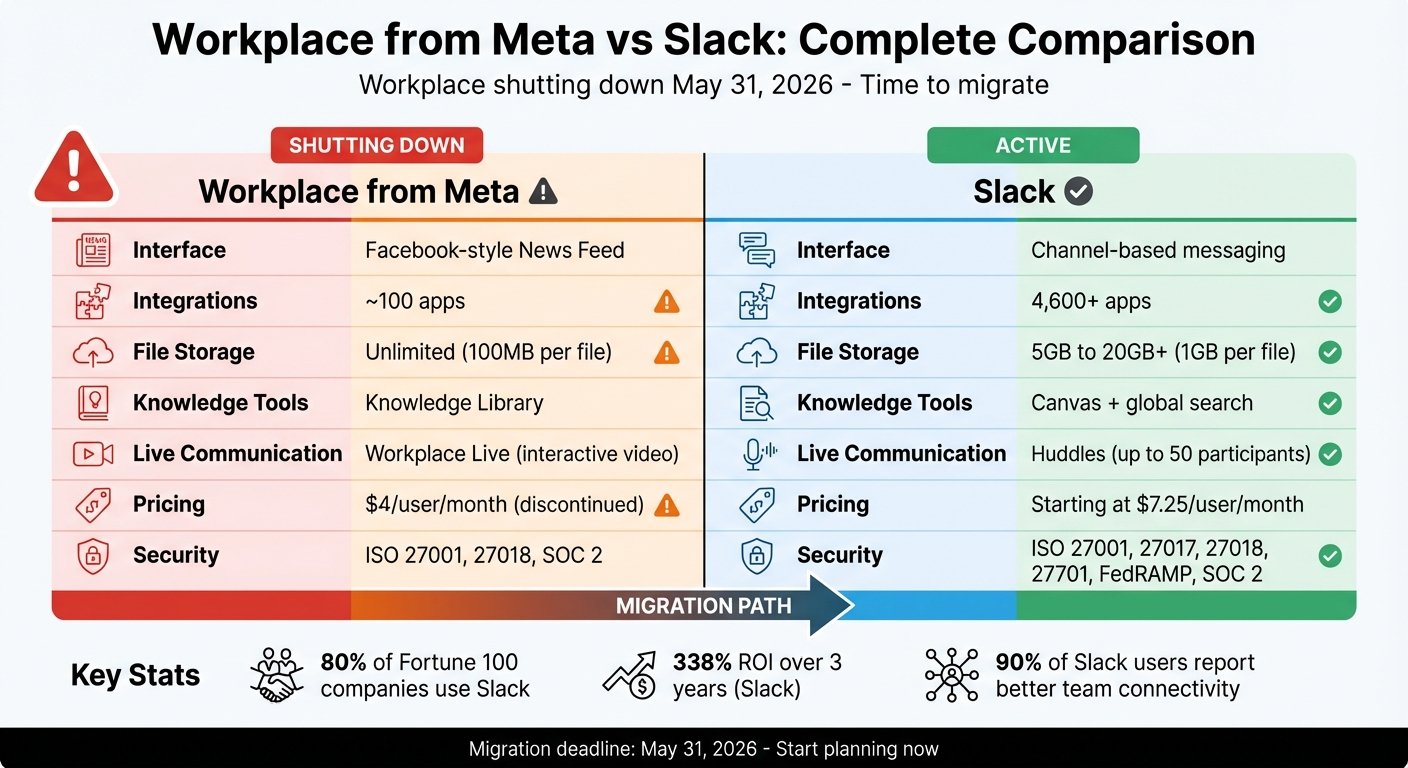
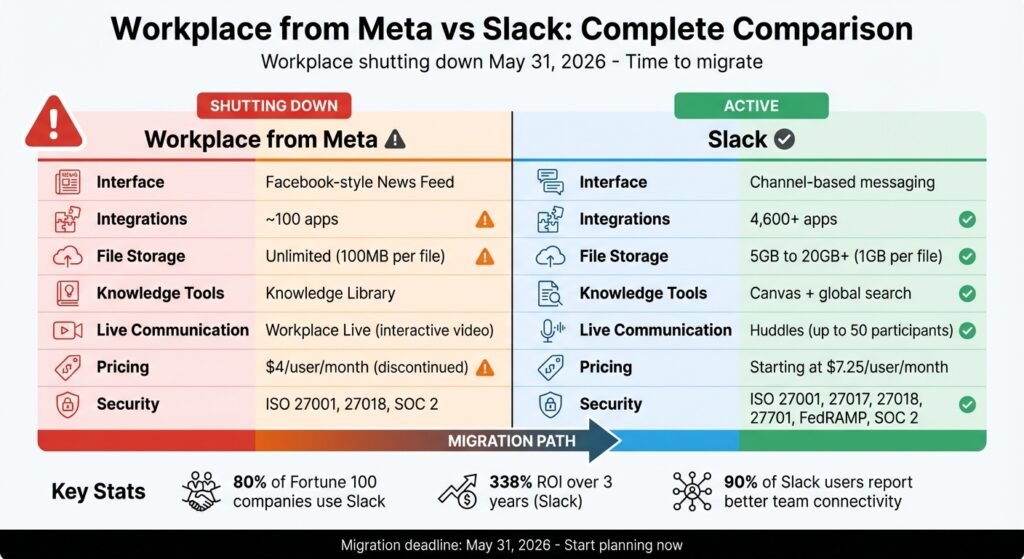
Workplace from Meta vs Slack: Feature and Pricing Comparison Chart
Slack Alternatives: Choosing the right team chat on the market
Feature Comparison
Workplace from Meta mirrored Facebook’s layout, with a News Feed, Groups, and user profiles for internal communication. Slack is built around channels – dedicated chat spaces where teams collaborate on specific projects or topics in real time. The contrast is worth understanding, because it explains why a straight Workplace-to-Slack migration disappoints some organizations.
Workplace’s News Feed curated updates, leadership posts, and team content into a single stream. Slack uses announcement channels and an activity feed to highlight mentions and direct messages, but it has no unified feed. For a company that broadcast to thousands of deskless staff, that is a real loss, not a detail.
For live communication, Workplace had native Live Video for town halls and Q&A sessions with live reactions. Slack offers Huddles, which are quick audio or video calls designed for smaller groups. Larger events on Slack need a third-party tool.
On knowledge management, Workplace had a Knowledge Library, a static intranet for HR policies and similar resources. Slack has Canvas, a collaborative document surface, plus search that scans messages and files. These solve the problem differently: a library is curated and top-down, a canvas is written by whoever needs it.
File sharing differed too. Workplace gave unlimited storage on paid plans but capped individual files at 100MB (25MB in Chat) and had no centralized file hub. Slack allocates storage per member on paid plans, allows files up to 1GB, and includes an “All Files” section. The table below summarizes the distinctions.
Feature Comparison Table
| Feature | Workplace from Meta (closed) | Slack |
|---|---|---|
| Primary Interface | Social media (Facebook-style) | Channel-based messaging |
| News Feed | Personalized feed | Activity feed (mentions only) |
| Groups/Channels | Open, Closed, or Secret Groups | Public or Private Channels |
| Live Broadcasting | Workplace Live (with Q&A/Polls) | Huddles (up to 50 participants) |
| Knowledge Base | Knowledge Library (static intranet) | Canvas + contextual search |
| Messaging | Workplace Chat (separate app) | Integrated chat and threads |
| File Storage | Unlimited, 100MB per file | Per-member allocation on paid plans, 1GB per file |
| File Management | No centralized hub | “All Files” section |
| Integrations | Dozens | Thousands, via the Slack Marketplace |
| External Collaboration | Multi-company groups | Slack Connect (shared channels) |
Pricing and Plans
Workplace from Meta is no longer sold. It stopped taking new subscriptions, went read-only on 1 September 2025, and closed in May 2026. Its Core plan had been $4 per user per month with optional add-ons at a further $2 per user per month. Those figures are historical and are included here only so you can compare them with what you are being quoted now.
Slack’s tiers, checked against Slack’s own pricing page in August 2026:
- Free Plan: 90 days of searchable message history, up to 10 app integrations, and 1:1 huddles, at no cost.
- Pro Plan: $7.25 per user per month billed annually, or $8.75 per user per month billed monthly. Unlimited message history, unrestricted integrations, and group huddles for up to 50 participants.
- Business+ Plan: $15 per user per month billed annually, or $18 per user per month billed monthly. Adds AI search and recaps, SAML SSO and SCIM provisioning.
- Enterprise+ Plan: quoted on request. Unlimited workspaces and enterprise-grade security.
Two things to note. First, annual billing saves about 17% on both paid tiers, which is real but smaller than the “up to” figures vendors usually advertise. Second, Slack’s Fair Billing Policy means you only pay for members active within a 28-day period, with prorated credit for inactive ones. On a large deployment with seasonal or frontline staff, that is worth more than the annual discount.
We removed a return-on-investment figure that used to appear here, because it came from vendor-commissioned research we could not trace to a primary source. Slack does offer discounted pricing to non-profits and educational institutions, arranged directly with the company.
Pros and Cons
Evaluating each option’s strengths and limitations helps ensure the platform aligns with your team’s workflows and long-term needs. Teams can further improve how they communicate and coordinate by learning how to automate business processes effectively, especially as workflows become more complex.
Workplace from Meta had a user-friendly interface reminiscent of Facebook, which made it easy for teams to adapt. Its weaknesses were a small integration library, search that was limited to individual conversations, and the need for two separate apps. Its fatal weakness, in the end, was that Meta closed it.
Slack is chat-first, with a large integration library and search that spans conversations and file contents. Its no-code Workflow Builder covers a lot of routine automation. Slack states that 77 of the Fortune 100 use it. Against that: busy workspaces produce notification overload, and at $7.25 per user per month it costs more than Workplace did. That comparison is now academic, but it matters if you budgeted against the old number.
Pros and Cons Table
| Platform | Pros | Cons |
|---|---|---|
| Workplace from Meta | • Easy-to-use Facebook-style interface • Great for asynchronous communication and company-wide announcements
• Unlimited file storage on paid plans • Was cheaper, at $4 per user per month |
• Closed in May 2026 • Small integration library
• Basic search limited to conversations • Required separate apps for different functions |
| Slack | • Thousands of apps in the Slack Marketplace • Global search across conversations and files
• Workflow Builder for automation • Real-time collaboration with Huddles and Channels • Slack states 77 of the Fortune 100 use it |
• $7.25 per user per month on Pro, billed annually • Can lead to notification overload
• Interface may feel cluttered in larger organizations • No equivalent of a company-wide News Feed |
Ease of Use, Integrations, and Security
Workplace from Meta took the familiar route, with a Facebook-like interface, a News Feed, Groups, and a social media feel. That minimized training time for teams already used to Meta’s consumer platforms. As one verified TrustRadius user put it:
Workplace is a product born from a social networking company making it friendlier. It feels more familiar, easy to use and it can be less formal and more relatable.
The mobile experience was clunkier than that suggests, because it needed two apps: one for Workplace and one for Workplace Chat. Search was limited to individual threads.
Slack consolidates everything into a single app. Its channel-based navigation organizes work into a sidebar of public and private channels, direct messages, and threads. There is a learning curve, and the layout is customizable down to sidebar themes. Trayan T., Founder and CEO, shared:
Slack is a robust communication tool. What I appreciate most is its intuitive interface and seamless integration with various third-party apps….
Slack’s search indexes all messages, including content inside shared files, which is the single biggest day-to-day difference from Workplace.
On integrations, the gap was wide. Slack describes its Marketplace as holding thousands of apps and does not publish an exact count; the figures between 2,000 and 4,600 that circulate online come from different years and different counting methods, so we have removed them rather than pick one. Workplace supported a far smaller set, in the dozens. Slack’s “Actions” let users create and complete tasks in tools like Jira or Asana from a chat. Both platforms offered APIs and webhooks for custom work.
On security, both encrypted data in transit and at rest, offered Single Sign-On and multi-factor authentication, and met SOC 2. Slack additionally holds ISO 27001, 27017, 27018 and 27701 certifications and FedRAMP authorization for U.S. public sector use. Workplace held ISO 27001 and 27018, and kept work accounts separate from personal Facebook accounts. Slack has native data loss prevention and region-specific data residency. Both integrated with Cloud Access Security Brokers and eDiscovery tools.
Which Platform Should You Choose?
Workplace from Meta is gone. It went read-only on 1 September 2025 and closed in May 2026. If you are reading this because you were told to migrate, that window has passed; content that was not exported before the shutdown is not recoverable, and there is no version of this article that can change that. What follows is about where Workplace users went.
For most teams the answer was Slack or Microsoft Teams. Slack offers real-time communication, a large app marketplace, and workflow automation through Workflow Builder and Lists. Teams is usually the cheaper answer if you already pay for Microsoft 365, because it is bundled.
Workplace’s strengths were social broadcasting and top-down communication, and it was genuinely popular with frontline and deskless workers who found the Facebook-style interface obvious. If that is what you are replacing, Slack is the wrong shape. Meta pointed those customers at Workvivo by Zoom, which is built for the same broadcast-and-engagement job.
Slack does cover part of it. Canvas handles shared reference material, Atlas covers profiles and directories, and Huddles and Clips give informal audio and video presence. What it does not give you is a feed that everyone in the company sees.
As teams settle into Slack or another platform, it is worth considering how communication ties into broader workflows and project coordination. Migrating platforms is not just about messaging but about ensuring your team can manage tasks, track progress, and stay aligned. Teams working through this can benefit from the best tools for managing multiple projects, especially when scaling collaboration across departments.
FAQs
What features make Slack a strong alternative to Workplace from Meta?
Slack’s case rests on real-time messaging, editable conversations, and a well-organized channel system. Users can edit or delete messages, react to posts, and keep discussions on track with topic-specific channels and direct messaging. That keeps team communication structured and searchable.
Slack also bundles collaboration tools – file sharing, voice and video calls, clip sharing – into one app, which removes the Workplace habit of switching between two. Its search covers past conversations and files.
The other strength is the range of third-party integrations and built-in automation through workflows and bots. Where Slack is a poor substitute is company-wide broadcasting, which is exactly what Workplace was best at.
How do the integration features of Slack compare to Workplace from Meta?
Slack’s Marketplace holds thousands of apps covering project management, CRM, analytics and DevOps. Slack does not publish an exact count, and the specific numbers quoted around the web are inconsistent, so treat “thousands” as the honest answer.
Workplace from Meta took a narrower approach, prioritizing Meta-owned services and a small set of partners such as Microsoft 365 and Google Workspace. That was fine for teams already invested in those platforms and limiting for everyone else.
Can I still migrate from Workplace by Meta to Slack?
No. Workplace closed in May 2026 and its data has been deleted, so there is nothing left to migrate. Third-party migration services existed while the export window was open; they no longer have a source system to read from.
If you exported your Workplace data before the shutdown and still hold the archive, a migration provider may be able to import parts of it into Slack, but check what formats they accept before paying for anything. Message history from an export rarely arrives in a useful shape.
More on this topic
Browse all 40 articles on Project & Team Management, or jump straight to our buying guide: Best Project Management Tools for Small Teams.