Most businesses spend considerable time deciding which software to adopt. They compare features, pricing, integrations, security, and ease of use before committing to a platform.
Far less attention goes into answering another important question:
What happens when you need to leave?
A platform that works perfectly today might become too expensive, discontinue an important feature, change its pricing structure, stop integrating with another system you rely on, or simply no longer fit the way your business operates. In more extreme cases, a provider could be acquired, significantly change direction, or shut down altogether.
By the time one of those things happens, figuring out how to retrieve years of customer records, documents, workflows, reports, and account history can become considerably harder.
That’s why businesses should create a software exit plan before they actually need one.
A software exit plan documents how your business could move away from an important platform while protecting its data and keeping essential operations running. It doesn’t mean you expect to leave every application you adopt. It simply prevents one software provider from becoming so deeply embedded in your business that leaving becomes unnecessarily risky.
What Is a Business Software Exit Plan?
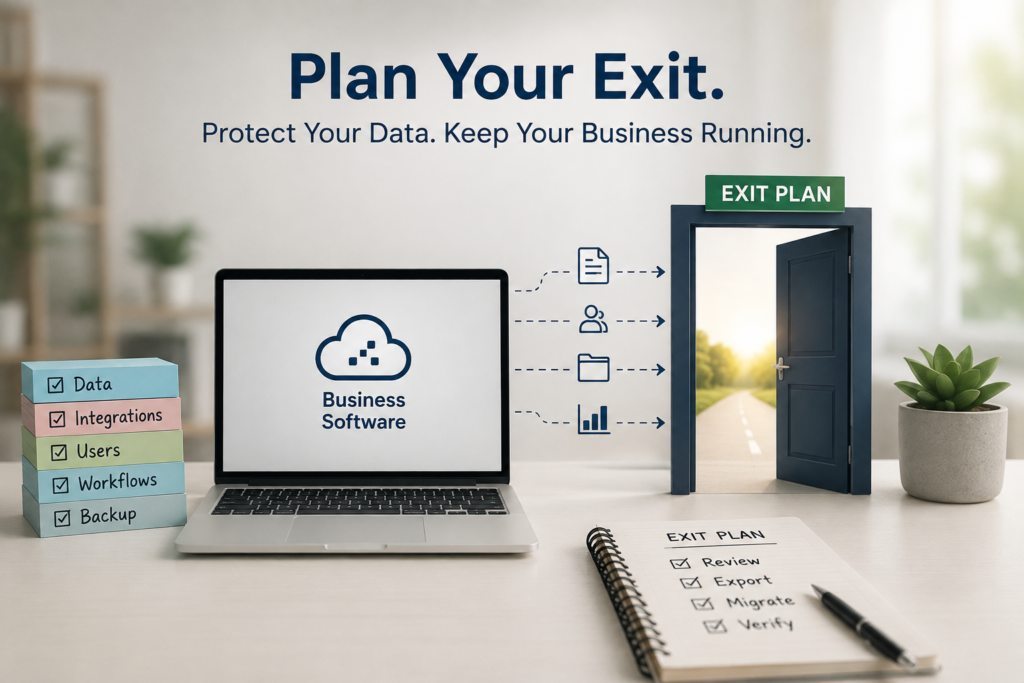
A business software exit plan is a documented process explaining how your company would stop using a software platform and move its essential data, workflows, and responsibilities somewhere else.
Think of it as an emergency exit for your technology stack.
You may never need to use it. But if you do, you don’t want to discover that the door is locked.
A good exit plan answers practical questions such as:
• What business data is stored in the platform?
• Who owns and administers the account?
• Can the data be exported, and in what format?
• Which other applications depend on the software?
• What would stop working if the platform disappeared tomorrow?
• Which business processes would need to move elsewhere?
• How long would a migration realistically take?
• What information needs to be retained after cancellation?
These questions aren’t only relevant to large companies with complex IT departments. A five-person business can become highly dependent on a CRM, accounting platform, project management system, cloud storage provider, or ecommerce platform without realizing how difficult replacing it would be.
The broader principle is similar to contingency planning: organizations should identify important systems, understand their operational dependencies, and establish recovery strategies before disruption occurs.
Why Businesses Get Trapped in Software
Software dependency usually develops gradually.
A company signs up for a platform because it solves one problem. Over time, employees upload documents, create templates, customize fields, connect other applications, build automations, and change their workflows around the software.
Eventually, the platform isn’t simply another subscription. It becomes part of how the business operates.
This creates switching costs.
Those costs aren’t limited to purchasing replacement software. They can include employee training, data migration, rebuilding integrations, recreating reports, changing internal processes, informing customers, and temporarily running two systems while the transition takes place.
The problem becomes more serious when nobody has documented how the existing system works.
Imagine discovering that your CRM contains five years of customer history but exports only some records cleanly. Or that an automation connecting your website, CRM, and email platform was built by an employee who left two years ago.
The software itself isn’t necessarily the problem. The problem is allowing dependency to develop without understanding what leaving would involve.
You Should Think About the Exit Before Buying the Software
One of the easiest times to evaluate a software exit is before signing up.
Businesses naturally focus on what a platform can do. However, the ability to leave deserves a place alongside features, pricing, security, integrations, and support when evaluating important software.
Before adopting a platform, find out how your data can be exported.
Don’t settle for seeing an “Export” button in a feature list. Understand what the export actually contains.
Can you export:
• Customer and contact records?
• Documents and attachments?
• Transaction history?
• Notes and comments?
• Custom fields?
• Reports?
• Images and media?
• Activity history?
• User information?
Also check the format.
A CSV containing basic contact details is very different from a complete export containing relationships between records, attachments, historical activity, and custom information.
This becomes particularly important for systems that accumulate large amounts of business information over time.
For example, businesses already using cloud storage need to think beyond capacity and everyday collaboration. Bizbot’s cloud storage guide discusses factors such as integration, security, scalability, and data management when choosing storage. Exit planning adds another consideration: how easily could you retrieve and reorganize everything if you changed providers?
Start by Identifying Your Business-Critical Software
Not every subscription needs a detailed exit plan.
If your team uses a simple image-resizing application occasionally, losing access tomorrow probably wouldn’t stop the business from operating.
Your accounting system is different.
So is the CRM containing your customer history, the ecommerce platform processing orders, the cloud storage service holding company files, or the scheduling system controlling customer appointments.
Start by identifying the applications whose sudden loss would materially disrupt operations.
A simple classification can help:
Critical: The business would struggle to operate without it.
Important: Losing it would create significant inconvenience, but temporary alternatives exist.
Non-critical: It could be replaced without major operational disruption.
Focus the detailed exit planning on the first category.
This mirrors a broader business-continuity principle: identify mission-critical operations and the systems and data supporting them before developing recovery strategies.
Step 1: Document What the Software Actually Does
The first section of your exit plan should explain why the platform exists.
That sounds obvious until a business has used the same software for several years.
A CRM originally purchased for lead management may now handle customer records, sales pipelines, email sequences, website forms, support information, reporting, and several automations.
Simply writing “CRM — manages sales” doesn’t capture that dependency.
Instead, document the actual business functions the platform supports.
For example:
Platform: CRM system
Business functions: Lead capture, contact management, sales pipeline, follow-up reminders, email automation, sales reporting
Primary users: Sales and customer service
Business owner: Head of Sales
Technical administrator: Operations Manager
Critical integrations: Website forms, email marketing platform, accounting software
You don’t need an elaborate IT document. You need enough information that someone unfamiliar with the setup could understand what would be affected if the platform disappeared.
Step 2: Map Where Your Data Lives
Next, identify what information the software holds.
This is where many businesses discover that a platform contains much more than they expected.
A project management application, for example, might contain project files, customer discussions, internal decisions, task histories, deadlines, employee assignments, templates, and attachments.
A CRM may contain years of emails, meeting notes, customer preferences, contracts, lead sources, and sales history.
Document the major categories of data and determine which information would need to survive a migration.
This also helps distinguish between operational data and historical data.
You might need active customer records immediately in a replacement system, while older reports only need to remain accessible for reference or record-keeping.
Knowing the difference can make a future migration considerably easier.
Step 3: Know How You Can Get Your Data Out
Once you know what information matters, test whether you can actually retrieve it.
Don’t wait until you’re cancelling the subscription.
Export a sample.
Open the files. Check whether important fields are included. Verify whether attachments come with the export or need to be downloaded separately. Look at whether relationships between records survive.
Then document the process.
Your exit plan should explain:
• Where the export function is located
• Which administrator permissions are required
• What file formats are available
• What the export includes
• What it doesn’t include
• How long large exports take
• Whether support must be contacted
• Whether exports are restricted by subscription level
The objective isn’t simply to prove that exporting is technically possible. It’s to understand whether the exported information would actually be useful during a migration.
Step 4: Maintain Backups of Critical Business Data
An export strategy and a backup strategy aren’t exactly the same thing.
Exports help you move information between systems. Backups help you recover information when something goes wrong.
For critical data, businesses should avoid assuming that because information is stored in a cloud application, they no longer need to think about recovery.
CISA’s guidance on data backup recommends maintaining multiple copies of important files rather than relying on a single copy, including keeping backups on different media and one copy offsite.
Your exact backup approach will depend on the platform and the sensitivity of the information involved. Some applications offer native backup capabilities, while others may require scheduled exports, third-party backup services, or separate archival processes.
Bizbot’s guidance on secure file-sharing platforms also highlights the importance of encryption, permissions, and access controls when businesses are handling sensitive information. Those considerations remain important when deciding where exported or archived software data should be stored.
The important point is simple: the first time you try to retrieve critical business data shouldn’t be the day you urgently need it.
Step 5: Map Every Integration and Dependency
Software rarely operates in isolation.
A CRM might receive leads from website forms, send contacts to an email marketing platform, synchronize transactions with accounting software, and trigger notifications in a team communication app. Replacing the CRM could affect every one of those connections.
Your exit plan should therefore document the applications connected to each critical platform and what information moves between them.
For every important integration, record:
• The systems being connected
• What data moves between them
• Which direction the data travels
• How frequently it synchronizes
• Who configured the integration
• Whether an API, native integration, or automation platform is involved
• What would stop working if the connection disappeared
Pay particular attention to automated workflows. They are easy to forget because employees may no longer actively interact with them.
A website form might automatically create a CRM contact, assign the lead to a salesperson, add it to an email sequence, and notify the team. If the CRM is replaced without documenting that workflow, part of the process could quietly disappear during migration.
Connecting business applications can eliminate duplicate data entry and keep information synchronized across teams, but every new connection also creates another dependency to document. This becomes especially clear when integrating CRM software with QuickBooks, where customer and financial data can flow automatically between two systems.
Step 6: Document Your Customizations
The more heavily you customize software, the harder it may be to replace.
Custom fields are a simple example.
Suppose your CRM contains fields for customer type, renewal date, account manager, contract value, referral source, and product preferences. Moving the basic contact information may be straightforward, but those customized fields also need somewhere to go in the replacement system.
The same problem applies to:
• Custom reports
• Dashboards
• Templates
• Approval processes
• Automated workflows
• User roles
• Permissions
• Tags and categories
• Saved filters
• Notification rules
Document the customizations that employees actually depend on.
You don’t necessarily need to recreate every setting in a replacement platform. Some may no longer be useful. But knowing what exists allows you to decide deliberately what should be migrated, redesigned, or retired.
Step 7: Know Who Actually Controls the Account
One surprisingly common software risk has nothing to do with technology.
It’s account ownership.
A critical application may have been created years ago using an employee’s email address, personal payment card, or authentication method. That person may eventually change roles or leave the company.
If nobody notices, the business can find itself dependent on an account it doesn’t fully control.
For every critical application, document the primary administrator, billing contact, account owner, and recovery method. Where possible, critical business systems should be controlled through company-managed accounts rather than personal credentials.
Also review administrator access periodically.
Someone who needed full access three years ago may no longer require it. Conversely, relying on a single administrator creates its own problem if that person suddenly becomes unavailable.
Account ownership should survive changes in employees.
Step 8: Understand What Happens After Cancellation
Before cancelling an important platform, you need to know what happens next.
Some providers may retain information for a period after cancellation. Others may restrict access immediately or eventually delete stored data according to their policies.
Don’t assume you’ll be able to log back in months later and retrieve something you forgot.
Before adopting critical software—and again before cancelling it—review the provider’s terms and documentation for questions such as:
• When does access end?
• How long is data retained?
• Can data still be exported after cancellation?
• When is information permanently deleted?
• Are backups retained separately?
• Can the account be restored?
• What happens to connected users?
• Are there contractual notice requirements?
This is particularly important when records need to be retained for financial, legal, regulatory, or operational reasons.
Your exit plan should include the relevant retention information and identify which records need to be archived independently before the account closes.
Step 9: Estimate the Real Cost of Leaving
The subscription price of replacement software is only one part of migration cost.
Businesses may also need to pay for data migration, implementation assistance, employee training, consulting, temporary subscriptions, integration work, and productivity lost while employees learn the new system.
There may also be a period when both platforms need to remain active.
If a CRM migration takes six weeks, cancelling the original platform immediately could create unnecessary risk. Running the systems in parallel for a short period may provide time to verify that records, workflows, and integrations are functioning correctly.
Your exit plan doesn’t need an exact migration budget years in advance. It should, however, identify the likely cost categories.
This makes future decisions more realistic. A replacement platform that appears cheaper on a pricing page may not actually save money once the cost of moving is considered.
Step 10: Decide What a Replacement Must Preserve
When businesses replace software, they often begin by searching for a product with the same feature list.
That isn’t always the best approach.
Start with the business processes that must continue.
If you’re replacing a project management platform, for example, the important requirements might be task ownership, deadlines, customer collaboration, recurring projects, and workload visibility. The replacement doesn’t necessarily need to reproduce every menu, dashboard, or feature from the old system.
Separating essential workflows from familiar features makes it easier to evaluate alternatives objectively.
It can also reveal processes that shouldn’t be migrated at all.
Software accumulates clutter. Old fields, outdated reports, abandoned workflows, duplicate records, and unused automations can survive for years simply because nobody wants to touch them.
Migration is an opportunity to decide what the business still needs rather than automatically carrying everything forward.
Step 11: Create a Basic Migration Runbook
Your exit plan should eventually become something another person could follow.
It doesn’t need to be a hundred-page technical manual.
A basic migration runbook might contain:
• Reason for leaving
• Person responsible for the migration
• Current account administrators
• Data that must be exported
• Data that must be archived
• Connected applications
• Automations that need rebuilding
• Required replacement features
• User accounts that need creating
• Testing requirements
• Employee training requirements
• Customer communication requirements
• Target migration date
• Old-system cancellation date
The order matters too.
Exporting data after cancelling the account is obviously too late. Redirecting website forms before the replacement CRM is ready could lose leads. Cancelling an old email system before historical messages are archived could remove information employees still need.
A runbook turns the migration from a collection of assumptions into a sequence of deliberate actions.
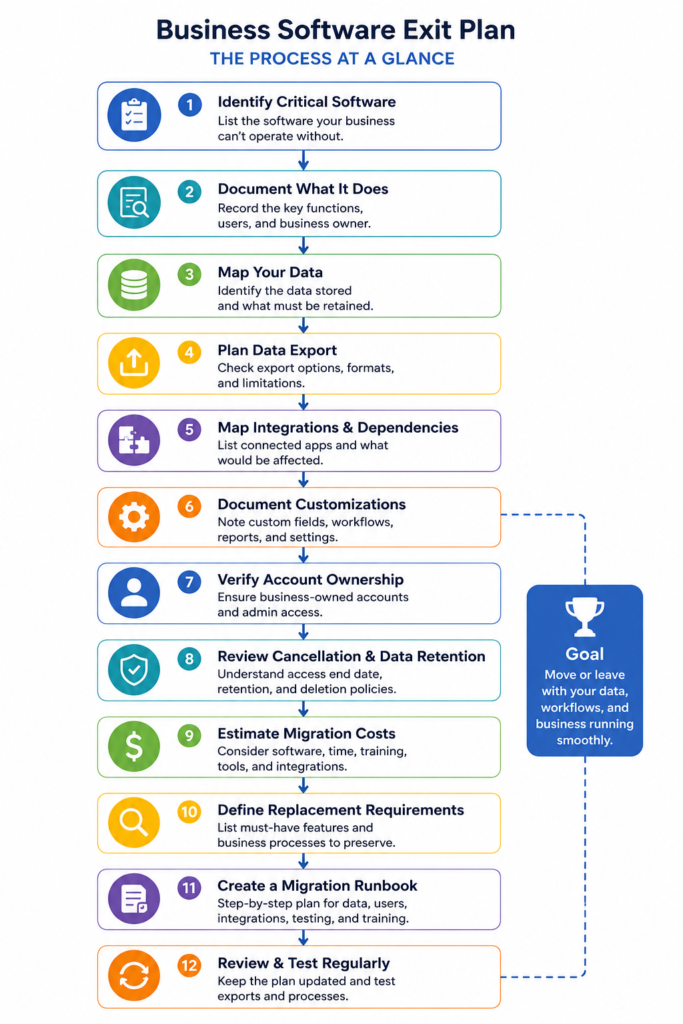
Test the Exit Plan Before There Is an Emergency
A plan that has never been tested is still partly theoretical.
You don’t need to migrate away from your software simply to test the plan. Instead, perform small checks periodically.
Try exporting a sample of important data. Confirm that someone other than the primary administrator can access the necessary settings. Review integrations. Check whether the documentation still matches the current configuration.
If your business has grown significantly, reconsider how long a migration would now take.
A plan created when the company had three employees and 500 customer records may no longer be realistic when there are 30 employees and 50,000 records.
Testing exposes these problems while you still have time to fix them.
Warning Signs That Your Business Is Becoming Too Dependent on One Platform
Software dependency isn’t automatically bad. Businesses adopt software precisely because it becomes useful to everyday operations.
The risk appears when losing that platform would create chaos because nobody understands how to operate without it.
Warning signs include:
• Nobody knows how to export all important data
• Only one employee has administrator access
• Critical workflows aren’t documented
• Multiple applications depend on undocumented integrations
• Employees don’t know where important records would go during a migration
• Years of information exist only inside the platform
• Nobody has reviewed the provider’s cancellation or data-retention policies
• The business has no idea how long replacing the system would take
If several of these apply to a critical application, creating an exit plan should become a priority.
How Often Should You Review a Software Exit Plan?
For critical platforms, reviewing the plan at least periodically—and whenever something significant changes—is more useful than creating it once and forgetting about it.
Changes worth reviewing include a major software upgrade, new integration, substantial customization, pricing change, acquisition of the provider, new regulatory requirement, or major change in the size of the business.
Employee changes matter too. If the person responsible for an important system leaves, update ownership and documentation immediately.
The exit plan should evolve alongside the software.
Frequently Asked Questions
Does every business application need an exit plan?
No. Focus on software whose loss would materially disrupt operations or put important business data at risk. Critical accounting, CRM, ecommerce, cloud storage, scheduling, communication, and operational systems generally deserve more attention than easily replaceable utilities.
What is software vendor lock-in?
Vendor lock-in occurs when switching away from a product or provider becomes difficult because of technical dependencies, proprietary formats, integrations, contractual restrictions, migration costs, or operational reliance.
Should I back up data stored in SaaS applications?
Critical business data should have an appropriate recovery strategy. The exact approach depends on the platform, the information involved, and your business requirements. A provider storing data in the cloud doesn’t automatically eliminate the need to think about backups, exports, retention, and recovery.
When should I create a software exit plan?
Ideally, begin evaluating exit options before adopting business-critical software. At minimum, create a documented plan once a platform becomes important enough that losing access would significantly disrupt operations.
How often should I test data exports?
There isn’t one schedule appropriate for every business. The more critical and frequently changing the data, the more important regular testing becomes. The goal is to discover export limitations while the platform is functioning normally rather than during an urgent migration.
What should I do before cancelling business software?
Export and verify important data, archive required records, document or rebuild integrations and workflows, confirm that users have moved to the replacement system, review retention policies, and make sure the old platform is no longer receiving new business information.
Final Thoughts
The best time to figure out how to leave important software is when you have absolutely no intention of leaving it.
That’s when you have time to understand exports, document integrations, clarify account ownership, test backups, and identify dependencies without the pressure of a price increase, service disruption, acquisition, or urgent migration.
An exit plan doesn’t mean avoiding long-term relationships with software providers. It means making sure those relationships remain a choice.
Businesses should be able to adopt useful technology, build efficient workflows around it, and benefit from it for years without surrendering control of the information and processes that keep the company running.
Good software should make your business more capable—not make your business incapable of operating without it.