
BYOD (Bring Your Own Device) is common. The appeal is obvious: it is cheap and flexible. It is not risk-free.
This article used to open with three figures: the share of companies running BYOD, an average saving per employee, and the share of firms naming data security as their top worry. None could be traced to an original source, so they are gone. Nearly every BYOD adoption number in circulation is recycled from a small set of vendor surveys with no published methodology. Treat them as marketing, not measurement.
Key best practices:
- Use strong encryption and 2-factor authentication
- Implement Mobile Device Management (MDM)
- Keep work and personal data separate
- Train employees on security risks
- Have a clear policy for lost devices
- Regularly audit and update your BYOD policy
Remember: balance flexibility with security. Trust your team, and check anyway.
Want to make BYOD work? Focus on clear rules, regular training, and staying flexible as tech changes.
Security Basics
BYOD security is a big deal, because once work data sits on a device you do not own, you have inherited a risk you cannot fully see. Let’s look at how to keep your company’s data safe.
Device Encryption
Think of encryption as a secret code for your data. It’s your first line of defense:
- It protects data stored on devices
- It secures data moving across networks
Here is a real example, and one of the few in this area with a paper trail. In November 2013, two laptops were stolen from Horizon Blue Cross Blue Shield of New Jersey. Neither was encrypted. According to HIPAA Journal’s account of the breach, nearly 840,000 members had names, addresses and dates of birth exposed, along with a limited amount of health information and some Social Security numbers. Full-disk encryption would have turned that from a breach into a property loss.
2-Factor Authentication
2FA is like having two locks on your door. It uses two or more ways to check if you’re really you. Why bother? Because a password that has been reused, guessed or phished stops being enough on its own.
Google published the clearest numbers on this. After auto-enabling 2-Step Verification for more than 150 million accounts, it reported a 50% decrease in accounts being compromised among those users. Note what that covers: people Google switched on by default, not people who opted in, and not all Google accounts. An earlier version of this article said Google had made 2FA mandatory for every user, which is not what happened.
Many systems, like Office 365, have 2FA built in. Turn it on.
Network Security
Imagine your network as a big house. Network segmentation is like dividing that house into separate rooms. It’s safer and works better.
Pro tip: Use a VPN when working remotely. It’s like a secret tunnel for your data, keeping it safe even on public Wi-Fi.
If Things Go Wrong
Even with great security, stuff can happen. Be ready:
1. Remote wipe: Be able to erase data from a device from anywhere. Crucial if a device is lost or stolen.
2. Quick action: Make sure employees know how to report lost or compromised devices fast.
3. Regular checks: Keep an eye on devices to make sure they follow your security rules.
On encryption specifically, ZDNet’s Ken Hess is quoted in Dan Virgillito’s Infosec Institute article on BYOD encryption as saying:
“Encryption provides one of the most robust defenses against security breach incidents between different networks.”
We could not locate the original ZDNet column the line came from, so treat it as Infosec Institute’s rendering rather than a primary source.
Privacy Rules
Balancing employee privacy with company data protection is tricky in the BYOD world. Here’s how to do it right:
Keeping Data Separate
Mixing work and personal data on one device is a bad idea. Here’s how to keep them apart:
- Use Containerization: Create a separate, secure space for work stuff on personal devices. Think of it like a digital safe for your work files.
- Set Up Work Profiles: On Android, Work Profile creates a clear line between work and personal apps. IT can manage the work side without touching personal stuff.
- Use Cloud Storage: Store work data in specific, encrypted cloud folders. It keeps it off personal devices and makes it easier to wipe if needed.
- Organize Apps: Keep work apps on one screen, personal apps on another. Simple, but effective.
Following Privacy Laws
Privacy laws keep everyone in check. Here’s how to play by the rules:
- GDPR Compliance: This EU law matters, even outside Europe. Article 83(5) sets the upper tier of fines at up to EUR 20 million or 4% of total worldwide annual turnover for the preceding financial year, whichever is higher.
- Get Employee Consent: Be clear about what data you’re collecting and why. Get written consent for any monitoring or data access on personal devices.
- Limit Access: Your IT team shouldn’t have free rein over employees’ personal data. Use MDM solutions that respect personal privacy while securing work data.
- Keep Training: Privacy laws change fast. Keep your team up to date with regular training sessions.
- Regular Audits: Schedule checks to ensure you’re following your own rules. It’s like a health check-up for your BYOD policy.
A good BYOD policy protects company data AND respects employee privacy. Get it right, and you’ll have a happier, more productive team. This section previously closed with a quotation on that point credited to Daniel Haurey Jr. of Exigent Technologies. Exigent is a real firm and Haurey is a real person, but the sentence does not appear on Exigent’s BYOD writing or anywhere else we could find, so it has been removed. The point stands without it: a device your employee paid for is their property, and a policy that ignores that will be quietly worked around.
Setting Up BYOD
Let’s break down how to create a solid BYOD system for your business.
Adding New Devices
Getting personal devices onto company systems should be a breeze, but secure. Here’s the game plan:
1. Keep sign-up simple
Don’t make employees jump through hoops. A complicated process? That’s a surefire way to kill participation.
2. Mobile Device Management (MDM) is your friend
Use MDM to check if devices play by the rules before they get network access.
3. Set device standards
Be clear about what’s allowed. For example: “No jailbroken or rooted devices, period.”
4. Automate where you can
Use tools to make enrollment quick and painless. Your IT team (and employees) will thank you.
Device Use Rules
You need ground rules for personal devices at work. Here’s what to cover:
- What’s okay and what’s not when using personal devices for work
- Who owns what data (this saves headaches down the road)
- When and how devices can hop on company networks
- Apps that are good to go, and ones that are no-gos for work stuff
Staff Training
Your team needs to know the BYOD ropes. Here’s how to get them up to speed:
- Run regular training sessions to keep everyone in the loop
- Hammer home cybersecurity basics (phishing, malware, the works)
- Show real examples of security fails and how to dodge them
- Make sure everyone actually gets it (quizzes can help here)
Cost Management
BYOD costs need a game plan. Try this:
- Spell out what the company will cover (data plans? repairs?)
- Put a cap on reimbursements (your budget will thank you)
- Know the law – some states say you HAVE to cover certain costs
- Use software to keep tabs on BYOD expenses (Excel sheets just won’t cut it)
Reducing Risks
BYOD policies are everywhere. But they’re not without their dangers. Here’s how to keep your company data safe while embracing BYOD.
Lost Device Steps
When a BYOD device goes missing, time is of the essence. Here’s the game plan:
1. Report ASAP
Tell your boss or IT team immediately if your device is lost or stolen. Every second counts in preventing a data breach.
2. Wipe It Clean
IT needs to be ready to erase the device remotely. This is where Mobile Device Management (MDM) software comes in handy. It lets IT zap sensitive data from anywhere, keeping your company info safe even if the wrong person finds the device.
3. Lock It Down
After wiping, IT should lock the device and change passwords for any accounts that were on it. This extra step helps keep company systems secure.
Two earlier versions of this article claimed Verizon’s 2024 Data Breach Investigations Report showed a jump in lost and stolen laptops. It does not; the report contains no such finding. What it does report is that 68% of breaches involved a non-malicious human element – error, or someone being socially engineered. A misplaced phone belongs to that same category. Plan for ordinary human carelessness, not for a film-grade attacker.
Data Breach Plan
Even with precautions, breaches can happen. Be ready with this plan:
1. Build Your A-Team
Put together a group of IT, legal, and communications experts who can jump into action if a breach occurs.
2. Map It Out
Create a step-by-step plan that covers:
- Finding the breach
- Stopping the damage
- Telling affected parties
- Finding out what happened
- Fixing the problem
3. Practice Makes Perfect
Run through your response plan regularly. It helps find weak spots and makes sure everyone knows what to do in a crisis.
4. Stay Up-to-Date
Threats change, so should your plan. Look it over and update it at least every three months to stay ahead of new risks.
Policy Checks
Regular check-ups keep your BYOD environment healthy. Here’s how to stay on track:
1. Regular Check-Ups
Do device audits often to make sure everyone’s following the BYOD rules. Look for things like:
- Updated security software
- Proper encryption
- Only approved apps
2. Keep Learning
Ongoing cybersecurity training is the part everyone skips and then regrets. A policy nobody has read is a document, not a control. Run short refreshers, use incidents that actually happened at your company, and check that people can describe what to do rather than that they clicked through a module.
3. Set Clear Rules
Spell out what happens if people don’t follow the rules. It might include:
- Losing BYOD privileges for a while
- Extra training
- Disciplinary action for serious cases
4. Listen and Learn
Set up a way for employees to report issues or suggest ways to improve the BYOD policy. It can help you catch problems before they get big.
Following Rules
Setting up a BYOD policy is just the start. The real challenge? Making sure everyone sticks to it. Here’s how to keep your BYOD program running smoothly.
Checking Compliance
Ensuring your team follows BYOD rules is key. Here’s the game plan:
1. Regular Device Audits
Set up a schedule to check devices. Look for up-to-date security software and proper encryption.
2. Use MDM Tools
Mobile Device Management software is your secret weapon. It lets you monitor devices without invading privacy. Microsoft Intune, for example, can check if devices meet your security standards before they access company data.
3. App Control
Be clear about which apps are work-approved and which aren’t. If you spot blacklisted apps, don’t hesitate to cut off network access. Harsh? Maybe. But it beats a data breach.
4. Clear Consequences
Spell out what happens if someone breaks the rules. It could be extra training or, in serious cases, losing BYOD privileges. The key? Be fair and consistent.
5. Surprise Checks
Throw in some random compliance checks. It keeps everyone alert and shows you mean business when it comes to security.
Regular Reviews
Your BYOD policy needs to evolve. Here’s how to keep it fresh:
1. Quarterly Policy Check-ups
Every three months, take a hard look at your policy. Does it still make sense with new tech or threats?
2. Get Feedback
Ask your team how the policy works for them. You might be surprised at what you learn. Want really honest feedback? Set up an anonymous suggestion box.
3. Stay Updated on Laws
BYOD policies need to work with data protection laws like GDPR. DLA Piper’s January 2024 fines and data breach survey counted EUR 1.78 billion in GDPR fines issued across Europe in the twelve months from 28 January 2023. An earlier version of this article gave the figure as a record EUR 2.92 billion for 2023. That number is not in DLA Piper’s report and we could not source it anywhere else, so it has been replaced with the published one.
4. Track Incidents
Keep a log of any BYOD-related security issues. Look for patterns. Seeing the same problem pop up? Time to tweak your policy.
5. Benchmark Against Others
See what other companies in your industry are doing. You don’t need to copy them, but it’s good to know where you stand.
A good BYOD policy is like a living document. It needs to grow and change to keep your data safe and your team happy.
“Trust, but verify.” – Ronald Reagan
The old saying fits BYOD. Trust your team to use their devices responsibly, and verify that they are. It’s not about being Big Brother; it’s about keeping everyone safe.
How BizBot Helps with BYOD
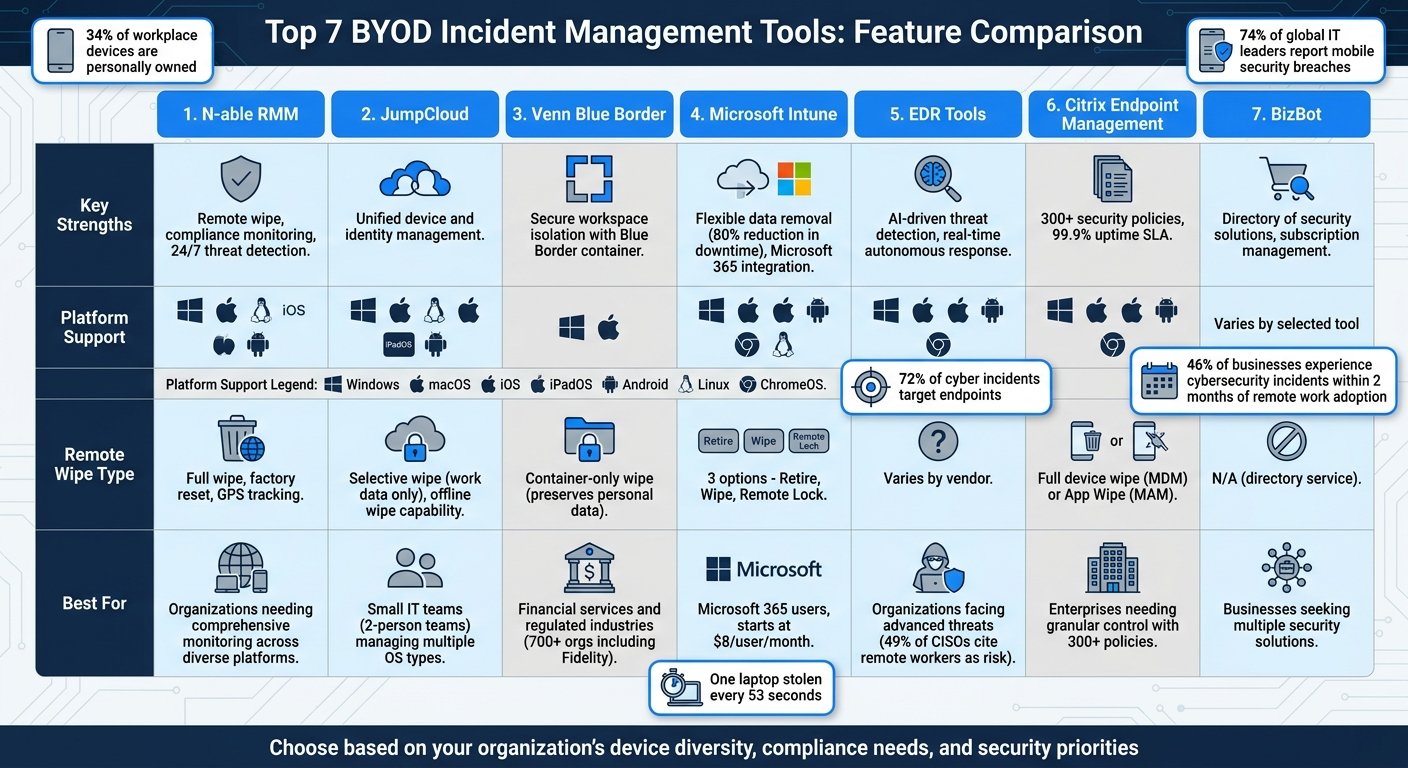
BYOD policies are tricky, and the tooling market is crowded. BizBot is a directory, not a vendor: we do not sell device management software, and an earlier version of this section implied we did. What we can do is tell you which categories matter and what to look for in each.
What to Shortlist
Mobile Device Management (MDM)
MDM is the baseline. At minimum you want to be able to:
- Enrol and configure devices remotely
- Enforce a passcode and disk encryption
- Wipe company data when a device goes missing or someone leaves
Check whether the wipe is selective. A tool that can only nuke the whole phone will not survive contact with an employee who owns it.
Mobile Application Management (MAM)
MAM handles the work apps rather than the device. It lets you:
- Manage work apps separately from personal ones
- Remove work data without touching personal data
- Apply per-app security rules
This is usually the better fit for BYOD, because it asks less of the device owner.
Unified Endpoint Management (UEM)
UEM covers phones, tablets and laptops under one policy. Worth it if you have a genuine mix of Android, iOS, Windows and macOS. If you have twelve iPhones, it is overkill and you will pay for capability you never configure.
Subscription and Expense Tracking
BYOD spreads small recurring costs across a lot of people: stipends, data plans, per-seat app licences bought on personal cards. Tracking software is worth it once that spend is large enough to argue about, and not before.
The trick with all of this is finding the balance between security and employee privacy. Buy the least intrusive tool that meets your actual obligations.
Conclusion
BYOD is here to stay, and for most small companies the economics are favourable. Just be clear-eyed that you are trading control for cost.
Security is the real worry. Personal devices tend to run older operating systems, carry more third-party apps, and get handed to family members. That is not a hypothetical weakness; it is the normal condition of a phone.
So how do you make BYOD work? Focus on these key areas:
1. Beef up security
Use strong authentication methods and keep security software up-to-date on all devices.
2. Set clear rules
Create a solid BYOD policy. Spell out what’s okay, how to register devices, and security must-dos.
3. Train your people
Regular training is a must. Untrained users are the most reliable route into a company, and no amount of tooling compensates for someone typing credentials into a convincing fake login page.
4. Use Mobile Device Management (MDM)
MDM tools let you manage and secure devices from afar. You can even wipe data if a device gets lost or stolen.
5. Keep work and personal stuff separate
Use containerization to split work and personal data. It protects company info and employee privacy.
6. Check-in regularly
Do periodic audits to make sure everyone’s following the rules and to spot any security gaps.
7. Stay flexible
Keep your BYOD policy fresh. Update it as tech and threats change.
John Martinez, Technical Evangelist at StrongDM, sums it up:
“With the right policies and security actions, you can let your employees take advantage of the convenience of their own devices while ensuring strong BYOD security.”
Looking ahead, BYOD will keep shaping how we work. The trick is to balance the perks of flexibility and cost-savings with tight security. Stay alert, be ready to adapt, and keep teaching your team. That’s how you’ll make BYOD work for you.
FAQs
What should organizations do to mitigate the risk of BYOD?
BYOD policies can be a blessing and a curse. They offer flexibility, but they also come with security risks. Here’s how to keep your organization safe:
Implement Mobile Device Management (MDM)
MDM is your best friend when it comes to BYOD. It lets you keep an eye on personal devices used for work, and it is the only practical way to remove company data from a device you do not own. An earlier version of this section cited a 35% jump in VMware Workspace ONE adoption among Fortune 500 companies in 2023. No such figure exists in any published VMware or Broadcom material we could find, so it has been removed.
Use Strong Authentication
Don’t skimp on security. Multi-factor authentication is the single highest-value control on this list, and the Google figures cited earlier in this article are the best public evidence for it.
Educate Your Team
Regular security training matters, and phishing is the reason. This section previously credited an 83% figure to Proofpoint’s 2023 State of the Phish report. We could not confirm that number or the year it belongs to from Proofpoint’s own materials, so it has been dropped rather than restated loosely.
Create a Solid BYOD Policy
Think of your BYOD policy as your playbook. Spell out the rules for device usage, security requirements, and what happens if someone doesn’t play by the rules. And don’t let it gather dust – update it regularly to tackle new threats.
Conduct Regular Audits
Keep your eyes peeled with regular security checks. Audit against your own written policy, not against a general sense of good practice, so that a failed check produces a specific thing to fix.
In short: BYOD can work, but you’ve got to stay on your toes.
More on this topic
Browse all 39 articles on IT, Cloud & Integrations, or jump straight to our buying guide: Best Collaboration Tools for Small Teams.