The right OKR software can transform how your team sets, tracks, and achieves goals. Here’s what you need to know:
- Start with your needs: Consider team size, structure, and specific challenges. Small teams prioritize simplicity, while enterprises need advanced features like role-based permissions and compliance.
- Core features to look for: Real-time dashboards, automated updates, and integrations with tools like Slack or Jira. These save time and connect daily tasks to big-picture goals.
- Budget wisely: Most OKR tools are billed per user per month, with free tiers for very small teams and enterprise tiers quoted on request. Subscriptions are often managed via subscription management software. Factor in setup, training, and scaling costs beyond just subscription fees.
- Test before you commit: Use trials or demos to ensure the tool fits your workflow. If it takes more than two minutes to update OKRs, it may not be the right fit.
- Security and scalability matter: Look for SOC 2 compliance, SSO, and a plan that can absorb more users without a migration.
Quick Tip: Start with a manual OKR process (e.g., Google Sheets) to refine your approach before investing in software.
The best OKR tool is one your team will actually use. Focus on usability, integration, and alignment with your goals to make the right choice.
OKR Software Selection Guide: Team Size Requirements and Feature Comparison
Step 1: Determine Your Business Requirements
Before diving into OKR software options, it’s crucial to figure out what your organization actually needs. The right tool should fit the workflow you already have, without adding complexity you did not ask for.
Consider Team Size and Structure
Your team size heavily influences the type of OKR software you’ll need. A small startup with 15 people will have very different requirements compared to a massive enterprise with thousands of employees.
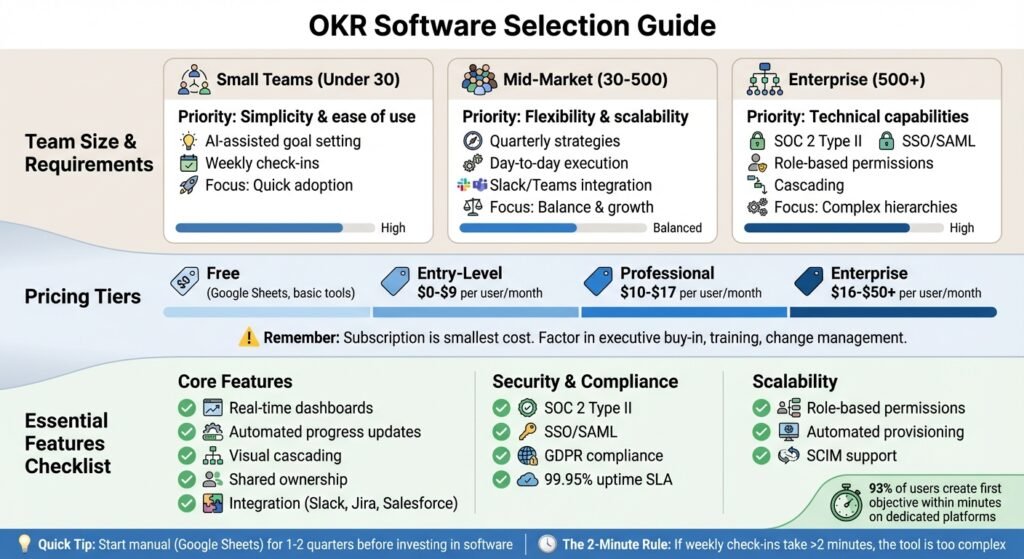
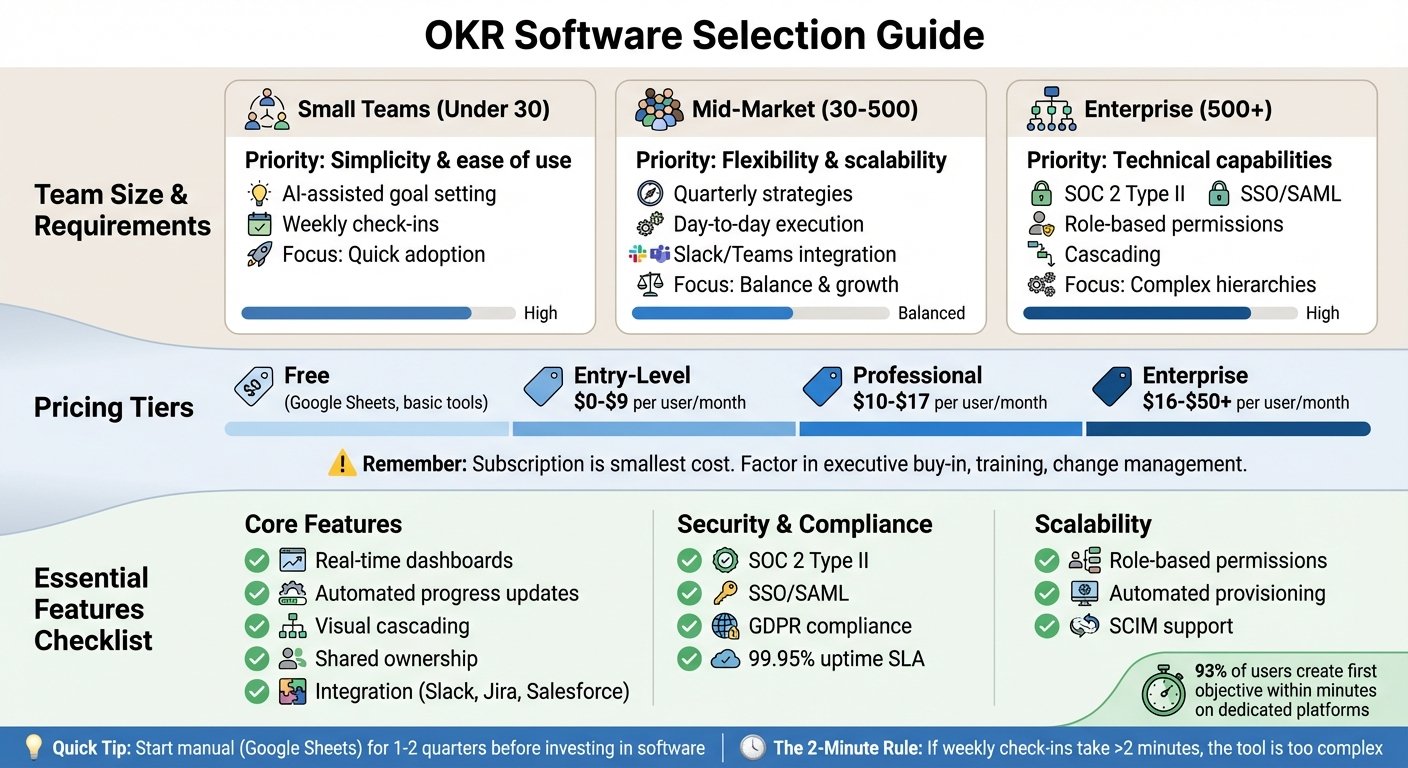
- Small Teams (under 30 people): Prioritize simplicity and ease of use. Features like AI-assisted goal setting and straightforward weekly check-ins can help smaller teams stay focused without needing enterprise-level functionality. Quick adoption is key here.
- Mid-Market Companies (30–500 employees): These teams often need tools that can balance quarterly strategies with day-to-day execution. Look for software that’s flexible, scalable, and integrates with existing tools like Slack or Microsoft Teams. The ability to adapt as your company grows is critical.
- Enterprises (500+ employees): For larger organizations, technical capabilities are a must. Features like SOC 2 Type II compliance, SSO/SAML authentication, and detailed role-based permissions are essential to manage complex hierarchies. Additionally, hierarchical companies might need cascading features to track progress across levels, while flat organizations benefit from shared ownership tools. Implementation times can vary – from a couple of weeks for smaller teams to several months for large-scale rollouts.
Once you’ve considered your team’s size and structure, it’s time to focus on aligning daily efforts with your broader OKR goals.
Define Your OKR Goals
It’s important to clearly define what you want your OKRs to achieve. Many teams struggle with the “strategy-execution gap,” where the big-picture goals are clear, but the day-to-day priorities are murky.
This is where dedicated OKR platforms shine. Features like real-time dashboards, automated progress updates, and alignment trees help connect individual tasks to overarching objectives. These tools eliminate the need for manual tracking and ensure everyone knows how their work contributes to the bigger picture.
Goal-setting and employee engagement are related, and involving people in setting their own targets is a common recommendation. We removed a specific engagement multiplier that was previously quoted here because we could not trace it to a published study.
Once your objectives are clear, the next step is determining how much you’re willing to invest in the OKR process.
Establish Your Budget
When planning your budget, think beyond just the subscription fees. As OKR vendor Mooncamp puts it:
“The subscription fee is the smallest part of the cost. The real price is everything around it: executive buy-in, workshops, training, change management.”
Costs vary with your needs. For teams just starting out, free tools like Google Sheets may be enough. Beyond that, the shape of the market is more useful than a price band: most vendors publish a free or low-cost starter tier capped at a handful of users, a mid tier billed per user per month, and an enterprise tier quoted on request rather than listed. Enterprise quotes commonly add an annual commitment and a minimum seat count, and neither is published. We removed the per-tier dollar ranges previously given here because no vendor or analyst source supports them. Get a written quote before budgeting.
Keep an eye on per-user pricing, as this can make scaling more expensive over time. If your company is growing, it’s smart to project your headcount over the next five years to understand the long-term financial impact.
Ryan Panchadsaram, Co-founder of What Matters, offers this advice:
“Make sure you’ve mastered the basics; start with simple tools, fall in love with the OKR process, and ensure everyone is on board. It’s too common for teams to adopt advanced tools too quickly and mistake the tool’s limitations for the failure of the OKRs.”
If your team hasn’t yet tried running OKRs manually for at least a quarter or two, it might be too soon to invest in high-end software.
Step 2: Review Core Features
When selecting OKR software, it’s essential to evaluate how well its features align with your team’s workflow. Some platforms are better suited for tracking long-term goals, while others focus on managing daily operations. The best choice depends on your team’s needs and how you want to connect daily tasks to broader business objectives. Here’s a closer look at the core features that help streamline OKR creation and monitoring.
OKR Creation and Management
A good OKR platform makes setting goals quick. Judge that yourself in a trial: time how long it takes a non-technical colleague to create one objective with two key results from a standing start. We removed a statistic about how fast most users create a first objective because it had no source.
Look for tools that offer visual cascading to map out how individual, departmental, and company-wide goals interconnect. This feature ensures everyone understands how their work supports the bigger picture. For instance, if your CEO’s objective is to “Expand into three new markets”, the sales team can link their OKRs to this goal by focusing on securing leads in those regions, while marketing teams can align their campaigns to support these efforts.
Shared ownership is another critical feature, especially for cross-functional teams. This allows multiple people or departments to collaborate on the same objective, enhancing teamwork. Additionally, templates and AI-powered suggestions can simplify the process. These tools help teams avoid common pitfalls, like setting activity-based goals (e.g., “make 10 customer calls”) instead of focusing on outcomes (e.g., “increase customer satisfaction to 85%”). As Quantive aptly states:
“The ability to create depth without complication is the sign of a great OKR platform.”
But creating OKRs is just the start. Tracking progress is equally essential.
Progress Tracking and Reporting
Monitoring progress should be straightforward, not a burden. The right platform provides real-time dashboards with features like progress bars, percentage completion, and color-coded indicators (e.g., “on track”, “at risk”, or “off track”). These tools help teams avoid the common trap of setting goals and then forgetting about them.
Automated check-ins can also make a big difference. By sending reminders through tools like Slack or Microsoft Teams, team members are prompted to update their progress regularly – often using a simple 1-10 confidence score to flag potential challenges early on.
For teams that rely heavily on data, integration with existing business banking and data tools is a must. Platforms that sync with systems like Jira, Salesforce, HubSpot, or Stripe can automatically update Key Results, reducing the need for manual input. For example, if a Key Result is “Close $500,000 in new sales”, the software can pull real-time revenue data directly from your CRM.
Advanced analytics take tracking a step further. Features like exportable reports, trend analysis, and heatmaps can highlight areas where performance is lagging. As Loach puts it:
“If the OKR software doesn’t help your team plan their week, it’s just a fancy dashboard.”
Step 3: Review User and Organization Management
As your team grows, keeping access to OKRs under control becomes essential. Without proper management, data accuracy and accountability can quickly fall apart. The right software should let you assign permissions based on actual job roles and adapt easily as the organization scales.
Role-Based Permissions
Most OKR platforms use three main permission levels: Org Admins (who have full system and billing access), Team Leads (who manage specific team cycles and members), and Team Members (who can view and update their assigned key results). This structure keeps the focus on relevant tasks for team members while giving leaders a broader view of the organization.
Assign roles strictly based on responsibilities. As Steven Macdonald, Founder of OKRs Tool, explains:
“Clear roles = clear accountability.”
Some advanced platforms also offer hierarchical roles. For example, Department Heads can automatically inherit Team Lead permissions, simplifying the management process as the organization becomes more complex.
| Role | Org Settings Access | View All Teams | Update OKRs | Create Teams/Cycles |
|---|---|---|---|---|
| Org Admin | ✅ Yes | ✅ Yes | ✅ All | ✅ Yes |
| Team Lead | ❌ No | ❌ No | ✅ Their Teams | ✅ Yes |
| Team Member | ❌ No | ❌ No | ✅ Own KRs | ❌ No |
It’s a good idea to review user permissions quarterly to reflect any changes in team structure. Avoid granting admin rights too broadly – keeping roles well-defined helps protect data and prevents unauthorized OKR creation. For industries with strict compliance requirements, ensure the software supports Separation of Duties, so no single user can act as both the “Requester” and “Approver” for a goal.
These permission frameworks are crucial for maintaining scalable and secure user management as your organization grows.
Scalability for Growing Teams
Once your team passes roughly 50 people, spreadsheets tend to break down: more owners, more versions, more stale rows. We removed a percentage figure for how much cross-team alignment drops at 100 employees because it had no source. Your software should handle growth effortlessly without the need for a complete overhaul.
Look for platforms with features like SSO (Single Sign-On) and automated provisioning to simplify user management. Enterprise-grade tools often include SCIM, which automates onboarding and offboarding processes as your workforce evolves. This matters most when headcount changes often, because stale accounts are both a security problem and a billing problem. A previously quoted figure for hours lost to manual tracking has been removed as unsourced.
Consider the pricing model carefully. Per-user billing means every new hire raises the bill, which quietly discourages adding people during growth. Flat-rate plans and low per-seat tiers scale more predictably. Check whether the trial exposes the full feature set or a cut-down version, because a trial that hides the reporting is not a trial.
Strong user and organization management ensures your OKR system can grow along with your team while supporting your strategic goals effectively.
Step 4: Check Integrations, Security, and Pricing
Once you’ve confirmed that your OKR software can scale with your team, the next step is to ensure it integrates smoothly with your existing tools, keeps your data secure, and aligns with your budget.
Integration with Existing Tools
Your OKR platform should connect to the tools your team already uses daily. For example, integrations with Slack and Microsoft Teams allow users to update goals or receive reminders without leaving their workflow. When tools require separate logins or operate outside of your team’s usual platforms, adoption rates can drop significantly.
For project management, look for compatibility with platforms like Jira, Asana, ClickUp, Trello, and Monday.com. These connections help link daily tasks to higher-level Key Results, making it clear how individual contributions support broader objectives. Advanced platforms also integrate with business tools such as Salesforce, HubSpot, Stripe, Zendesk, and Looker. These integrations can update Key Results from live data instead of someone retyping numbers each quarter.
Make sure updates in tools like Slack or Jira automatically sync with the OKR platform – and vice versa. For custom workflows, support for Zapier can connect your OKR software to thousands of other apps. Once your tools are connected, check the platform against your security requirements.
Data Security and Compliance
As your organization grows, protecting sensitive information becomes critical. Ensure the software encrypts data and supports Single Sign-On (SSO) with providers like Okta or Azure AD. SSO simplifies user management while enhancing security by integrating with your existing directory services.
Look for certifications like SOC 2 Type II, ISO 27001, and GDPR compliance to meet regulatory standards and build trust. Additional features to consider include audit trails for tracking user activity, infrastructure redundancy for disaster recovery, and regular penetration testing to identify vulnerabilities. Enterprise-ready platforms back uptime with a Service Level Agreement. Ask for the SLA document and read the credit terms; we removed a specific uptime percentage here because it was not sourced to any vendor.
Pricing Models
Once functionality and security are confirmed, look at how the pricing model fits your budget. The wrong structure limits adoption. Flat-rate plans give you one predictable number regardless of headcount. Per-seat plans track headcount, so model the bill at the size you expect to be in two years, not the size you are today. Some vendors also set a minimum seat count, which makes a small team pay for seats it does not use. We removed the per-user dollar ranges previously printed here because we could not source them.
Two published examples show the difference. Loach has a free tier for up to five users and a Grow tier at €2.99 per user per month, billed monthly, charged only from the sixth user onwards — note that it is priced in euros, not dollars. Simple OKR takes the flat-rate route: a single plan at $49.99 per month, billed monthly, covering unlimited users, after a seven-day trial. Both prices were checked on the vendors’ own pricing pages in August 2026 and should be confirmed before you budget. A free tier for a handful of users is also a cheap way to test a platform before rolling it out.
Don’t forget to factor in additional costs like deployment, training, and ongoing maintenance. Bundled suites that combine OKRs with performance reviews generally cost more per seat than standalone goal trackers, and the review module is often the part that pushes you into a higher tier. Price both shapes before choosing; we removed a specific per-user figure here as unsourced.
Lastly, prioritize platforms that automatically update Key Results from your data sources. Manual updates not only increase the workload but also reduce software adoption. The ideal tool should save time and drive organizational progress, rather than simply offering the lowest price tag.
Step 5: Compare Options and Decide
Now that you’ve evaluated the features of potential OKR software, it’s time to move from analysis to action. This step focuses on comparing your options and making the best choice for your organization. With your requirements outlined, features assessed, and integrations reviewed, you’re ready to make an informed decision.
Build a Feature Comparison Table
Start by creating a straightforward spreadsheet to compare the platforms you’ve shortlisted. Focus on key features such as hierarchical alignment, shared ownership, custom cadences, weekly planning views, and initiative tracking. Don’t forget to evaluate reporting tools like real-time dashboards, exportable reports, and heatmaps. Also, check whether the software integrates with tools like Salesforce and Jira to automate metric updates, and ensure it meets security standards like GDPR compliance and SOC 2 Type II.
To simplify the decision-making process, try a pairwise comparison method. This involves directly comparing two options at a time, helping you weigh trade-offs and identify the best fit for your needs. This approach can help avoid getting overwhelmed by too many choices.
Test with a Trial or Demo
While feature lists and comparisons are helpful, nothing beats seeing the tool in action. A demo can highlight its capabilities, but a trial allows you to truly test its usability. Run a focused four-week trial with a small group of 5–10 contributors. Here’s how to structure it:
- Week 1: Set up real OKRs to test the setup process and user interface.
- Week 2: Use the tool for daily workflows and test integrations with your existing systems.
- Weeks 3–4: Gather team feedback and measure engagement. Use the “two-minute rule” – if a weekly check-in takes longer than two minutes, the tool might be too cumbersome. Also, evaluate customer support by asking a technical question and noting the response time and quality.
Vendor testimonials are marketing, but they do tell you what the tool is built around. Loach publishes this one from Sandhna Chintoe, CEO of Cammio:
“Before Loach our OKRs were collecting dust in Confluence. Now our team works weekly on our OKRs!”
Be cautious of tools with overly complex setups or rigid systems that require significant process changes. The right platform should feel intuitive and fit naturally into your team’s workflow within a few days. These trials and demos will give you a clear sense of which option aligns best with your team’s needs and future goals.
Conclusion
Choosing an OKR tool that matches how you actually work is the whole decision. The right software shifts OKRs from being just another reporting tool to becoming a strategic guide that ties everyday tasks to big-picture goals like increasing revenue or improving customer retention. When your tool matches your needs, it avoids becoming “shelfware” – those overly complex tools that no one ends up using.
Before diving in, test your OKR process manually using something simple like Google Sheets for a quarter or two. This trial run helps fine-tune your approach. Once you’re ready, look for tools that fit your team’s workflow, whether that’s weekly updates or quarterly reviews. A well-matched tool shortens prioritisation debates because the trade-offs are visible to everyone. We removed a percentage figure for that effect as unsourced. These advantages only appear if the team uses the software consistently.
Make sure your chosen tool includes essential features like cascading goals and automated data syncing, as these ensure scalability as your organization grows. Pay close attention to pricing models too. Per-user pricing might seem fine at first, but it can quickly become a budget issue as your team expands. Flat-rate pricing, on the other hand, keeps costs predictable. Watch out for hidden fees, such as extra charges for premium integrations or OKR coaching, which aren’t always included in base pricing.
For extra help, platforms like BizBot can guide you through the selection process. They offer unbiased comparisons of management tools, highlighting must-haves like SOC 2 compliance and SSO integrations. Plus, they categorize tools by your organization’s stage – whether you’re a startup, scaling team, or large enterprise – making it easier to find the right fit for now and the future.
Ultimately, your OKR software should feel natural within just a few days of use. It should act as a “single source of truth”, where every team member can easily see and trust the objectives. If your weekly check-ins start taking more than two minutes, that’s a sign the tool might be too complicated. Choose a solution that effortlessly integrates into your workflow to ensure it becomes a long-term asset.
FAQs
When should we move from spreadsheets to OKR software?
When your organization starts struggling to manage objectives and key results (OKRs) manually, it’s probably time to consider OKR software. Common signs include version control headaches, updates spread across multiple platforms, and declining visibility into progress. You might also notice a drop in alignment across teams or confusion due to fragmented ownership of goals.
As your team grows, spreadsheets can become more of a hindrance than a help. Dedicated OKR software simplifies goal management by improving clarity, collaboration, and accountability. This is especially valuable during periods of rapid growth when keeping everyone aligned becomes increasingly challenging.
Which integrations matter most for OKR tracking?
The best integrations for OKR tracking are the ones that fit naturally into your current workflow tools, deliver real-time progress updates, and offer strong reporting and analytics capabilities. These integrations help teams stay aligned and give you a clear view of progress, making it simpler to track and achieve your objectives.
What security features do enterprises need in OKR tools?
Enterprises need OKR tools that prioritize security to manage goals safely and effectively. Essential features include granular permissions to control access, SSO (Single Sign-On) integration for streamlined authentication, adherence to standards like GDPR, and encryption of data at rest and in transit. These features ensure sensitive information is handled securely while supporting the scalability of operations.
More on this topic
Browse all 40 articles on Project & Team Management, or jump straight to our buying guide: Best Project Management Tools for Small Teams.