Cloud security workflow automation streamlines repetitive security tasks like alert handling, threat detection, and incident response across cloud environments. Instead of manually managing threats or updating configurations, automated systems handle these processes in real-time, improving accuracy and response speed. This approach is essential for dynamic cloud infrastructures, where resources like containers and serverless functions can appear and disappear in seconds.
Key Benefits:
- Improved Accuracy: Reduces human errors by applying consistent logic.
- Faster Response Times: Detects and mitigates threats within seconds.
- Cost Savings: Cuts operational costs by optimizing resources and reducing manual work.
- Simplified Compliance: Maintains audit-ready records and ensures adherence to regulations.
How It Works:
- Monitors cloud environments continuously.
- Detects issues and enriches alerts with context (e.g., severity, asset importance).
- Automates remediation actions like fixing misconfigurations or blocking threats.
- Integrates with tools like AWS Security Hub and Microsoft Sentinel.
Automation not only enhances security but also reduces workload, allowing teams to focus on critical decisions. Starting small – by automating high-frequency tasks – can deliver immediate results.
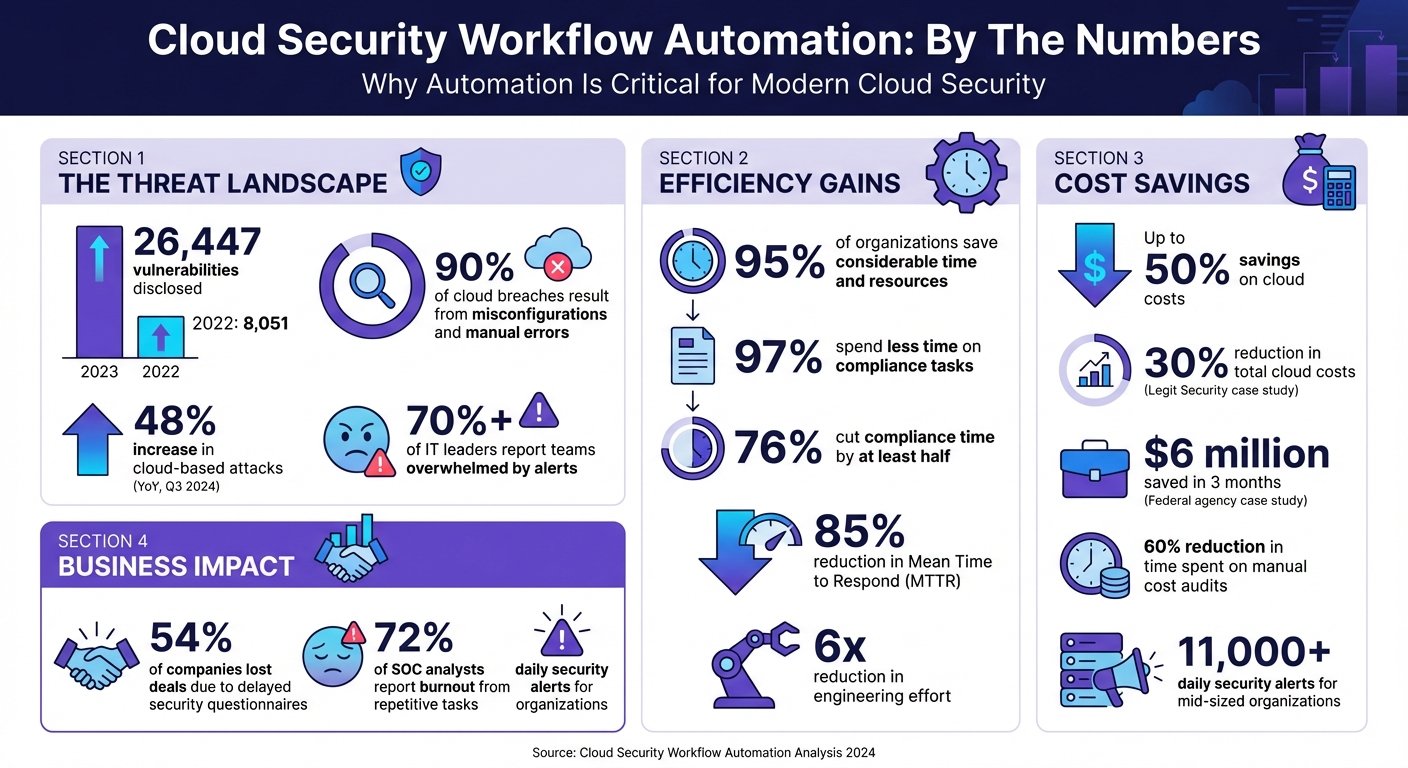
Cloud Security Workflow Automation: Key Benefits and Impact Statistics
Benefits of Cloud Security Workflow Automation
Automating cloud security workflows brings several advantages, from reducing errors to cutting costs and improving overall security. It saves time while simplifying the challenges of managing complex cloud environments. Let’s break down some of the key benefits.
Better Accuracy and Fewer Human Errors
Relying on manual processes like spreadsheets, screenshots, and shared drives often leads to mistakes. Automation eliminates this risk by applying consistent logic and criteria every time, achieving a level of precision that manual reviews simply can’t match.
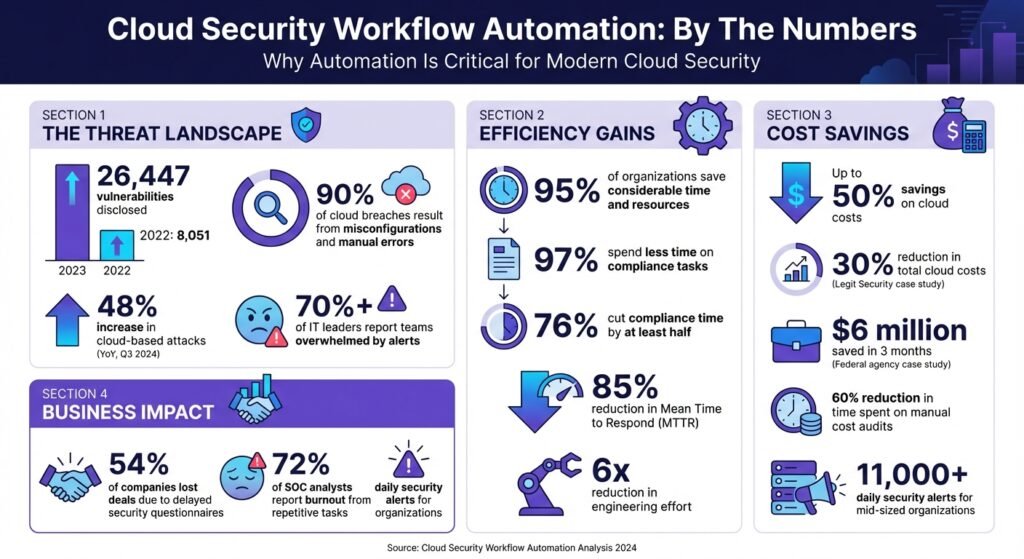
One major advantage is the ability to manage the overwhelming number of alerts. 28,902 CVEs were published in 2023, up from 25,081 in 2022 – a rise of about 15% in one year, and that count excludes cloud misconfigurations, which are not CVEs at all. Tracking that volume by hand is no longer feasible. Automation filters out irrelevant alerts, reducing the chances of burnout and critical oversights.
An earlier version of this article quoted several survey percentages about time saved through security automation. None could be traced to a named study with a stated method, so they have been removed. The mechanism is the part worth relying on: when a playbook is code rather than memory, no step is skipped during an incident. Real-time evidence collection pulls data directly from cloud services and identity providers, so documentation stays audit-ready without anyone assembling it.
Faster Threat Detection and Response
Automated systems can detect and respond to threats in seconds, a significant improvement over the hours or days manual processes might take. This speed is crucial for minimizing damage, as it directly affects metrics like Mean Time to Detect (MTTD) and Mean Time to Respond (MTTR). Real-time monitoring constantly scans for anomalies, triggering predefined responses without waiting for human input. Check Point Research counted a 48% increase in cloud-based network attacks in 2022 compared with 2021 – the most recent figure of its kind we could attribute to a named vendor report, and now several years old. Automated workflows can isolate compromised resources, update firewall rules, and alert the appropriate teams before an attacker moves laterally.
Lower Security Management Costs
Beyond speed and accuracy, automation also cuts cost by reducing repetitive manual work and trimming idle resources. One published example: Legit Security used OpenOps no-code automation on its AWS infrastructure and reports a 30% reduction in total cloud costs, a 35% cut in EBS spend, and a 57% drop in backup storage costs, with time spent on manual cost audits down 60%. OpenOps does not state the period those figures cover, and it is the vendor’s own case study rather than an independent audit.
“By using the OpenOps no code automation engine and templates, we immediately resolved issues that saved over 30% of bill, and set guardrails to make sure they don’t surface again.” – Liav Caspi, Co-Founder & CTO, Legit Security
Nextonic Solutions publishes a second example: a federal health agency saved $6 million across all its AWS accounts and cut monthly spend by 30% through rightsizing, automated DevSecOps shutdowns, reserved instance strategy, and real-time cost monitoring. An earlier version of this article described the customer as a science agency and added a three-month timeframe, a 40% rightsizing figure, and a 65% cut in on-demand usage. None of those appear in the source and all have been removed.
Automation also reduces personnel costs. Time-consuming tasks like evidence collection, alert triage, and completing security questionnaires can be handled automatically, which delays or avoids the point at which you need another specialist on the payroll.
Better Compliance and Reporting
Automation not only speeds up threat detection but also simplifies compliance. Instead of scrambling to prepare for audits, automated systems maintain compliance evidence around the clock by pulling data from cloud services, identity providers, and HR tools. This continuous monitoring removes the need for error-prone manual processes like taking screenshots and managing spreadsheets.
Compliance automation vendors publish confident percentages about time saved and deals won. We removed the ones this article previously carried, because none linked to a study you could check. The structural argument stands on its own: cross-framework control mapping lets a single control satisfy several regulatory requirements – GDPR, HIPAA, SOC 2, and PCI-DSS overlap heavily – so you write the control once instead of four times.
Centralized platforms also create immutable audit trails, tracking compliance tasks and remediation actions. That makes audits shorter and gives you verifiable records when a customer’s security review asks for them.
How Cloud Security Workflow Automation Works
Cloud security automation works by continuously monitoring your environment, spotting issues, and taking immediate action. Instead of relying on periodic audits, these systems operate in real time, comparing your setup against predefined security policies and industry standards.
The process kicks off with continuous discovery. Automated tools keep track of both long-term assets and temporary resources. This inventory feeds into detection engines that flag irregularities – like an S3 bucket becoming public, a logging service being disabled, or unusual login activity. Once a problem is identified, the system generates an event (via tools like Amazon EventBridge or Google Pub/Sub), which triggers a serverless function to fix the issue.
What sets this system apart is its contextual enrichment. Alerts are supplemented with details such as user permissions, asset importance, threat intelligence, and activity logs. This extra context helps prioritize risks based on both the severity of the issue (often measured using CVSS scores) and the business impact of the affected asset. For example, a medium-risk vulnerability on a production payment server can be elevated to a critical priority. The system also performs automated compliance checks to ensure assets consistently meet industry standards.
Automated Compliance Checks
Automated compliance checks improve accuracy and reduce the risk of human error, ensuring your environment adheres to security policies at all times. These checks use programmable rules, often called Policy-as-Code, to define the desired state of your environment. Tools like HashiCorp Sentinel and AWS Config Rules continuously evaluate resources against benchmarks such as CIS AWS Foundations, NIST 800‑53, PCI DSS, SOC 2, HIPAA, and GDPR. Unlike manual audits conducted quarterly or annually, these checks run nonstop, immediately flagging any misconfigurations.
For instance, if someone disables encryption or modifies a security group without authorization, automated systems detect the configuration drift and either flag it for review or roll back the change. Platforms like AWS Security Hub consolidate findings into a single dashboard, offering compliance scores and prioritizing risks. These systems also maintain an ongoing audit trail by capturing snapshots, logs, and evidence automatically – eliminating the need for manual record-keeping. As a result, compliance issues are addressed in real time rather than months later during an audit.
Threat Detection and Prioritization
Threat detection systems learn what “normal” behavior looks like for users and applications, enabling them to spot anomalies like unusual login attempts, unexpected data transfers, or suspicious API activity. Alerts from tools like SIEM platforms, endpoint detection systems, and native cloud logs are consolidated and standardized by automation platforms.
The prioritization engine then evaluates several factors – threat severity (using CVSS scores), the importance of the affected asset, and its potential business impact – to determine the order of response. Vendors claim large reductions in analyst time from AI-assisted triage; we found no published figure with a stated method, so this article no longer quotes one.
These systems also correlate findings across compute, storage, and network layers to map out attack paths and identify root causes. Automated deduplication reduces noise by merging related alerts, such as multiple failed login attempts from the same IP, into a single incident. That is the practical defence against alert fatigue: fewer tickets that each mean something, rather than thousands that mostly do not.
Automatic Remediation Actions
When a threat is confirmed, automated remediation takes over with a three-step process: Monitor, Detect, and Respond. During the response phase, serverless functions execute specific API calls to resolve the issue without waiting for human intervention. Actions might include re-enabling disabled logging, enforcing encryption on storage buckets, rotating expired credentials, or closing open ports in security groups.
To avoid unintended consequences, organizations often use safety measures like “dry-run” modes (which log actions without executing them) or “human-in-the-loop” triggers, where high-impact fixes require manual approval. Tag-based exclusions – such as labeling a public bucket with “auto-remediation: excluded” – can also prevent automation from interfering with sensitive resources.
“Using [Tenable One Cloud Exposure] automation allowed us to eliminate exhaustive manual processes and perform in minutes what would have taken two or three security people months to accomplish.”
– Larry Viviano, Director of Information Security, IntelyCare, quoted on Tenable’s CSPM page
How to Implement Cloud Security Workflow Automation
To kick off cloud security automation, start by pinpointing repetitive, time-intensive tasks like patch management, vulnerability scanning, and compliance checks. Automating these processes not only reduces manual effort but also improves precision and ensures adherence to compliance standards. Prioritizing well-defined, high-frequency tasks can deliver immediate results.
Adopt a phased approach to automation. Instead of trying to automate everything at once, focus on the top five most common alert types, such as phishing triage, brute force attempts, or malware incidents. Begin by testing workflows in “observe mode”, where actions are logged but not executed. This validates the logic and prevents unintended outcomes before going live. Vendor case studies quote dramatic MTTR reductions from this approach; treat them as marketing until you measure your own baseline first, which you should do anyway.
The tools you choose play a critical role. Look for automation platforms that integrate with your cloud providers (like AWS, Azure, or Google Cloud) and existing DevOps setups. Ensure your security tools – firewalls, SIEM systems, endpoint detection – offer APIs for orchestration. Without strong API support, connecting the components will be difficult. Convert manual incident response guides into digital playbooks that outline triggers, enrichment steps, decisions, and actions. For critical decisions, include checkpoints for human review to prevent errors.
Integrating with DevSecOps Pipelines
Embedding security checks directly into CI/CD pipelines ensures vulnerabilities are addressed before they reach production. This “shift-left” strategy incorporates tools like Static Application Security Testing (SAST) and Dynamic Application Security Testing (DAST) into development workflows, catching issues caused by manual errors or misconfigurations. Automating these checks at the pipeline stage eliminates repetitive setup mistakes.
For a worked example, security engineer Siddhant Rangra published a multi-phase DevSecOps lab across AWS and Azure in March 2026. He wired AWS CodeBuild and GitHub into a CI/CD pipeline that scanned container images in Amazon Elastic Container Registry (ECR), and in a simulated attack an exposed S3 bucket triggered Amazon GuardDuty, which used EventBridge to run an AWS Lambda function that fixed the misconfiguration. It is a personal lab build rather than a production case study, which is exactly what makes it readable: the wiring is all there.
Using Infrastructure-as-Code (IaC) tools like Terraform or AWS CloudFormation can standardize deployments, enabling automated drift detection. If someone alters a security group or disables encryption, the system can flag or reverse the change immediately. For remediation actions, staged rollouts like canary or blue-green deployments allow you to test for issues before fully rolling out changes.
Using Policy-as-Code
Policy-as-Code (PaC) integrates governance directly into your infrastructure, enabling continuous monitoring instead of periodic reviews. Tools such as HashiCorp Sentinel, AWS Config, and Azure Policy let you define and enforce rules for your environment. These tools automatically detect violations – like disabled encryption or unauthorized security group changes – and can either alert your team or trigger automated fixes.
Start small by focusing on less complex, repetitive policies that are easy to codify. Use benchmarks like NIST or CIS to identify high-risk areas. Treat PaC like software: use version control, thorough testing, and centralized libraries for common rules. Organize controls by Organizational Units (OUs) to allow for exceptions, such as workloads that require public S3 buckets while enforcing strict rules elsewhere.
Integrate PaC early in the software development lifecycle, particularly when IaC templates are created. Misconfiguration and human error are the dominant causes of cloud security incidents – that much is uncontroversial, though the widely circulated percentages behind the claim trace back to no checkable source, so this article no longer prints one. Catching the mistake in the template is cheaper than catching it in production either way.
Using SOAR Platforms
SOAR platforms take automation further by connecting your security tools and automating multi-step responses. While SIEM systems focus on collecting and correlating logs to generate alerts, SOAR platforms enrich those alerts, automate triage, and execute containment measures in seconds rather than hours. That matters most in teams where analysts spend their day on repetitive triage.
Check your tools for API compatibility before you commit. Note that almost nobody in this category publishes list prices, and the numbers you find quoted around the web – including in an earlier version of this article – do not come from vendor pricing pages:
- Microsoft Sentinel: billed on data ingested, either pay-as-you-go per GB or a daily commitment tier from 100 GB to 50,000 GB per day. Microsoft advertises savings of up to 52% against pay-as-you-go on commitment tiers but does not print a per-GB rate on the pricing page; use the Azure pricing calculator for your region.
- Splunk SOAR: no published price. Quote only.
- Palo Alto Cortex XSOAR: no published price. Quote only.
- Tines: free edition with unlimited users and connectors but a cap of three live workflows; paid editions lift the workflow cap and are quoted, not listed. A discounted startup program exists.
Pricing was checked in August 2026 and should be confirmed with each vendor before budgeting. Where a vendor sells by data volume rather than per seat, model your actual ingest first – that is the variable that decides the bill.
Develop digital playbooks for specific scenarios. For example, a phishing triage playbook might extract URLs from emails, query threat intelligence feeds, quarantine malicious messages, and notify users – all automatically. A brute force detection playbook could check IP reputations, block suspicious IPs at the firewall, and reset affected accounts. Automating containment actions like isolating compromised hosts or disabling API keys is worthwhile; avoid automating destructive actions such as deleting hosts, which destroys forensic evidence.
Begin by automating the most frequent alert types and refine your workflows based on performance metrics like MTTR. This iterative process allows you to build capabilities gradually while seeing measurable improvements from the start.
Conclusion
Cloud security workflow automation offers real-time threat detection, continuous compliance, and cost savings – protection that identifies misconfigurations and threats in seconds instead of hours or days. Misconfiguration and manual error remain the leading causes of cloud incidents, and Check Point’s 48% rise in cloud-based network attacks in 2022 was the last well-attributed figure on attack growth we could find.
This article previously carried a run of impressive percentages – share of breaches caused by misconfiguration, share of firms improving their security posture, cloud savings, an engineering-effort multiple. Every one of them was removed, because none led back to a study with a method you could read. If a vendor quotes you a number like that, ask which study, what sample, and what year. The good ones will tell you.
Beyond security, automation buys back operational time: hours spent manually triaging alerts move to work that needs judgement. Focus on high-volume, repetitive tasks. Start phased, use observe mode before full deployment, and choose tools with real APIs. Automation works best on clearly defined processes, leaving critical decisions in human hands.
Choosing a platform is the part worth taking slowly. For businesses at that stage, directories like BizBot categorize business and management tools so you can shortlist by cloud provider, security need, and budget before you start booking demos.
FAQs
What security tasks should I automate first in the cloud?
Automating tasks like alert triage and vulnerability management can save time and significantly speed up response efforts. Beyond these, consider automating processes such as threat detection, patch management, and access control. These steps ensure your security policies remain consistent and help you tackle risks efficiently, especially as your cloud environment expands.
How do I prevent auto-remediation from breaking production systems?
To minimize disruptions, consider implementing safeguards like shadow mode, which allows you to test automated actions in a controlled setting before full deployment. For critical decisions, include a human-in-the-loop approach to maintain oversight and ensure accountability. Prioritize automating workflows with significant impact, such as alert triage, and rigorously validate all automation processes before applying them to live systems. These strategies help prevent unintended consequences in production environments.
What metrics should I track to prove automation is working?
To gauge how well automation is working, focus on tracking key metrics like error reduction, productivity improvements, cost savings, scalability, and response times. These metrics offer clear, measurable ways to assess the impact and success of your automated workflows.
More on this topic
Browse all 79 articles on Security & Compliance.