Most small businesses have some kind of plan for physical emergencies. There may be a first-aid kit in the office, emergency numbers on the wall, insurance documents in a drawer, and perhaps a spare set of keys somewhere safe.
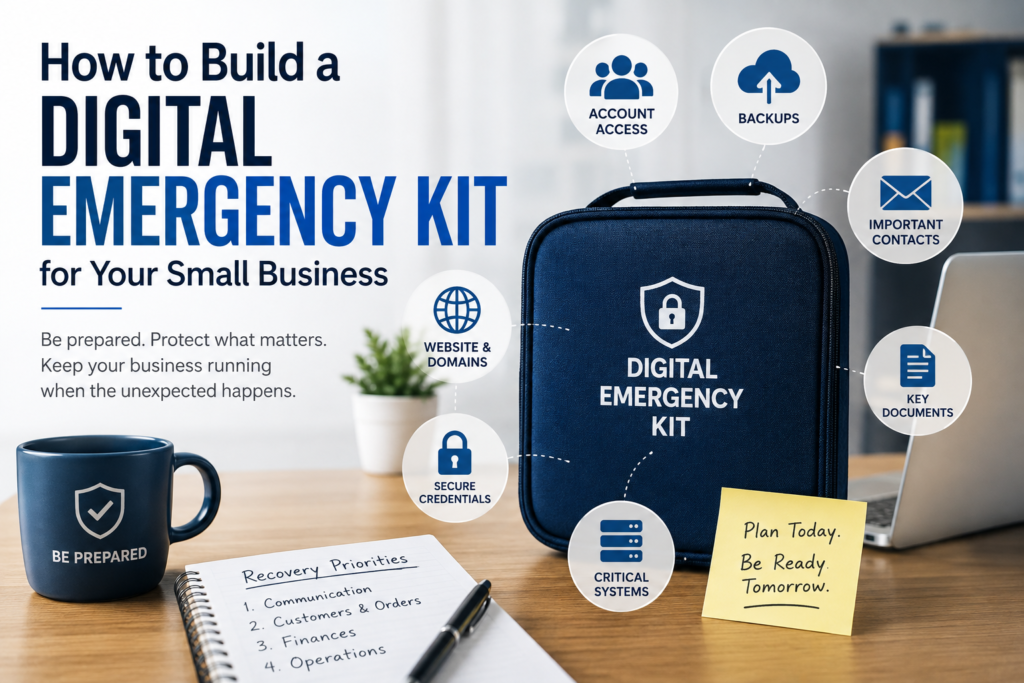
Digital emergencies tend to be much less organized. That’s why creating a digital emergency kit for small business operations can be just as important as preparing for a physical emergency.
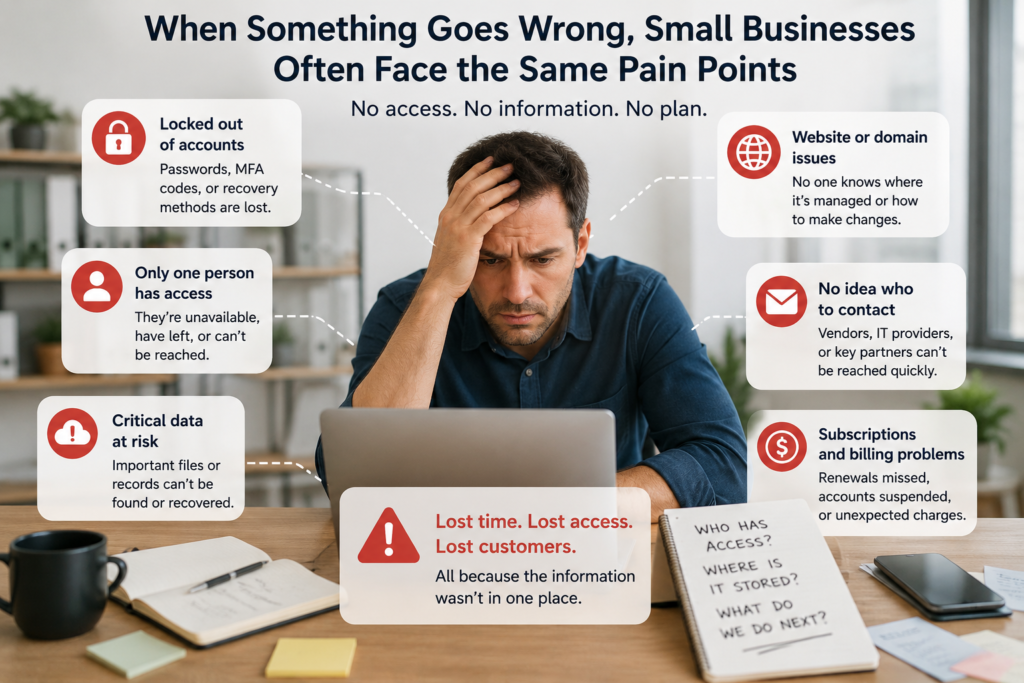
What happens if the laptop used to manage the business suddenly dies? Could someone else access the company email if the owner were unavailable? Does anyone know which company controls the website domain? And if an important cloud account were locked tomorrow morning, would the business know how to recover it?
These aren’t unusual scenarios. A lost phone, failed computer, locked account, departed employee, cloud outage, or accidental deletion can be enough to disrupt a small business. A digital emergency kit helps make sure the information needed to respond isn’t scattered across different devices, accounts, or people’s heads.
A digital emergency kit gives you a way to prepare for those situations before you’re dealing with one.
It doesn’t have to be a huge disaster-recovery manual. For most small businesses, it’s simply a secure collection of the information and instructions someone would need to keep essential operations going when the usual systems—or the people who manage them—aren’t available.
What Is a Digital Emergency Kit for Small Business?
Think of it as a set of digital spare keys.
Your business probably depends on dozens of online accounts, but some are far more important than others. Email, cloud storage, accounting software, your website, customer records and payment systems may be essential to everyday operations.
Normally, you don’t think much about how those systems are accessed because the people who use them already know what to do. Problems start when those people or systems suddenly aren’t available.
Imagine that the person who manages your website is unexpectedly unreachable. You need to make an urgent change, but nobody knows where the domain is registered or who has administrator access.
Or perhaps your phone is lost while travelling. You know the password for an important business account, but the authentication app needed to log in was on that phone.
A digital emergency kit is designed for exactly these moments. It tells an authorized person what the business depends on, who controls it, where essential information is kept, and what to do if normal access is lost.
A Backup Alone Isn’t an Emergency Plan
Backing up important files is an excellent start, but having a backup doesn’t necessarily mean you’re ready for an emergency.
Suppose you have a complete copy of your customer records. That’s useful—but where is it stored? Who can access it? What software is needed to open it? How recently was it updated? And if your main system is unavailable, does anyone know how those records should actually be used?
The same issue applies to websites, accounting records and other important business information.
A backup protects the data. An emergency kit provides the context needed to use it.
This is why contingency planning generally goes beyond simply creating copies of files. NIST’s contingency-planning guidance emphasizes identifying important systems and operations, developing recovery strategies, and regularly testing and maintaining those plans. Although the publication is aimed at federal information systems, the underlying principle translates well to a small business: decide how you’ll recover before you actually need to recover.
Step 1: Figure Out What Your Business Really Depends On
Before creating documents or copying files, ask yourself a more useful question:
What would stop us from doing business if we couldn’t access it tomorrow morning?
The answer will be different for every company.
A consulting business may depend heavily on email, cloud documents, its CRM and accounting system. An online retailer may put its e-commerce platform, payment processor and order database at the top of the list. A service business might depend on its scheduling software and customer records.
You don’t need to document every app you’ve ever subscribed to. Start with the systems whose disappearance would actually interrupt the business.
One easy way to do this is to imagine arriving at work tomorrow and discovering that each system is unavailable. Would you need it back immediately? Could you work around the problem for a few days? Or would hardly anyone notice?
That simple exercise will quickly separate your critical systems from the merely convenient ones.
Step 2: Find Out Who Actually Controls Those Systems
This is where small businesses sometimes discover a problem they didn’t know they had.
Paying for an account doesn’t necessarily mean the business has full control over it.
Your domain might have been registered years ago using an employee’s personal email address. An outside developer could still be the main administrator for your website. Perhaps only one person can access the company’s cloud storage settings, or a former employee originally created an important software account.
None of these arrangements may cause problems during normal operations. They become important the moment that person isn’t available.
Go through your critical systems and find out who owns the main account, who has administrator privileges, which email address is used for recovery, and whether another trusted person could regain access if necessary.
This doesn’t mean everyone should become an administrator. Giving unnecessary access creates its own security problems. The objective is to remove accidental single points of failure while keeping permissions controlled.
That’s also why clearly defined cloud application access controls matter. Access should belong to the right people, but the business shouldn’t become completely dependent on one person’s account.
Step 3: Think About What Happens If You Lose Your Phone
Passwords aren’t the only thing standing between you and your accounts anymore.
Many important business services use multi-factor authentication, which is a good thing. But it introduces another question that is easy to overlook:
What happens if the device providing the second factor disappears?
If your authentication app is on a lost or damaged phone, knowing the password may not be enough. The same problem can occur when an employee leaves and their device was being used to approve administrator logins.
For your most important accounts, look at the recovery options now rather than during an emergency. Some services provide backup codes, secondary administrators, security keys or alternative recovery methods.
Those recovery details should be stored securely and separately from the device they are designed to replace.
You don’t want to weaken multi-factor authentication just to make recovery easier. You simply want to make sure your recovery method doesn’t depend on the exact device you’ve just lost.
Step 4: Decide Which Data You Couldn’t Afford to Lose
Next, forget about software for a moment and think about the information inside it.
If one piece of business data disappeared permanently tonight, what would hurt the most?
For some companies, that’s customer information. For others, it might be accounting records, contracts, project files, employee information, order histories or intellectual property.
Once you’ve identified that information, find out where the main copy lives and whether you have another usable copy somewhere else.
The word usable matters.
A backup isn’t particularly reassuring if nobody has ever tried to restore it. Likewise, having files synchronized across several computers isn’t necessarily the same as maintaining an independent backup. An accidental change or deletion can sometimes be synchronized too.
Your emergency kit should therefore tell you where critical backups are located and how they can be recovered—not simply state that “we have backups.”
Choosing appropriate storage is part of that process. Version history, recovery options and reliability can matter just as much as storage capacity when you’re protecting important company information, which is something worth considering when choosing cloud storage for a small business.
Step 5: Decide What You Would Restore First
Here’s a useful exercise: imagine that several of your normal systems are unavailable at the same time.
You can’t restore everything immediately.
What comes back first?
For many businesses, communication will be near the top of the list. Employees need a way to talk to each other, and customers need a way to reach the company.
After that, priorities vary. An online retailer may urgently need orders and payments. A professional-services firm may care more about customer records and project files. Another business might need its scheduling system before almost anything else.
There isn’t a universal correct order.
What matters is making that decision before an emergency rather than having several people debate it while the business is already disrupted.
NIST’s Guide for Cybersecurity Event Recovery similarly discusses identifying and prioritizing organizational resources as part of recovery planning.
For a small business, you don’t need to turn that into a complicated recovery framework. A simple written order may be enough:
First: restore the systems needed to communicate.
Next: restore whatever is required to serve customers and collect revenue.
Then: bring back the systems that support normal day-to-day operations.
Everything else can wait.
Step 6: Document the Things Someone Else Would Need to Know
Now focus on the information that tends to live in people’s heads.
Where is your domain registered? Who manages the website? Who controls your accounting software? Which company handles IT problems? Who should be contacted if your payment system stops working?
Your emergency kit should answer those questions without becoming a directory of everything your business uses.
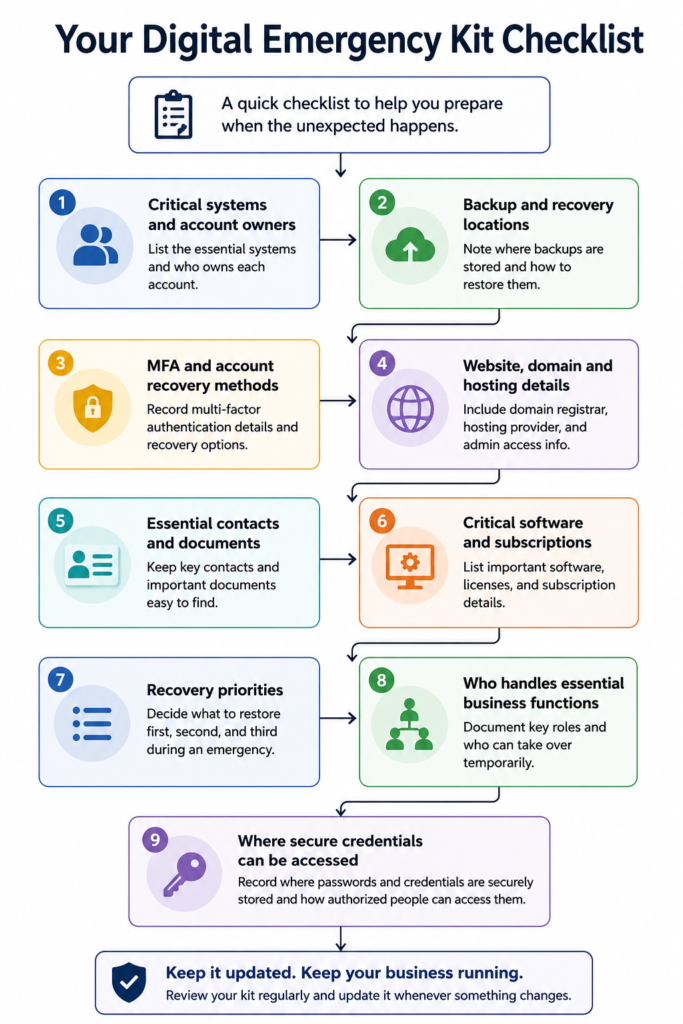
Include the important account owners, emergency contacts, website and domain details, key software subscriptions, and the location of essential documents such as contracts and insurance information.
The test is simple: could a trusted person figure out who to contact and where to start if you weren’t available?
Step 7: Identify Your Single Points of Failure
Small businesses often depend heavily on particular people without realizing it.
Perhaps only one employee knows how payroll works. The owner is the only administrator of the company email. Your developer controls the website hosting. One employee’s phone receives authentication codes for an important account.
Write down these dependencies and decide who could take over temporarily.
You don’t need everyone to have administrator access. You simply don’t want a critical part of the business to become inaccessible because one person isn’t available.
Step 8: Store the Kit Somewhere Safe—and Accessible
Don’t keep your only emergency kit inside the system you might lose access to.
A sensible approach is to maintain a secure primary copy and a protected secondary copy that doesn’t depend on exactly the same account or device.
The kit also doesn’t need to contain your actual passwords. Instead, document where credentials are securely managed and how an authorized person can obtain emergency access.
Only trusted people should have access to the complete kit.
Step 9: Test It Occasionally
A beautifully organized emergency kit isn’t useful if the information is outdated.
Every six months or so, choose a simple scenario and walk through it. Imagine the owner is unavailable or you’ve lost access to an important account. Could another authorized person work out what to do?
This quickly exposes problems such as old recovery numbers, former employees who still own accounts, missing backup codes, outdated contacts or backups that haven’t been tested.
Update the kit whenever you change a critical system or the person responsible for it.
How Often Should You Update Your Digital Emergency Kit for Small Business?
A digital emergency kit isn’t something you create once and forget about.
Businesses change too quickly.
Employees leave. Software changes. Domains move between registrars. New payment systems are introduced. Recovery phone numbers change. New administrators are added. Old suppliers disappear.
For most small businesses, reviewing the kit every six months is a reasonable starting point. You should also update it whenever something significant changes, such as switching a critical software platform, changing IT providers, moving important data, or changing who controls key accounts.
The review doesn’t need to become a major project. Open the kit, work through the important sections and ask whether the information would still help someone today.
If the answer is no, update it.
FAQ
Do I need special software to create a digital emergency kit?
No. The organization of the information matters much more than the software used to create it. A secure document, spreadsheet, password manager, encrypted storage system or combination of these can work.
What matters is that authorized people know where the kit is and can access it when normal systems aren’t available.
Should I put all my passwords in the emergency kit?
Generally, no.
The kit should explain where credentials are securely stored and how authorized people can access them rather than becoming a second password database.
Keeping passwords scattered through documents and spreadsheets can create unnecessary security risks.
Should I keep an offline copy?
For important recovery information, having a protected copy that doesn’t depend entirely on your normal systems can be useful.
The appropriate format depends on the sensitivity of the information. The goal is to avoid a situation where losing access to one account also removes access to your entire recovery plan.
Who should have access to the kit?
Only people who genuinely need it.
For a very small business, that might be the owner and one trusted backup person. A larger company may divide responsibilities between management, IT, finance and operations.
Not everyone needs access to everything.
Is a digital emergency kit the same as a disaster recovery plan?
They’re related, but they don’t have to be the same thing.
A formal disaster recovery or business continuity plan can be much more detailed. A small-business digital emergency kit is deliberately practical: it gives people the information they need to regain access to critical systems, recover important information and keep essential operations moving.
When should I create one?
Ideally, while everything is working normally.
It’s much easier to find out who controls your domain, test a backup or generate recovery codes when you still have access to everything.
Final Thoughts
Most digital emergencies aren’t dramatic.
Sometimes it’s simply a broken laptop, a lost phone, a forgotten login or the one employee who knows how something works being unavailable at exactly the wrong time.
What turns those inconveniences into serious business problems is often missing information.
A digital emergency kit solves a surprisingly simple problem: it makes sure the knowledge needed to keep the business running doesn’t exist only inside one person’s head, one laptop or one online account.
You don’t have to build the perfect kit in one afternoon. Start with the systems you couldn’t operate without, document who controls them, make sure important data can be recovered, and give a trusted person enough information to act if you’re not available.
Then test it.
Because the most useful emergency plan isn’t the most detailed one. It’s the one someone can actually use when something goes wrong.