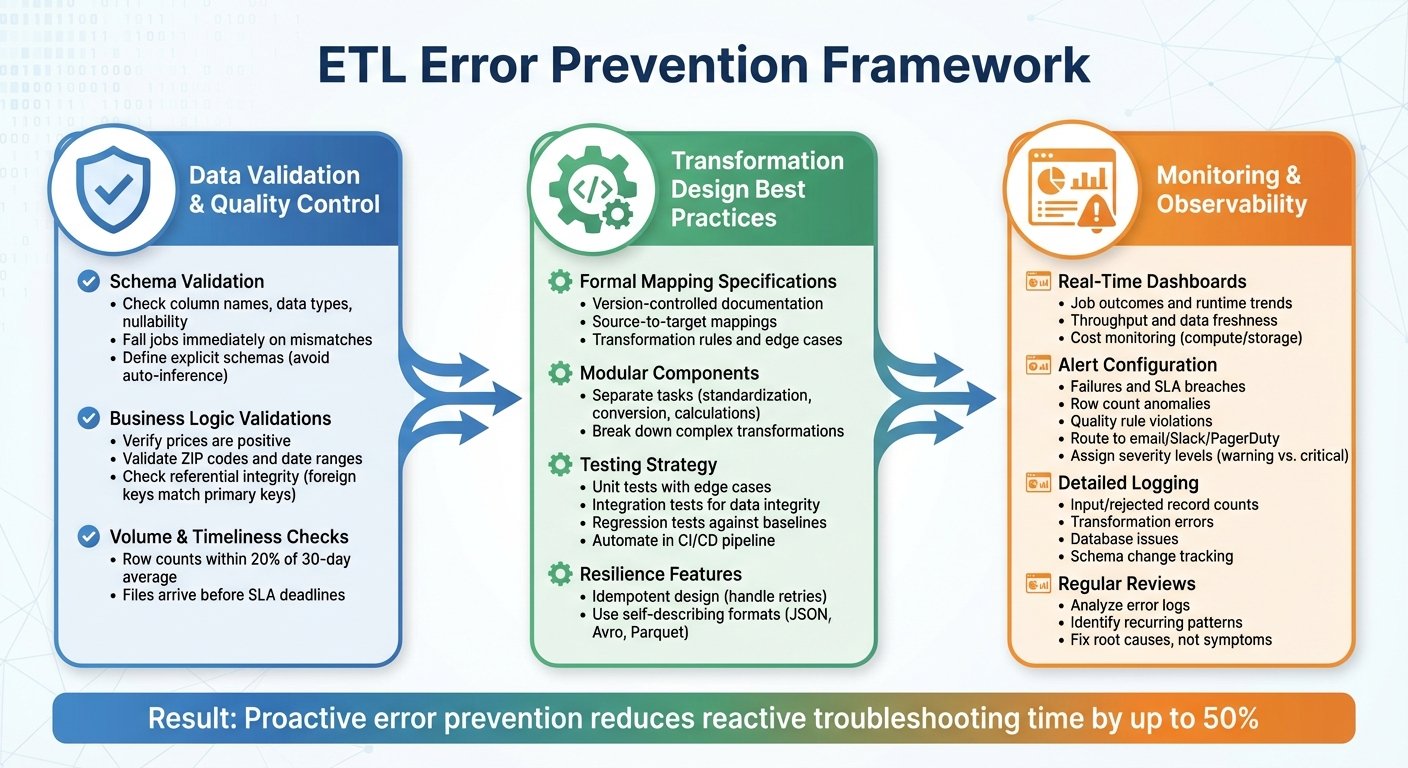

- Duplicate Records: Repeated data entries inflate numbers, confuse teams, and waste resources.
- Mixed Data Formats: Differing date, currency, or naming formats disrupt data alignment.
- Missing or Incomplete Data: Gaps in records lead to errors in reporting and decision-making.
- Data Type Conflicts: Mismatched formats (e.g., integers vs. decimals) cause processing errors.
- Source Integration Errors: Schema mismatches and naming conflicts break ETL mappings.
Fixing these issues involves:
- Data Profiling: Analyze and catch errors early.
- Standardizing Formats: Apply uniform rules for dates, currencies, and other data types.
- Real-Time Monitoring: Track data quality and stop bad data from entering your systems.
Addressing these challenges ensures accurate analytics, smoother workflows, and compliance with regulations like SOX and HIPAA.
This article used to open and close with a claim that poor data quality costs businesses up to 25% of revenue. We could not trace it to any study. Every route led back to a statistics round-up citing another round-up, and the figure appears elsewhere as 12%, 20% and 30% with equal confidence and equally little evidence. It has been removed, along with an anonymous example crediting a 40% drop in data incidents to ETL automation. Neither was needed: if your revenue reports are wrong, you already know what that costs you.
5 Common Data Consistency Problems in ETL
Data consistency is the backbone of effective ETL processes, but it’s not always easy to maintain. Below are five common problems that can throw your ETL workflows off track. By recognizing these issues, you can address them before they disrupt your operations.
Duplicate Records
Duplicate records pop up when multiple sources provide the same data or when extraction rules fail to catch repeats. These aren’t just a nuisance – they can seriously mess with your analytics and reporting.
Take revenue reporting, for example. Duplicate records can inflate your numbers, leading to inaccurate budgets and forecasts. Customer data duplicates create their own headaches. If “John Smith” and “J. Smith” are treated as separate entries, your marketing team might send the same person several copies of the same email, annoying customers and wasting resources.
The problem worsens when duplicates come from different systems with unique identifiers. For instance, your CRM might label a customer as “12345”, while your billing system uses “CUST-12345” for the same individual. Without proper deduplication rules, your ETL process treats them as separate entities, causing confusion across departments and slowing down operations.
Mixed Data Formats
Handling mixed data formats is another major hurdle. Different systems often store the same type of information in wildly different ways, and these inconsistencies can disrupt your entire data pipeline.
Date formats are a classic example. One system might use MM/DD/YYYY (e.g., 08/20/2025), another YYYY-MM-DD (2025-08-20), and yet another DD-MM-YYYY. When these formats mix, your ETL process can misinterpret the dates entirely. The dangerous case is not the one that errors, it is 05/06/2025, which is valid in two formats and wrong in one of them, and which no exception handler will ever flag.
Currency and number formatting add to the chaos. Some systems might store amounts as “$1,234.56”, others as “1234.56”, or even “1234.56 USD.” Phone numbers can vary too – “(555) 123-4567”, “555-123-4567”, and “5551234567” might all represent the same number but won’t match without standardization. These inconsistencies make it difficult to sort, analyze, or even use the data effectively.
Missing or Incomplete Data
Missing data can quietly undermine the reliability of your ETL processes. Sometimes, fields look complete but contain placeholders like “N/A”, “TBD”, or blank spaces. If your ETL process doesn’t recognize these as missing, it can lead to errors down the line.
Certain gaps cause immediate problems. Missing email addresses, for example, can derail marketing campaigns. Missing product codes can mess up inventory tracking. Incomplete financial data can lead to inaccurate reports – or even compliance violations.
The issue deepens when different systems have different requirements. Your sales system might demand a phone number, while your support system doesn’t. When these systems feed into a central data warehouse, you’re left with partial records that fail to meet the needs of all departments.
Another layer of complexity comes from partial updates. If a source system updates only some fields, your ETL process might combine outdated information with new data, creating inconsistencies that ripple through your operations.
Data Type Conflicts
Conflicts between data types can wreak havoc on ETL processes. These issues arise when systems store similar information in different formats.
For example, one system might record product quantities as integers (150), while another uses decimals (150.00). Boolean values are another trouble spot – some systems use “Y/N”, others “1/0”, and still others “True/False.” Even text fields can cause problems. If one system allows 255 characters for customer names but another caps it at 100, longer names get truncated, which can disrupt matching algorithms and create duplicate records.
These mismatches must be resolved before you can even think about tackling deeper integration issues.
Source Integration Errors
Even after you’ve dealt with duplicates, format inconsistencies, missing data, and type conflicts, integration errors can still trip you up. Schema mismatches between systems are among the toughest challenges. When data is organized differently across systems, your ETL process struggles to map it correctly.
Take naming conflicts, for instance. One system might use “emp_name”, while another uses “employee_full_name.” These differences aren’t just cosmetic – they require careful mapping to ensure data flows into the right fields. If a source system changes field names without warning, your ETL mappings can break, causing data to land in the wrong place or disappear entirely.
Relationship structures between systems often don’t align either. Your CRM might link customers directly to sales opportunities, while your billing system ties customers to accounts first, then to invoices. These differences can create broken links or missing connections when building unified customer views.
Version control adds another layer of complexity. If a source system updates its schema but your ETL process doesn’t adjust, outdated mappings can let bad data flow into your target systems. This creates a constant maintenance burden and can disrupt operations across the board.
How Data Consistency Issues Affect Your Business
When your ETL (Extract, Transform, Load) process struggles with data consistency, it’s not just a technical problem – it’s a business problem. These issues can lead to unreliable analytics, misguided decisions, potential legal troubles, and operational slowdowns.
Poor Decision-Making
Bad data equals bad decisions. When your data is riddled with errors or inconsistencies, the insights you draw from it are flawed, and the flaw is invisible: a report built on duplicated rows looks exactly like a report built on clean ones.
This section previously made that point via a quotation credited to a data quality vendor. We could not find the sentence anywhere in their published material, so it has gone. The point does not need borrowing. Take customer contact details: if this information is inaccurate, your communication efforts fail silently, and you will read the resulting low response rate as a message about your offer rather than about your database. Decisions built on faulty data can also expose you to compliance and legal risks.
Compliance and Legal Risks
Inconsistent data doesn’t just hurt decision-making – it can also jeopardize your compliance with industry regulations. Regulatory bodies and auditors rely on accurate, consistent data for their assessments. If your reports are unreliable, you risk losing their trust and facing penalties. Reliable data isn’t just a best practice; it’s a necessity for staying on the right side of the law.
Slower Operations
Data consistency problems don’t just slow down analytics – they slow down your entire operation. Every team that stops trusting a number starts keeping its own copy, and reconciling those copies becomes somebody’s standing weekly job. That is the real cost, and it is one you can measure inside your own company without borrowing anyone’s statistic: count the hours your people spend arguing about whose figure is right.
How to Fix Data Consistency Issues
Fixing data consistency issues requires a combination of smart strategies and reliable tools. By addressing these challenges head-on, you can refine your ETL pipeline to ensure accurate and dependable data flow every time.
Use Data Profiling and Quality Checks
Data profiling acts as your first line of defense. Before data even enters the transformation phase, profiling tools analyze it for irregularities. These tools can detect patterns, flag anomalies, and identify inconsistencies that could cause bigger problems down the line.
The goal here is to catch issues early. For example, during the extraction stage, profiling can help you identify duplicate customer records, spot missing values, or uncover formatting mismatches across various source systems. Many modern profiling tools can generate detailed reports, highlighting metrics like data completeness, uniqueness violations, and pattern deviations.
But don’t stop there – quality checks should run continuously throughout your ETL process. Establish validation rules to ensure financial and operational data stays within acceptable ranges. For example, account balances should reconcile correctly across systems, and any discrepancies should be flagged immediately.
Once you’ve set up quality checks, the next step is to ensure your data follows consistent formatting rules.
Set Standard Data Formats
Standardization is the foundation of consistency. Without clear formatting rules, your data will remain chaotic, no matter how advanced your tools are. To avoid this, create organization-wide standards for common data types and enforce them consistently.
For instance:
- Dates should follow a uniform format like MM/DD/YYYY.
- Currency values should always use the dollar sign ($) and include two decimal places.
- Phone numbers might follow the (XXX) XXX-XXXX format.
- Addresses should use standardized abbreviations for states and street types.
Store dates internally in an unambiguous format such as ISO 8601 (YYYY-MM-DD) even if you display them differently. Display formats are a presentation choice; storage formats are where the silent errors come from.
Your ETL pipeline should automatically convert incoming data to match these standards. If one system uses DD-MM-YYYY while another uses YYYY/MM/DD, your transformation layer should normalize both to your chosen format before loading the data into your target system.
To make this manageable, develop a data dictionary that records these standards. Include examples, acceptable variations, and transformation rules for each data type. This documentation will be a valuable resource for both current team members and new hires, as well as when integrating new data sources.
Once your standards are in place, real-time monitoring ensures they’re consistently applied.
Monitor Data in Real-Time
Real-time monitoring transforms your ETL process into a proactive quality management system. Instead of discovering data issues days or weeks later, you can address them as they happen.
For example, you can set up alerts to notify your team if duplicate records exceed a threshold you have chosen, or if a data source starts sending incomplete records. In some cases, your system might even halt the ETL process to prevent bad data from contaminating your database.
Set those thresholds from your own baseline. Run the pipeline for a few weeks, look at what normal variation actually looks like in your data, and put the alert somewhere above it. Thresholds copied out of an article produce either constant noise or silence, and both get the alerting switched off within a month.
Dashboards are another useful tool. They provide a clear view of your data pipeline’s health, tracking metrics like record counts, processing times, error rates, and data quality scores. Any unusual deviations in these metrics can signal a problem, allowing you to investigate and fix it before it disrupts operations.
You might also consider adding automated stop mechanisms. If data quality falls below a critical threshold, the system can pause processing and send an alert to your team. This prevents small issues from snowballing into larger failures, giving you time to address the root cause without affecting your entire data ecosystem.
Conclusion: Managing Data Consistency
ETL data consistency issues can disrupt operations and lead to long-term challenges if not addressed early. The five common problems we’ve discussed – duplicate records, mixed data formats, missing data, data type conflicts, and source integration errors – tend to grow worse over time, creating a ripple effect across systems.
To tackle these issues head-on, use proactive strategies like data profiling, applying standardized formats, and implementing real-time monitoring. These steps can help identify and resolve inconsistencies before they escalate.
Be realistic about what that costs. Profiling, standardisation and monitoring are ongoing work, not a project with an end date, and the maintenance burden grows with every source you add. That is worth knowing before you connect a tenth system to a pipeline nobody has time to look after.
By focusing on data profiling, enforcing standardization, and maintaining continuous monitoring, you create a solid foundation for accurate analytics, regulatory compliance, and smoother operations. The measure of success is simple and local: your finance team and your sales team quote the same number for the same month, without a meeting.
FAQs
What role does data profiling play in preventing data consistency issues during ETL processes?
Data profiling is essential for avoiding data consistency problems during ETL processes. It works by examining the quality, structure, and patterns of data before any transfer or transformation takes place. This early analysis helps spot anomalies, missing values, and inconsistencies, ensuring that only clean, reliable data flows through the pipeline.
By evaluating data integrity and suitability from the start, organizations can tackle issues as they arise, minimizing errors and improving the overall data quality. This approach not only simplifies ETL workflows but also ensures that decision-makers have access to consistent and dependable data for analysis.
What are the best practices for ensuring consistent data formats across systems in ETL processes?
To keep data formats consistent in ETL processes, start by implementing a schema that sets clear guidelines for data structure and types. Stick to standard naming conventions and ensure uniform formatting for key elements such as dates (like MM/DD/YYYY), currencies (e.g., $1,000.00), and measurements (e.g., inches or pounds).
Use data profiling tools to examine and clean data before processing, and create mapping rules to harmonize data from various sources. Validating data early in the ETL pipeline against these established standards can help spot inconsistencies and boost overall data quality. By following these steps, you can minimize errors and make integration across systems much smoother.
How does real-time monitoring help improve data quality and prevent inconsistencies in ETL processes?
Real-time monitoring is essential for maintaining data quality and catching inconsistencies in ETL processes as they occur. By addressing issues immediately, it prevents data anomalies – like unexpected patterns, errors, or missing values – from affecting downstream systems.
With constant tracking of data flow and quality metrics, real-time monitoring turns data management into an active, responsive process. This approach helps organizations uphold high standards, minimize downtime, and ensure their data stays accurate and dependable for making informed decisions.
More on this topic
Browse all 53 articles on Data & Analytics.