Disclosure: This page contains commercial links. BizBot may earn a commission from qualifying purchases. Paid placements do not buy a better ranking. Read our affiliate disclosure.
The best video conferencing software for small businesses should make meetings easier, not add another layer of complexity to everyday work. Whether you’re meeting clients, managing remote employees, conducting interviews, or delivering presentations, the right platform needs to offer dependable video calls, useful collaboration features, and pricing that makes sense for your team.
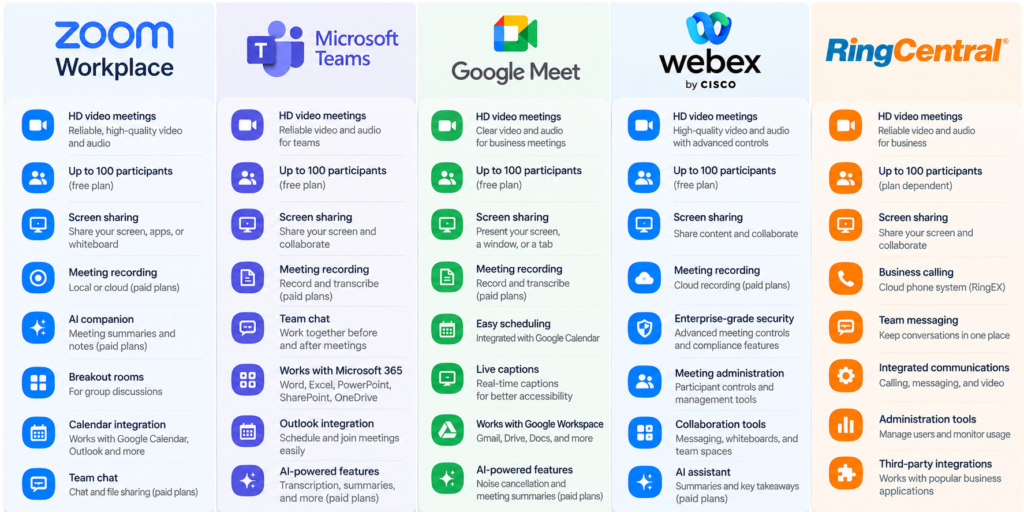
Zoom, Microsoft Teams, and Google Meet are familiar names, but they aren’t necessarily interchangeable. Some platforms focus on making meetings straightforward for external participants, while others work best as part of a larger business productivity suite. Options such as Cisco Webex and RingCentral also deserve consideration, particularly when companies need more advanced meeting controls or integrated business communications.
This guide compares five video conferencing platforms based on their features, usability, limitations, and suitability for different business needs. Rather than choosing a winner based on the longest feature list, we’ll look at what each platform actually offers small businesses.
Best Video Conferencing Software for Small Businesses: Quick Comparison
| Software | Best For | Main Strength | Potential Drawback |
|---|---|---|---|
| Zoom Workplace | Client meetings and presentations | Meeting-focused tools and external collaboration | Some useful capabilities require paid plans |
| Microsoft Teams | Microsoft 365 users | Integrated meetings, chat, and file collaboration | Can feel complex for teams needing only video calls |
| Google Meet | Google Workspace users | Simple meeting access and Google integrations | Some advanced features depend on Workspace plans |
| Cisco Webex | Teams needing advanced meeting controls | Meeting administration, security, and collaboration | May offer more functionality than small teams need |
| RingCentral | Businesses combining calls and meetings | Business communications in one platform | Less compelling if video meetings are the only requirement |
The best choice often depends on the software your business already uses. A company paying for Microsoft 365 or Google Workspace may already have access to capable meeting tools, making an additional subscription unnecessary.
1. Zoom Workplace — Best for Client Meetings and Presentations
Zoom Workplace is a familiar choice for businesses that regularly communicate with clients, contractors, and partners. Its video conferencing features are designed to support everything from brief one-on-one discussions to longer presentations and team meetings.
One of Zoom’s practical advantages is its meeting-focused experience. Businesses can schedule calls, share screens, use breakout rooms, and collaborate through features such as whiteboards and meeting chat. Depending on the plan, AI-powered summaries and note-taking can also reduce the amount of manual documentation required after meetings.
For businesses that work with people outside their organization, the experience of joining a meeting is especially important. A meeting platform should be straightforward for clients who may not use the same software every day.
Key Features
Zoom Workplace includes video meetings, screen sharing, team chat, whiteboards, calendar integrations, and recording options. Paid plans expand meeting duration and provide additional cloud storage and AI capabilities.
Its free Basic plan supports meetings of up to 40 minutes with up to 100 participants. Zoom Workplace Pro extends meetings to as long as 30 hours and includes additional meeting and productivity features.
Where Zoom Works Well
Zoom is particularly useful for consulting firms, agencies, trainers, and service businesses that spend significant time speaking with external clients.
For example, a consulting business that conducts several hour-long client sessions each week may find the paid plan worthwhile. Longer meeting durations eliminate the need to restart calls, while recording and AI features can help document discussions and follow-up actions.
Potential Limitations
Zoom isn’t automatically the most economical option for every team. Businesses that already subscribe to another productivity suite may have comparable meeting functionality available without purchasing additional licenses.
The free plan’s meeting-duration limit can also become inconvenient for longer group discussions. And while AI features are useful, their value depends on whether employees actually incorporate them into their workflow.
Best suited for: Businesses that prioritize external meetings, presentations, training sessions, and straightforward video collaboration.
Want to see if Zoom is right for your business? Try Zoom Workplace for free before committing to a paid plan.
2. Microsoft Teams — Best for Businesses Already Using Microsoft 365
Microsoft Teams approaches video conferencing as part of a broader workplace collaboration system rather than treating meetings as a separate activity. Alongside video calls, it provides team messaging, file collaboration, and connections with Microsoft’s business applications. For organizations already using Outlook, Word, Excel, SharePoint, and OneDrive, this integration can make everyday communication more convenient by allowing employees to work within a familiar software environment.
Unlike platforms that focus primarily on meetings, Teams also supports ongoing collaboration before and after a call. Employees can continue discussions through chat, access shared documents, and coordinate projects without relying on several unrelated applications. This makes it particularly useful for businesses that want their communication tools to support everyday teamwork rather than occasional video meetings alone.
Key Features
Microsoft Teams supports scheduled video meetings, screen sharing, messaging, meeting collaboration, and integration with Microsoft 365 applications. Depending on the subscription, businesses can also access meeting recordings, transcription, administrative controls, and AI-assisted capabilities.
The main advantage is how these features connect with other Microsoft applications. Employees can schedule meetings through Outlook, collaborate on Office documents, and access files stored in OneDrive or SharePoint. However, Microsoft offers different Teams and Microsoft 365 packages, so businesses should confirm which features are included in their intended subscription.
Where Microsoft Teams Works Well
Teams makes sense for businesses that already organize much of their work around Microsoft 365. Consider a small accounting firm that uses Outlook for client communication, OneDrive for document storage, and Excel for financial reporting. Instead of introducing a separate platform for meetings and internal discussions, employees can use Teams to communicate, review documents, and coordinate tasks within their existing software environment.
For this type of business, the primary advantage isn’t necessarily superior video quality or more meeting features. It’s the convenience of having communication and collaboration tools that work together. Teams can reduce the need to switch between applications, particularly when employees regularly discuss shared files or work on projects together.
Potential Limitations
Microsoft Teams may feel more complicated than necessary for businesses that only need occasional video calls. Its channels, workspaces, permissions, and collaboration features can require more initial setup and employee familiarization than a straightforward meeting application.
Organizations that don’t use Microsoft 365 extensively may also find fewer advantages in adopting Teams. If employees mainly need to schedule client calls and share their screens, a simpler video conferencing platform could be more practical.
Best suited for: Small businesses already invested in Microsoft 365 that want meetings, messaging, and file collaboration in a connected environment.
3. Google Meet — Best for Businesses Using Google Workspace
Google Meet is a practical option for small businesses that want straightforward video conferencing without managing a complicated collaboration platform. It works particularly well for teams already using Gmail, Google Calendar, Drive, and other Google Workspace applications because meetings can fit naturally into their existing scheduling and communication processes.
One of Google Meet’s biggest advantages is its simplicity. A business owner can create a meeting through Google Calendar, invite participants, and include a meeting link without switching to a separate scheduling application. For companies that primarily need to communicate with employees, customers, and business partners, this convenience may be more valuable than having an extensive collection of advanced meeting tools.
Key Features
Google Meet supports video meetings, screen sharing, live captions, and integration with Google Calendar. Depending on the subscription, businesses can also access meeting recordings, transcripts, noise cancellation, and AI-powered meeting assistance.
Its browser-based experience is particularly convenient when inviting clients or contractors who use different devices and operating systems. Participants can join supported meetings without installing a separate desktop application, while Google Workspace users benefit from familiar scheduling and collaboration tools.
The platform’s integration with Gmail, Calendar, and Drive also helps businesses coordinate meetings alongside their everyday work. Rather than introducing an entirely new communication system, Google Meet extends the tools many employees already use.
Where Google Meet Works Well
Google Meet is particularly suitable for freelancers, small agencies, and businesses that manage much of their operations through Google Workspace. For example, a marketing agency that uses Gmail for client communication, Google Calendar for scheduling, and Google Drive for campaign materials may find Google Meet sufficient for regular project discussions.
In this situation, the agency can schedule meetings, share presentations, and discuss campaign progress without paying for a separate conferencing service. The benefits become especially apparent when employees already understand Google’s applications and don’t require additional training.
Google Meet can also be a sensible choice for businesses whose meetings are relatively straightforward. If employees mainly need to discuss projects, share screens, and communicate with clients, they may not need a specialized platform with extensive meeting administration or event-management features.
Potential Limitations
Some of Google Meet’s advanced capabilities are available only through eligible paid subscriptions. Businesses that need recordings, longer meetings, transcripts, or AI-powered features should review the specific Google Workspace plan before deciding whether it meets their requirements.
Google Meet may also be less appealing to organizations that rely heavily on Microsoft 365 or need specialized presentation and meeting-management tools. Although it handles common business meetings effectively, the most suitable platform still depends on how employees collaborate and which applications they already use.
Best suited for: Small businesses using Google Workspace that want convenient scheduling, accessible meetings, and minimal additional software.
4. Cisco Webex — Best for Businesses Needing Advanced Meeting Controls
Cisco Webex is an established video conferencing platform that combines online meetings with collaboration and communication features. Although it is often associated with larger organizations, it can also serve small businesses that place a high priority on meeting administration, security controls, and structured collaboration.
The platform supports everyday video calls as well as more demanding business communication requirements. Depending on the subscription, organizations can access recording, transcription, AI assistance, and additional meeting management capabilities. For small businesses that regularly host formal discussions, technical presentations, or meetings involving multiple stakeholders, these features may offer practical advantages.
Key Features
Webex includes video meetings, screen sharing, messaging, and collaboration tools. Its paid offerings can provide expanded meeting capabilities, recording options, and administrative controls, while features such as participant management and noise reduction help make meetings more manageable.
Webex also provides tools for documenting discussions, which may be useful when meetings involve detailed technical information or decisions that need to be reviewed afterward. However, the availability of these capabilities depends on the subscription, making it important to distinguish between the free offering and paid meeting plans.
Where Cisco Webex Works Well
Webex may appeal to professional service firms, technology companies, and businesses that conduct structured meetings with employees, customers, and external stakeholders. Consider a small IT consultancy that regularly hosts technical discussions, product demonstrations, and internal planning sessions. The company may value centralized meeting administration, participant controls, and documentation features that help employees manage detailed conversations.
Webex can also be worth evaluating when a company expects its communication requirements to become more complex as it grows. A business that currently conducts simple team meetings may eventually need more structured collaboration, particularly when coordinating larger projects or working with multiple departments and external partners.
Potential Limitations
The main consideration for smaller teams is whether they will use enough of Webex’s capabilities to justify the subscription and setup. A business that holds only a few short meetings each week may find that a simpler platform already meets its needs, particularly if its existing productivity software includes video conferencing.
Webex’s range of products and subscription options can also make comparisons less straightforward. Businesses should focus on the specific meeting plan they intend to purchase and verify which capabilities are included rather than assuming every advertised feature is available across all subscriptions.
Best suited for: Businesses that value meeting administration, collaboration controls, and room to accommodate more demanding communication needs.
5. RingCentral — Best for Businesses Combining Meetings and Business Communications
RingCentral takes a different approach from platforms that focus primarily on video conferencing. Its broader business communications offerings can bring calling, messaging, and video meetings into a connected environment, making it worth considering for companies that need more than an online meeting application.
For small businesses, this distinction matters because communication often takes place across several channels. Employees may speak with customers over the phone, coordinate internally through messaging, and use video meetings for detailed discussions. Rather than maintaining separate services for each activity, a business may prefer a communications platform that supports several of these needs.
However, RingCentral is best evaluated as part of a company’s overall communications strategy. A business that needs only occasional video calls may not benefit from a broader subscription, while a company already considering a cloud phone system could find greater value in an integrated approach.
Key Features
Depending on the product and subscription, RingCentral provides video conferencing, team messaging, business calling, and related collaboration features. Its integrated approach is designed to help employees move between communication channels without relying on several unrelated services.
For example, a customer conversation might begin with a telephone inquiry, continue through internal team messaging, and eventually require a video meeting to review a proposal or resolve a technical issue. Having these communication tools within a connected system can make coordination more convenient, particularly for businesses that handle frequent customer interactions.
The availability of specific capabilities depends on the RingCentral product selected. Businesses should therefore distinguish its video meeting features from those included in broader communications packages before comparing costs.
Where RingCentral Works Well
RingCentral can be particularly useful for businesses that communicate with customers through multiple channels. A small property management company, for instance, may receive frequent telephone inquiries, coordinate with maintenance staff through messaging, and use video meetings for discussions with property owners.
For this type of business, having connected communications tools may be more useful than choosing a video conferencing platform in isolation. Employees can manage different types of conversations within a broader communication system, potentially reducing the need for separate applications.
Similarly, growing service businesses that are planning to replace a traditional phone system may want to consider whether an integrated communications platform can meet several needs at once. The value comes from how the tools support everyday operations, not simply from the availability of video meetings.
Potential Limitations
RingCentral may be more than a small team needs if its primary requirement is occasional video conferencing. Businesses that already have satisfactory phone and messaging services may see little benefit from replacing them with a broader communications platform.
Pricing and functionality can also differ considerably between video-focused products and comprehensive business communications packages. Comparing only the advertised subscription price may therefore give an incomplete picture of the total cost. Before subscribing, businesses should confirm which calling, messaging, meeting, and administrative features are included and whether the package would replace any existing software expenses.
Best suited for: Small businesses that want video meetings alongside business calling and team messaging, particularly when evaluating a more integrated communications system.
Best Video Conferencing Software for Small Businesses: Pricing Comparison
Pricing is an important consideration when choosing video conferencing software, especially for businesses that need licenses for several employees. However, the cheapest plan isn’t necessarily the most economical choice. A platform that includes email, cloud storage, messaging, or business calling may replace other subscriptions, while a standalone meeting tool may be more affordable for businesses that don’t need those extras.
The following table compares representative plans from the five platforms.
| Platform | Free Option | Paid Plan Example | Starting Price (USD) |
|---|---|---|---|
| Zoom Workplace | Basic plan | Pro | $14.16/user/month, billed annually |
| Microsoft Teams | Free Teams offering | Teams Essentials | $4/user/month, paid yearly |
| Google Meet | Free personal meetings | Google Workspace Business Starter | $7/user/month with annual commitment |
| Cisco Webex | Webex Free | Webex Meet | $12/user/month, billed annually |
| RingCentral | Limited-time trial for RingEX | RingEX business communications plans | Varies by plan, users, and billing terms |
Prices are in USD and reflect published US pricing reviewed in October 2026, excluding temporary promotions and applicable taxes. Annual prices are expressed as monthly equivalents where appropriate. Features, regional availability, and billing conditions may change.
Zoom Pro is also listed at $16.99 per user per month with monthly billing. Microsoft Teams Essentials is comparatively inexpensive as a standalone business collaboration subscription, while Google Workspace Business Starter includes business email and other productivity tools in addition to Google Meet.
Google Workspace Business Standard costs $14 per user per month with an annual commitment and adds meeting recording and other capabilities not included in Starter. Webex Meet includes longer meetings, additional participant capacity, and cloud recording compared with its free tier.
RingCentral requires a slightly different evaluation because RingEX combines business calling, messaging, and video meetings. Its cost should be assessed against the communications services a business would otherwise purchase separately.
Understanding the Real Cost of Video Conferencing
Consider a business with ten employees. At $14.16 per user per month, ten Zoom Pro licenses would cost approximately $141.60 per month, or $1,699.20 annually.
Ten Microsoft Teams Essentials licenses at $4 per user per month would cost $40 monthly, equivalent to $480 annually.
Those figures don’t automatically make Teams the better choice. A company might prefer Zoom for its meeting workflow, while another might benefit more from Teams’ integration with existing Microsoft applications.
Businesses should also consider whether every employee needs a paid license. Some staff may only join meetings hosted by others, while managers, trainers, or client-facing employees may need advanced hosting capabilities.
Before purchasing licenses across the organization, it’s worth reviewing recurring software expenses with a Subscription Cost Analyzer to understand how a new service will affect the annual budget.
How to Choose the Best Video Conferencing Software for Small Businesses
Choosing a video conferencing platform involves more than comparing participant limits and monthly fees. The right decision depends on how employees communicate, which applications they already use, and what problems the software is expected to solve.
Start With Your Existing Software
Businesses using Microsoft 365 or Google Workspace should first examine the meeting capabilities already included in their subscriptions.
For example, a company that relies on Gmail and Google Calendar may find Google Meet convenient enough for its everyday meetings. A business using Outlook, OneDrive, and Microsoft 365 applications may find Teams a more natural fit.
If the existing platform already meets employees’ needs, purchasing another subscription could create unnecessary expenses and duplicate functionality.
The same principle applies to broader collaboration software. A comparison of team collaboration tools for remote work can help businesses evaluate how meetings fit alongside messaging, file sharing, and project coordination.
Consider How Often You Meet With External Clients
Businesses that frequently meet with customers, consultants, or suppliers should prioritize the experience of joining and participating in meetings.
A platform might work well internally but introduce unnecessary steps for external guests. Before committing to a subscription, test how easily someone outside the organization can join a meeting, share a screen, and participate without technical assistance.
For consultants, trainers, and agencies, these practical details may matter more than having the largest number of collaboration features.
Identify Which Paid Features You Actually Need
Longer meeting durations, cloud recording, AI summaries, transcripts, and advanced administration tools can all be valuable. However, their usefulness varies significantly between businesses.
A company that holds short weekly check-ins may not need paid meeting software at all. Another business that conducts client interviews, training sessions, or detailed project discussions may benefit from recordings and automated documentation.
AI meeting summaries can save time, but they should be reviewed for accuracy before being used as formal records or shared with clients. Businesses should also consider participant consent, recording policies, and how meeting information is stored.
Evaluate Reliability and Ease of Use
Video conferencing software should work consistently across the devices and internet connections employees use.
Before purchasing, conduct several real meetings using different browsers, computers, and mobile devices. Test screen sharing, microphone performance, calendar invitations, and guest access.
This provides a more realistic understanding of the platform than relying entirely on advertised features.
Calculate the Full Subscription Cost
The total cost depends on the number of licenses, billing terms, optional features, and any existing subscriptions that could be replaced.
Businesses should review whether a provider requires an annual commitment, charges extra for storage or calling, or offers features only in higher subscription tiers.
A lower advertised monthly price can become less attractive when essential capabilities require upgrades. Conversely, a more expensive suite may offer better overall value if it replaces several separate services.
Which Video Conferencing Software Is Best for Your Business?
There isn’t one platform that will be the best choice for every small business. Each of the five options serves a somewhat different purpose.
| Business Need | Platform Worth Considering | Why |
|---|---|---|
| Frequent external client meetings | Zoom Workplace | Meeting-focused tools and presentation features |
| Existing Microsoft 365 environment | Microsoft Teams | Connected meetings, messaging, and file collaboration |
| Existing Google Workspace environment | Google Meet | Convenient scheduling and Google application integration |
| Advanced meeting administration | Cisco Webex | Meeting controls and collaboration capabilities |
| Combined phone and video communications | RingCentral | Integrated calling, messaging, and meetings |
| Lowest additional software spending | Existing included meeting platform | May eliminate the need for another subscription |
For many businesses, the most practical solution is the one that employees can use confidently without additional training or unnecessary software.
The decision should also reflect how communication happens across the organization. Businesses evaluating their broader communication setup may benefit from comparing business communication tools before selecting a dedicated meeting platform.
Best Video Conferencing Software for Small Businesses: Frequently Asked Questions
What is the best free video conferencing software for a small business?
Zoom Workplace, Google Meet, Microsoft Teams, and Cisco Webex offer free meeting options, although their meeting limits and included features differ. For small businesses that hold occasional calls, a free plan may be sufficient. The best choice depends on meeting duration, participant requirements, and whether the company already uses Microsoft or Google applications.
Is Zoom better than Microsoft Teams?
Zoom may be more suitable for businesses that prioritize external client meetings, presentations, and a meeting-focused experience. Microsoft Teams may provide greater value for organizations already using Microsoft 365, particularly when employees need integrated messaging and file collaboration. Neither platform is universally better; the right choice depends on the company’s existing workflow.
Is Google Meet good enough for professional business meetings?
Google Meet can support professional client discussions, internal meetings, interviews, and presentations. Its integration with Google Calendar and Gmail makes scheduling convenient, particularly for businesses using Google Workspace. Companies requiring recordings, transcripts, or advanced AI features should review the capabilities included in their subscription.
Do small businesses need paid video conferencing software?
Not necessarily. Free plans can be sufficient for occasional short meetings and basic screen sharing. Paid subscriptions become more useful when businesses regularly need longer meetings, recording, transcripts, AI assistance, larger participant capacities, or additional administrative controls.
Can video conferencing software replace a business phone system?
Some platforms offer broader business communications products that include calling and messaging alongside video meetings.
RingCentral and certain Webex offerings are examples, but businesses should verify phone numbers, calling coverage, charges, and included features before replacing an existing telephone service.
How many video conferencing licenses does a small business need?
The answer depends on who needs to host meetings and access paid features.
A business may not need a paid license for every employee if only a few people regularly organize longer meetings or use recording and administrative tools. Licensing conditions differ by provider, so organizations should confirm the applicable rules before purchasing.
Final Thoughts: Choosing the Right Video Conferencing Platform
The best video conferencing software for small businesses isn’t necessarily the platform with the most features or the lowest advertised price. It’s the one that makes everyday communication easier while fitting the company’s existing tools and budget.
Zoom Workplace remains a strong option for businesses that prioritize client meetings and presentations. Microsoft Teams and Google Meet are particularly practical for organizations already using their respective productivity suites. Cisco Webex offers another option for companies that value meeting administration, while RingCentral may appeal to businesses looking to combine video meetings with calling and messaging.
Before paying for a subscription, businesses should test the platforms that best match their requirements, compare the features included in each plan, and consider whether an existing service already provides what they need.
Starting with a free plan or trial can help teams evaluate the actual meeting experience before making a longer-term financial commitment.