
Disclosure: This page contains commercial links. BizBot may earn a commission from qualifying purchases. Paid placements do not buy a better ranking. Read our affiliate disclosure.

IT tools decide how much administrative work a business does by hand. From managing projects and finances to customer relationships and reporting, the right software removes steps; the wrong software adds them. This guide covers:
- Project Management Tools: Asana, Trello, Jira for task organization
- CRM Software: Salesforce, HubSpot for customer management
- Accounting Software: QuickBooks, FreshBooks for financial tracking
- Business Intelligence Tools: Tableau, Looker for data analysis
- IT Asset Management Tools: ServiceNow, BMC for technology resource management
- Digital Workplace Tools: Slack, Microsoft Teams for team collaboration
- Business Analysis Tools: Lucidchart, Tableau for process improvement
Choosing well means weighing your needs, budget, scalability, and how easily your team will actually use the thing. Implementation needs planning and training. Two figures that used to appear in this guide – a cloud spending forecast attributed to the wrong year, and a claim that automation gets work done 30-50% faster – have been corrected and removed respectively; the details are below.
Which IT tool should you choose first?
Start with the process that repeatedly loses time or information, not a list of popular apps. Check whether software you already pay for can solve it before adding another subscription.
- Missed customer follow-ups: evaluate a CRM with a clear owner and next action for each opportunity.
- Unclear deadlines or responsibilities: evaluate project management with tasks, owners and due dates.
- Duplicate invoice entry: evaluate accounting and invoicing integrations with your accountant.
- Files and decisions scattered across chats: agree on a shared workspace and document ownership before buying an additional tool.
- Conflicting reports: first agree on definitions and source data; a new dashboard will not resolve inconsistent records.
Shortlist two options for one workflow. Ask the people doing that work to complete the same task in each, including a correction and a data export. Record what they could finish without help.
What are IT tools for business?
IT tools for business are software and systems that help companies get work done with fewer manual steps. The main categories:
- Project management tools (Asana, Trello, Jira) for organizing projects and tasks
- CRM platforms (Salesforce, HubSpot) for customer records and conversation history
- Accounting and invoicing software (QuickBooks, FreshBooks) for managing money
- HR tools (BambooHR, Gusto) for payroll and employee records
- Marketing automation tools (Mailchimp, ActiveCampaign) for campaigns and reporting
- Business intelligence and data analytics tools (Tableau, Looker) for making sense of your own numbers
The common purpose is coordination: fewer spreadsheets emailed around, fewer things known only to one person.
The Evolution of IT Tools
IT tools started as simple databases in the 1960s and 1970s and now run as cloud services.
- In the 1980s, spreadsheets like Lotus 1-2-3 and Excel let people work with data without a programmer.
- The 1990s brought enterprise systems like SAP and Oracle that connected departments.
- In the 2000s, software moved into the browser, with Salesforce’s CRM as the landmark example.
- Today the model is cloud services, accessible anywhere and billed per user per month.
On the scale of that shift: Gartner forecast worldwide end-user spending on public cloud services at $723 billion for 2025. An earlier version of this article said spending would “hit $500 billion by 2023”. That figure was real but misdated – Gartner’s near-$500 billion forecast was for 2022, and its 2023 forecast was closer to $600 billion. Stale forecasts get recycled in this category constantly; check the year on any one you are quoted.
Importance of IT Tools
Why businesses invest here:
- Shared visibility across teams, so decisions are made from the same information.
- Automation of routine tasks. This article previously claimed a 30-50% speed gain; there was no source for it and it has been removed. The honest answer is that the size of the gain depends entirely on how manual your current process is, and the only number worth having is your own before-and-after measurement.
- Current data rather than last month’s, so you can react while it still matters.
- Reporting that surfaces patterns you would not spot by eye.
- Collaboration features that work when the team is not in one room.
- Vendor-maintained updates, so you are not the one patching the server.
There is a cost side too, and it is usually underestimated: licence creep, integration maintenance, and the time people spend learning tools that get replaced eighteen months later.
Categories of Essential IT Tools
Project Management Tools
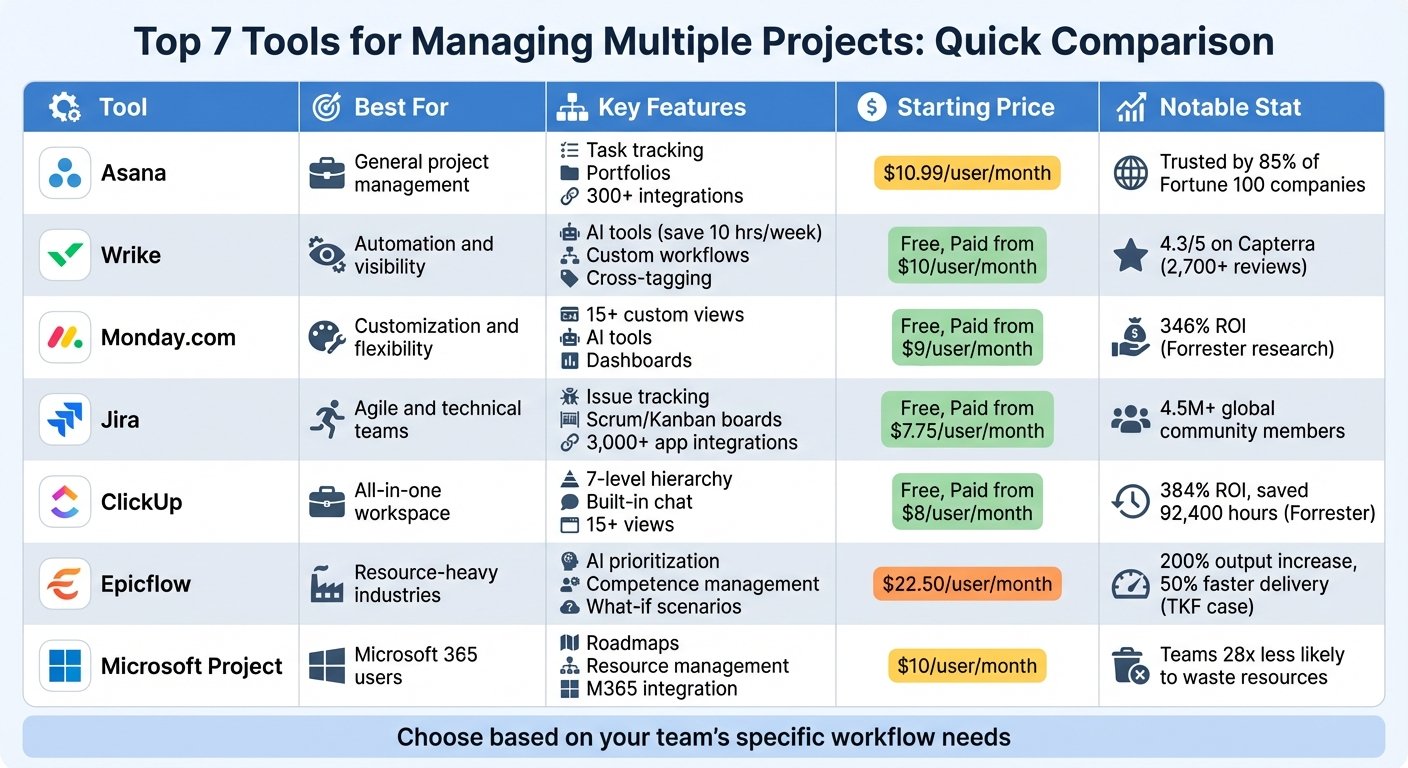
Project management tools like Asana, Trello, and Monday.com help teams:
- Break projects into smaller tasks
- Assign tasks to team members
- Set deadlines and track progress
- Spot and resolve blockers
- Keep discussion attached to the work
They only work if people update them. A project tool nobody maintains is worse than a shared document, because it looks authoritative while being wrong.
CRM Software
CRM software like Salesforce, HubSpot, and Zoho helps:
- Keep customer records and conversation history in one place
- Track deals through the pipeline
- Segment customers and tailor communication
- Coordinate a sales team
- Report on what is and isn’t converting
Accounting Software
Accounting tools like QuickBooks, FreshBooks, and Sage handle:
- Invoicing and tracking
- Bank reconciliation
- Accounts payable and receivable
- Payroll
- Financial reporting
Business Intelligence Tools
BI tools like Tableau, Power BI, and Looker:
- Connect to and clean up data
- Visualise key figures
- Build interactive reports
- Surface trends
- Support decisions with evidence
A BI subscription needs someone responsible for preparing data and maintaining reports. Before licensing one, check who in the business will build the reports – if the answer is nobody, you are buying a dashboard nobody opens.
IT Asset Management Tools
IT asset management tools like ServiceNow, BMC, and Flexera:
- Track hardware and software
- Manage licences
- Record where equipment is and who has it
- Plan capacity
- Support security and compliance requirements
Digital Workplace Tools
Tools like Slack, Microsoft Teams, and Time Doctor cover:
- Chat and messaging
- Video meetings and screen sharing
- File sharing and storage
- Task and deadline management
- Time tracking and scheduling
- Integration with other software
Worth separating two things that often get grouped: collaboration tools and monitoring tools. Time tracking of the second kind changes how people behave, and not always in the direction you intended.
Business Analysis Tools
Tools like Lucidchart, Tableau, and Axure RP help:
- Map processes, data flows, and structures
- Identify what is broken and how to fix it
- Prototype solutions before anyone writes code
- Draw insight out of data
- Communicate ideas visually
How to Choose the Right IT Tools
Determine Your Needs
- Company size: How big you are and how much data you handle. Small businesses do not need what large ones need.
- Budget: Work out what you can spend per person per month, including the second year.
- Industry: Some sectors need specialist tools for regulatory reasons.
- Scalability: Whether the tool copes with more users and more data.
- Ease of use: Whether your team will actually use it daily.
Key Evaluation Criteria
- Core features: Does it do what you need?
- Ease of use: How long to competence?
- Scalability: Does it hold up at double your size?
- Data security: Encryption, access control, and a security report you can read.
- Customer support: What is included and what costs extra.
- Integration: Native connectors to what you already run.
- Price: Now and at renewal.
- User reviews: Particularly the ones describing migration off the product.
Prioritizing Needs
You will not find a tool that does everything. Decide which two or three things matter most and pick something that does those well, rather than something mediocre at all of them.
Trying Before Buying
Use free trials, demos, or a pilot before committing. Have the people who will use it daily run their real workflows through it, not the vendor’s demo scenario.
A four-week pilot before a wider rollout
- Week 1 — establish the baseline. Choose one workflow, name an owner and record the current time, errors and handoffs. Set a spending ceiling.
- Week 2 — test the shortlist. Use the same representative tasks and approved data in each option. Check the exact plan, user limits, required integrations and export format.
- Week 3 — run a limited trial. Include the people who will use it, log support issues and keep the previous process available if the trial fails.
- Week 4 — decide. Compare total human time, including training and corrections, with the baseline. Keep, adjust or stop based on the evidence, not how polished the demo looked.
This is a suggested schedule, not a promise that every implementation takes four weeks. Complex migrations need their own plan. Include setup, subscriptions, usage charges and ongoing administration when comparing costs.
Scalable Growth Strategy
Starting with free or low-cost tools is reasonable, as long as you check how hard it is to get your data out later. Export capability is the thing to test before you have five years of records inside.
Review your tool stack annually. Check usage and ownership before renewing each subscription; do not assume that every paid seat is still needed.
Implementing IT Tools Effectively
Common Challenges When Implementing New IT Tools
- Lack of leadership support – without it, projects lack budget, people, and a decision-maker.
- Poor planning and requirements gathering – leads to the wrong system, poor adoption, and wasted money.
- Inadequate training – people work around tools they do not understand.
- Resistance to change – often rational; the old process may work fine for the person being asked to change.
- Integration difficulties – connecting old and new systems takes longer than quoted.
- Unreliable technology – repeated failures can undermine adoption; define a fallback process and an owner for resolving incidents.
Strategies for Successful IT Tool Implementation
Secure executive sponsorship
- Make the case for the tool in terms of a business problem, not features
- Align project goals with company priorities
- Keep leadership involved past the kickoff
Conduct thorough requirements analysis
- Document how things are done now
- Define exactly what you need
- Separate must-haves from nice-to-haves before you see any demos
Create a detailed project plan
- Steps, timelines, budgets, and owners
- Contingency for the parts that will slip
- Regular check-ins
Establish an adoption strategy
- Identify people who will champion the change
- Explain what problem the new system solves for them specifically
- Retire the old system on a date, or people will keep using it
Implement training programs
- Sessions pitched at different skill levels
- Written guides and short videos
- Training timed to when people will actually use the system
Integrate stakeholder feedback
- Ask users what is not working
- Fix problems quickly in the first weeks, when opinions form
- Tell people what changed as a result
Emerging Trends
The Rise of AI and Machine Learning
AI (Artificial Intelligence) and machine learning now appear in most business software. The main applications:
- Predictive analytics: forecasting sales, flagging possible fraud, predicting equipment failure. Accuracy varies enormously by use case and data quality.
- Virtual assistants: bots handling routine customer service questions, which genuinely reduces ticket volume for common queries and irritates customers with unusual ones.
- Personalization: tailoring recommendations to individual behaviour.
- Cognitive services: vision, speech and language APIs from the major cloud providers, bolted into your own applications.
The Growth of Blockchain
Blockchain is best known for cryptocurrency, and the business use cases usually cited are:
- Supply chain tracking: tamper-evident records of goods moving from production to delivery.
- Digital payments: particularly cross-border.
- Smart contracts: agreements that execute automatically on defined conditions.
- Distributed storage: files spread across nodes rather than one provider.
Adoption outside financial services has been slow, and for several of these an access-controlled database with proper audit logging solves the same problem more cheaply. Treat a blockchain feature as a question to ask, not a reason to buy.
The Expanding Cloud
- Hybrid cloud: mixing private and public services.
- Multi-cloud: using more than one provider to avoid lock-in – at the cost of running two of everything.
- Edge computing: processing data on the device before sending it on, which cuts latency and bandwidth.
- Serverless computing: code that runs only when called, billed by execution.
Conclusion
IT tools matter for businesses of any size. Used well, they cut duplicated effort, keep records in one place, and let a distributed team work together.
The difficulty is not choosing between good and bad products – most of the well-known ones work. It is matching the tool to what your business actually does, planning the rollout, and training people properly. Process fit, rollout and training deserve the same scrutiny as reliability, integrations and product limitations.
One closing note, given what this article previously contained: be sceptical of percentage improvements quoted in this category, including the ones vendors publish. Measure your own baseline before you buy, and compare against it afterwards. That number is the only one that tells you whether the purchase was worth it.
More on this topic
Browse all 39 articles on IT, Cloud & Integrations, or jump straight to our buying guide: Best Collaboration Tools for Small Teams.