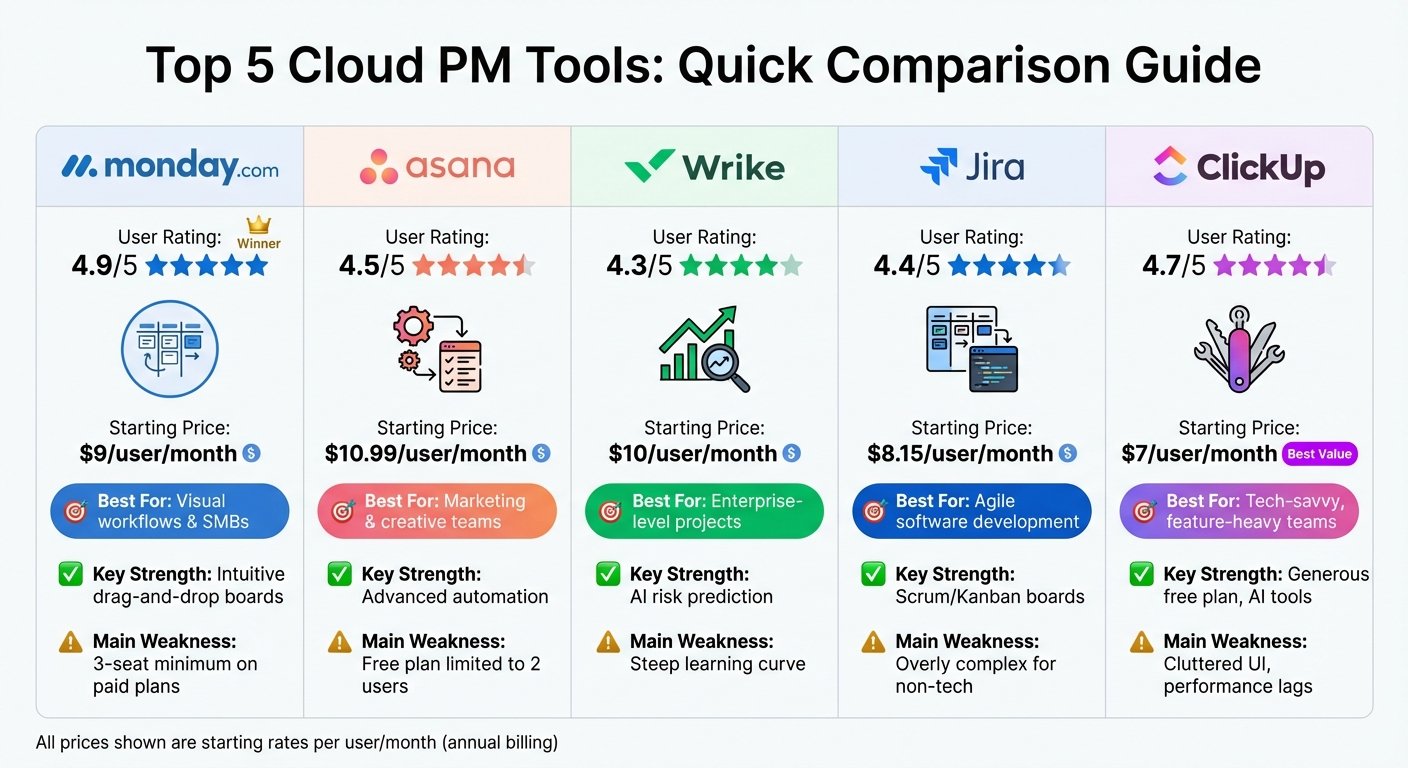
If you want one tidy system that non-technical teams will actually keep updated, and you are willing to pay per seat for that discipline, monday.com is the safer pick. If you want to replace four tools at once — tasks, docs, whiteboards, time tracking, chat — and you have someone who will own the configuration, ClickUp gives you far more for the money and a free tier that real teams can live on. The trade is consistency versus coverage, and most buying regret in this pair comes from underestimating that trade.
The short answer
- Pick monday.com if multiple departments will use it, adoption matters more than feature count, and you want boards that look the same everywhere.
- Pick ClickUp if you are consolidating tools and want docs, whiteboards, goals and native time tracking inside the same workspace as the tasks.
- Pick ClickUp if budget is tight or the team is large — its free tier has no member cap and paid seats go further.
- Pick monday.com if your use case is really CRM, service desk or dev tracking, since those are purpose-built products rather than a configured list.
Where they differ that actually matters
The shape of the data
monday.com is boards, items and columns. A board is essentially a smart table: each column has a type — status, person, date, number, connect-board — and views sit on top of it. It is flat by design. Relationships between boards are made explicit through connect and mirror columns rather than through nesting.
ClickUp nests. A workspace holds spaces, spaces hold folders, folders hold lists, lists hold tasks, and tasks hold subtasks several levels deep. That suits work that genuinely has depth — a product area containing initiatives containing epics containing tasks. It also means two teams can model the same thing in incompatible ways, and nobody notices for six months.
Breadth in one workspace
ClickUp’s pitch is consolidation, and it is not empty: docs and wikis, whiteboards, mind maps, chat, goals, forms, dashboards and native time tracking all live in the same product, linked to tasks. For a small company paying for three or four separate subscriptions, that alone can justify the switch.
monday.com takes the opposite approach and splits work management, CRM, service and dev into separate products, each with its own pricing and feature gates. That is more expensive if you want several, but each one arrives configured for its job rather than as a blank board you must shape yourself. If you are weighing this against a general roundup, our guide to easy to use project management software is a useful reference point.
How much configuration you are signing up for
This is the practical difference people feel in month three. monday.com constrains you: column types, view types, a strong visual language. You can make an ugly board, but it is hard to make an unusable one, and a new joiner can read any board in the company.
ClickUp exposes far more settings — statuses per list or per space, custom field scope, view defaults, task types, permissions, a long list of ClickApps to switch on and off. Powerful, and genuinely capable of matching an unusual process. But without an owner enforcing conventions, ClickUp workspaces sprawl, and the most common complaint about the product is not missing features but that nobody can find anything.
Reporting and rollups
Both do dashboards over live task data. monday.com meters this: how many boards a single dashboard can combine depends on your tier, from one board on the free plan up to large numbers on higher plans. If cross-project reporting is the reason you are buying, check that number against the number of boards you actually run before you sign.
ClickUp gates it differently: portfolios and goals arrive on higher tiers, with unlimited dashboards from the Business level. Neither is a business intelligence tool. To blend project data with finance or product analytics, plan on exporting.
Automation limits and admin
Both include rule-based automation, and both cap it by tier as a monthly count of actions or executions. This catches people out: an automation you rely on stops running mid-month because the workspace hit its allowance. Estimate volume honestly, especially if you plan recurring or scheduled rules across many boards.
On governance, both put SAML SSO, advanced permissions and audit trails at the enterprise level. monday.com additionally gates private boards to a mid tier, which matters if any team handles sensitive work such as HR cases or vendor negotiation.
Side by side
| Decision criterion | monday.com | ClickUp |
|---|---|---|
| Core structure | Flat boards with typed columns | Deep hierarchy of spaces, folders, lists, subtasks |
| Consistency across teams | High — the product constrains you | Depends entirely on your conventions |
| Tools it can replace | Mostly task and process tracking | Tasks, docs, whiteboards, time tracking, chat |
| Free tier for a real team | Very limited seat cap | Unlimited members, capped storage and features |
| Seat model | Per seat, bought in tiered blocks | Per member, no block minimums |
| Purpose-built CRM or service desk | Yes, as separately priced products | Configure it yourself from lists |
| Automation ceiling | Monthly action allowance by tier | Monthly execution allowance by tier |
| Setup effort before it is useful | Low to moderate | Moderate to high; needs an owner |
| AI packaging | Included with credit allowances | Largely a separate add-on subscription |
Who each one is really for
monday.com is for organisations rolling one system out across departments that do not share a working style — marketing, operations, HR, finance. Its constraints are the feature. It is also the better answer when the buyer is not the person who will maintain it, because it degrades gracefully when nobody is tending the setup.
ClickUp is for teams that want everything in one place and will configure it: startups consolidating a scattered stack, agencies needing time tracking against client work, product teams that live in docs as much as tasks. Give it an owner and a written convention for spaces and statuses and it is excellent value. Skip that and it becomes noise.
When neither is the right answer
If your team is small and your work is a simple queue, both are heavier than you need, and a lighter board tool will get better adoption at lower cost. If you are a software team whose process is sprints, releases and issue workflows, a dedicated engineering tracker still fits better than either. And if the actual problem is that people communicate in chat and never update the tracker, look at team collaboration tools and at your working agreements first — the wider project management software roundup covers the alternatives.
FAQs
Is ClickUp’s free plan genuinely usable?
More than most. There is no member cap and tasks are unlimited. The binding limits are storage, space count, forms and automation executions. Teams usually upgrade for custom fields, time tracking and dashboards rather than for seats.
Does monday.com really need a minimum number of seats?
Paid plans are sold in seat blocks rather than one at a time, so small teams can pay for seats they do not use. Check current seat tiers against your headcount — this is the most common invoice surprise.
Which is easier to get a team to actually use?
monday.com, in most cases. It is more visual, more constrained and asks fewer decisions of each user. ClickUp can be just as usable, but that is an outcome of good setup rather than a property of the product.
Can either replace a real CRM?
monday.com sells a dedicated CRM product, a reasonable fit for straightforward pipelines. ClickUp can be shaped into a pipeline tracker, but you maintain that structure yourself. Neither replaces a full sales platform once you need forecasting, sequences and quoting.
Plans, seat tiers, automation allowances and AI packaging in this category change frequently. Check monday.com’s and ClickUp’s current pricing and product pages before committing.
More on this topic
Browse all 40 articles on Project & Team Management, or jump straight to our buying guide: Best Project Management Tools for Small Teams.