Quick facts
| Best for | Small and mid-sized agency, marketing and ops teams that have outgrown shared spreadsheets. |
|---|---|
| Category | Project Management |
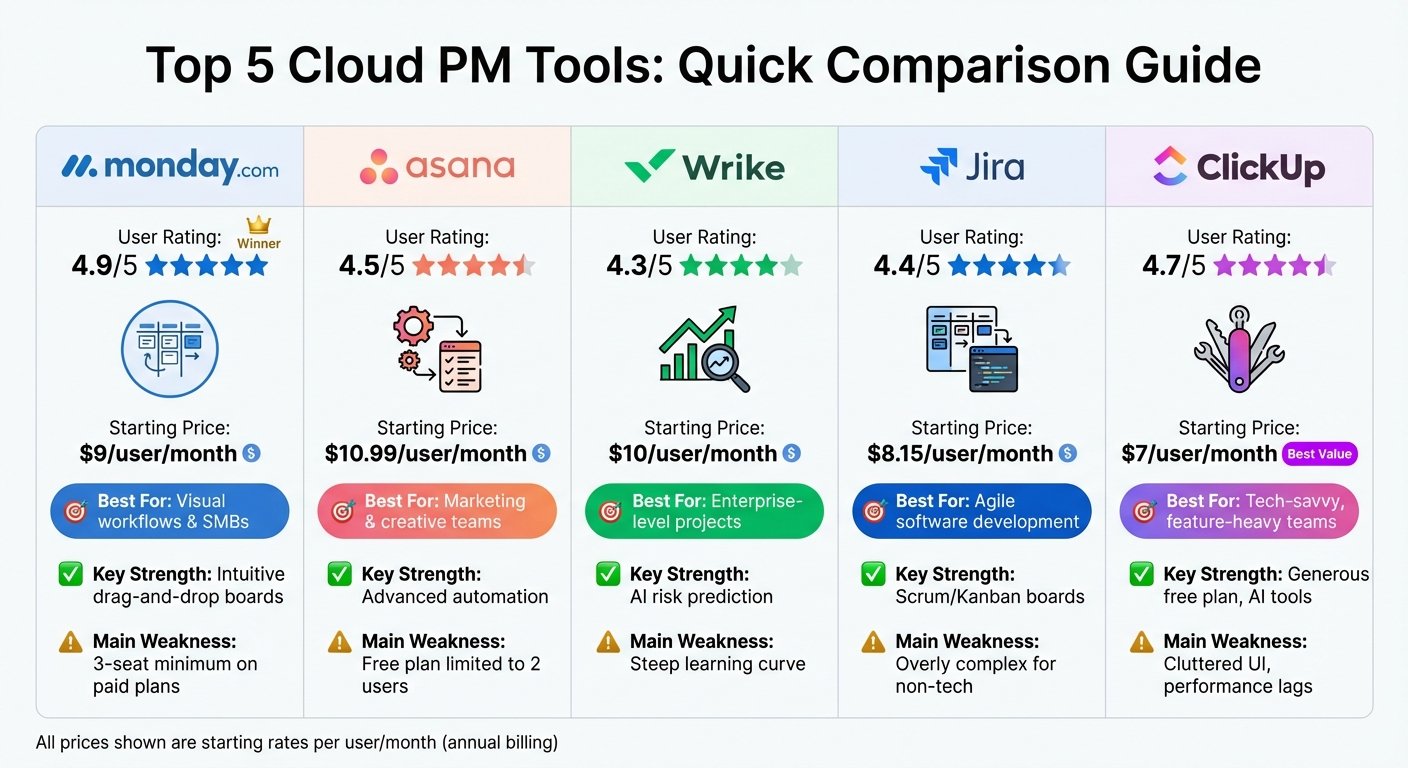
| Pricing from | USD 9 seat/month (Basic; pricing starts at 3 seats) |
| Free plan | Yes |
| Free trial | 14 days |
| Team size | 2-10, 11-50, 51-200 |
| Last verified | 18 August 2026 — how we verify |
Quick verdict
Consider it if: Non-technical people need to build and change workflows themselves across several departments.
Look elsewhere if: You need deep specialist tooling such as resource management, issue tracking or accounting, or just a simple to-do list.
Compiled from the vendor’s own documentation and pricing pages, checked on the date above. We have not tested this product hands-on. How we evaluate software.
Compare monday.com with Asana and ClickUp · Not sure what you need?
monday.com is a visual work management platform where teams build boards to track projects, tasks, requests and pipelines. The building block is a board: rows are items, columns hold whatever data you decide matters – status, owner, date, number, file – and the same board can be viewed as a table, kanban, timeline or calendar. Rather than shipping one fixed workflow, it gives you a flexible structure and expects you to shape it around how your team already works.
What you can actually do with it
Most teams start with one board for one process and expand from there. The core capabilities:
- Build boards for any process. Client onboarding, content calendars, hiring pipelines, bug lists and asset requests all fit the same structure, so one platform can cover several departments.
- Switch views without rebuilding. The same data can be shown as a kanban, Gantt-style timeline, calendar or chart, which suits teams where a manager and a doer want different pictures of the same work.
- Automate routine steps. Recipe-style automations handle “when status changes to done, notify the owner and move the item” without any scripting.
- Collect work through forms. Public or internal forms feed straight into a board, which is a clean way to handle intake requests instead of email threads.
- Report across boards. Dashboards pull widgets from multiple boards to show workload, budget, deadlines and status in one place.
- Connect other tools. Built-in integrations cover email, Slack, calendars, storage and common business apps, with an API for the rest.
- Use purpose-built products. Alongside work management there are separate monday CRM, dev and service products that share the same underlying platform.
Who it fits best
It suits small and mid-sized teams that have outgrown shared spreadsheets and want visibility over who is doing what. Agencies, marketing teams, operations and client services get the most out of it, because their work is a stream of similar items moving through stages – exactly the shape a board handles well.
It is also a good fit when non-technical people need to build and change the workflow themselves. If you have an ops person who likes tidy systems but does not write code, they can usually get something useful running in a day. It is a weaker fit for teams needing deep specialist functionality – detailed resource management, complex software issue tracking or true accounting – where a dedicated tool will go further.
Things worth knowing before you commit
- Seats are sold in blocks. Paid plans have historically had a minimum seat count and are billed per seat, so a three-person team may end up paying for more than it uses. Check the current minimum before budgeting.
- Key features sit in higher tiers. Timeline and Gantt views, dashboards combining many boards, time tracking and automation volumes are tier-gated, and the automation and integration action limits are the ones people hit first.
- The free plan is very limited. It is really for individuals evaluating the product rather than a workable option for a team.
- Flexibility invites sprawl. Because anyone can spin up a board, organizations often end up with duplicate and abandoned boards; it pays to agree a structure early.
- It is not a lightweight to-do app. For simple personal task lists the interface is more machinery than you need.
Alternatives to compare it against
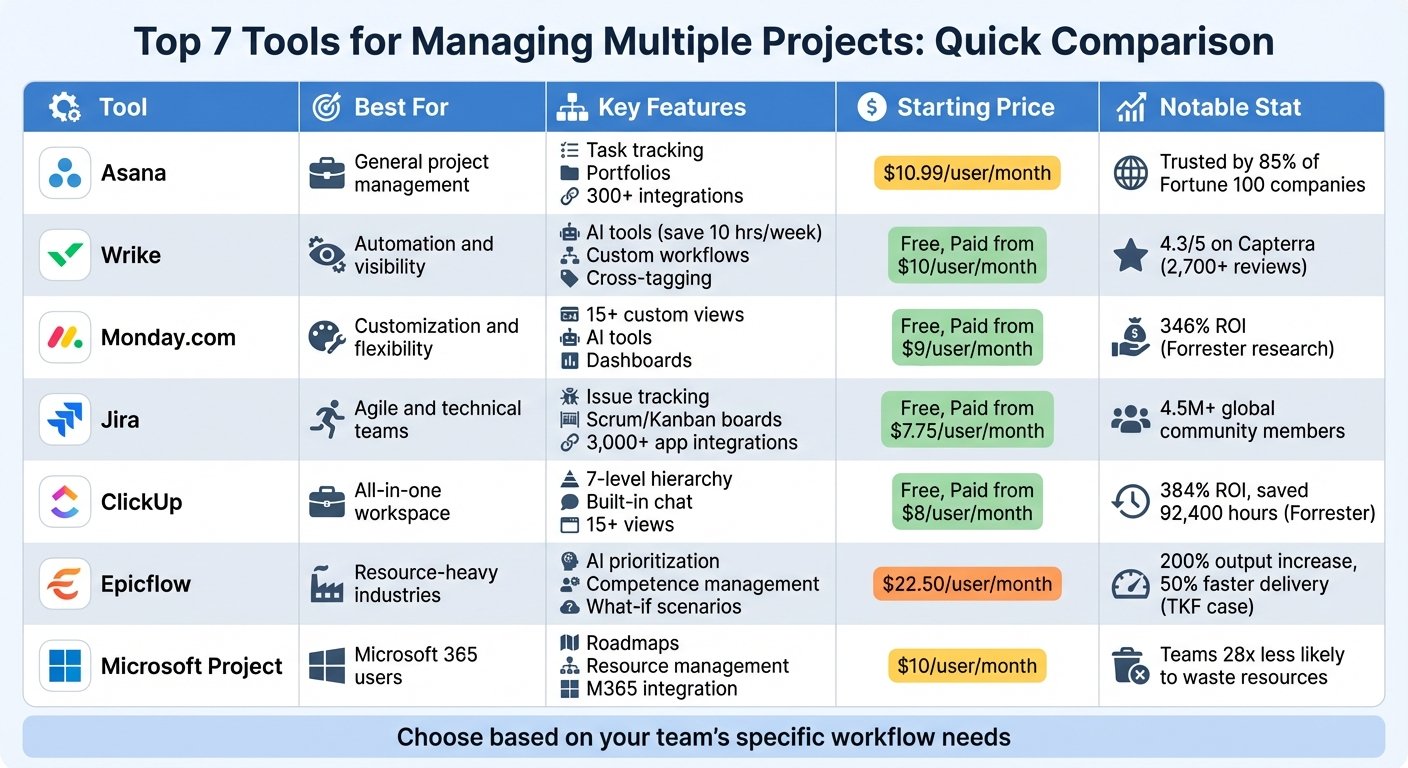
Asana and ClickUp are the closest comparisons: Asana is cleaner and more opinionated about task management, ClickUp packs in more features for less money at the cost of some complexity. If your work is more data-shaped than project-shaped – records with relationships you want to query and build interfaces on – Airtable is the better model. If your team is small and the work is genuinely just a shared list, Trello or a simple task app will be faster to adopt and cheaper to keep.
Plan tiers, seat minimums, automation limits and pricing change regularly. Check monday.com’s own pricing page and confirm the features and limits you need are in the plan you are costing.
Further reading
- The 7 Best Project Management Software for Businesses in 2024 — puts monday.com beside the Asana and ClickUp alternatives named above.
- 10 Best Gantt Chart Software for Project Management 2024 — worth reading because timeline and Gantt views are tier-gated here.
- Easy to Use Project Management Software: A Guide — aimed at the non-technical ops person who would be building the boards.
- Task Tracking for Teams: 10 Tips for 2024 — conventions that keep boards from turning into sprawl.
- 8 Best Task Management Tools 2026 — lighter options if a full work management platform is more than you need.
Have you used monday.com?
One sentence is enough. Would you pick it again, and why or why not? We publish the critical reviews too — that is the point.