Quick facts
| Best for | Growing teams up to a few hundred who want one system and will own its configuration. |
|---|---|
| Category | Project Management |
| Pricing from | USD 7 per user/month, billed yearly |
| Free plan | Yes |
| Team size | 2-10, 11-50, 51-200, 200+ |
| Last verified | 18 August 2026 — how we verify |
Quick verdict
Consider it if: Tasks, notes and status reports currently live in three different tools and you want to consolidate them.
Look elsewhere if: You want something opinionated and simple, or a few people just need a shared to-do list.
Compiled from the vendor’s own documentation and pricing pages, checked on the date above. We have not tested this product hands-on. How we evaluate software.
Compare ClickUp with Asana and Trello · Not sure what you need?
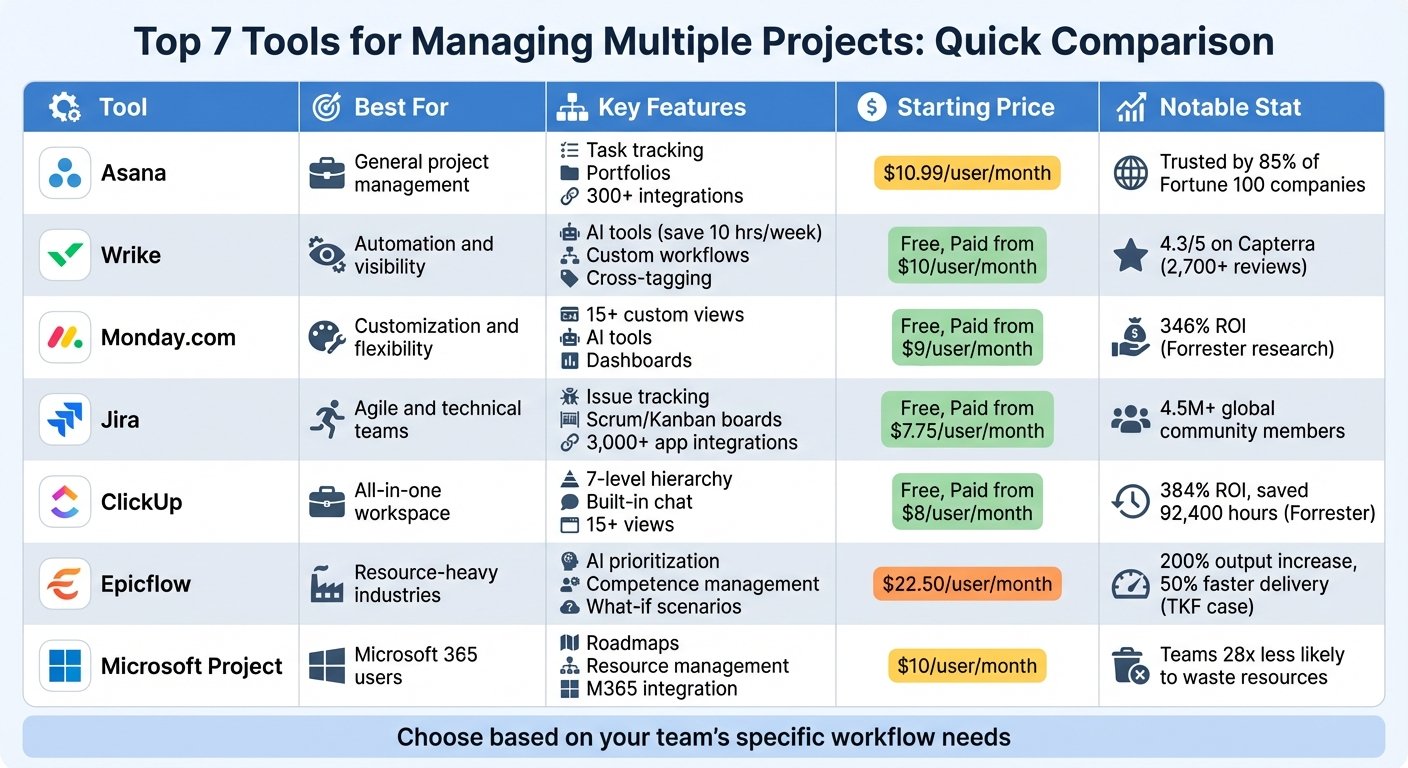
ClickUp is a work management platform that tries to hold tasks, documents, goals, chat and reporting in one place. Work is organised in a hierarchy of spaces, folders, lists and tasks, and the same data can be viewed as a list, board, calendar, Gantt chart or table depending on who is looking. The company markets it as a replacement for a stack of separate subscriptions, and the feature list is unusually broad even by the standards of this category.
What you can actually do with it
The breadth is real, but most teams live in a handful of these areas day to day.
- Structure work at several levels. Spaces, folders, lists, tasks and subtasks let one workspace hold several departments without them tripping over each other.
- Switch views on the same data. List, board, calendar, Gantt, timeline and table views mean a developer and a client-facing manager can look at the same project differently.
- Add your own fields. Custom fields, statuses and templates let you shape tasks around your process rather than the default one.
- Write and store documents. Docs and wikis live alongside tasks and can be linked to them, so the brief and the work are not in different products.
- Automate repetitive steps. Rule-based automations handle status changes, assignments and handoffs when conditions are met.
- Track time and workload. Native time tracking, timesheets and workload views cover who is doing what and how much capacity is left.
- Report on it. Dashboards assemble cards for burndown, workload, time and custom queries, which is how managers get answers without asking.
- Use AI where it helps. ClickUp’s AI features can summarise threads, draft content, take meeting notes and answer questions about your workspace.
Who it fits best
ClickUp fits growing teams from a handful of people up to a few hundred who want one system rather than several, and who have someone willing to own how it is configured. Agencies, marketing teams, product and engineering groups, and operations teams all use it happily. It is a strong choice if your current problem is that tasks live in one tool, notes in another and status reports in a spreadsheet.
It suits less well the team that wants something opinionated and simple. If three people need a shared to-do list, ClickUp gives you far more surface area than you need, and the choices themselves become work. Solo users on the free tier get a lot, but the pieces that make it useful for a business sit on paid plans.
Things worth knowing before you commit
- It rewards discipline and punishes drift. Without agreed naming, statuses and field conventions, a workspace becomes sprawl within months. Decide the structure before rolling it out.
- Expect a learning curve. The feature density that makes it powerful is exactly what makes onboarding slower than lighter tools.
- Performance can suffer at scale. Very large lists, dense boards and heavy dashboards can feel sluggish; test with realistic data volumes during a trial.
- AI is a separate add-on. The AI features are charged on top of your plan, so budget for them rather than assuming they are included.
- Mobile is for consuming, not configuring. Checking and updating tasks works; setting up automations and permissions really does not.
- Notifications need tuning. Defaults are noisy, and a team that does not adjust them will start ignoring the tool.
Alternatives to compare it against
If you want something calmer and easier to adopt, Asana and Trello cover task and project tracking with much less configuration, though you give up depth. If visual process design and non-technical automation matter most, monday.com occupies similar ground with a friendlier feel. Notion is worth weighing if documents and knowledge are the centre of gravity and tasks are secondary, while Airtable suits teams whose real need is structured data with views. For software teams specifically, Jira remains the deeper option for issue tracking and agile reporting.
Plan contents, feature limits, AI add-on charges and pricing change regularly. Check ClickUp’s own pricing page for the current details before you commit.
Further reading
- The 7 Best Project Management Software for Businesses in 2024 — the field ClickUp competes in, useful for judging whether its breadth is worth the setup.
- Easy to Use Project Management Software: A Guide — the counter-argument for teams that would drown in ClickUp’s configuration options.
- 10 Best Gantt Chart Software for Project Management 2024 — relevant if the Gantt and timeline views are the reason you are considering it.
- Task Tracking for Teams: 10 Tips for 2024 — the naming and status conventions that stop a ClickUp workspace sprawling.
Have you used ClickUp?
One sentence is enough. Would you pick it again, and why or why not? We publish the critical reviews too — that is the point.