Chat scalability is the ability of a system to handle more users and messages without delays. It matters for any business running chat for customer support, team communication or real-time interaction. Here is the short version:
- Why it matters: A chat system that slows under load fails at exactly the moment it is busiest.
- Key challenges: Distributing load, storing and retrieving message data efficiently, and holding performance through traffic spikes.
- Core solutions:
- Load balancing: Distribute traffic across servers.
- Database and caching: Distributed storage with layered caching.
- Cloud scaling: Adjust capacity with demand.
- Scaling methods:
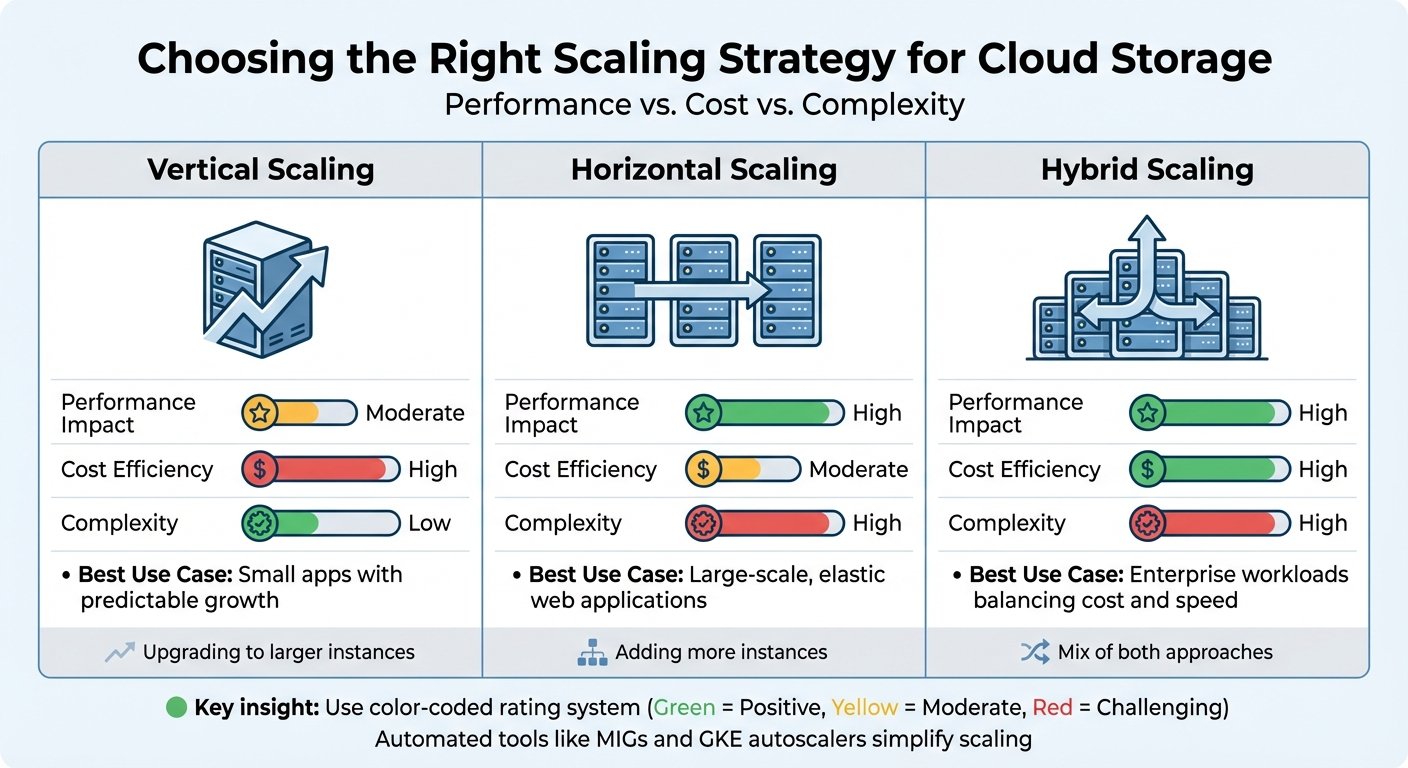
- Vertical scaling: Bigger servers. Fast to do, hard limits.
- Horizontal scaling: More servers. More complex, far more headroom.
- Microservices: Scale the component under pressure rather than everything.
- Data management: Partitioning and tiered storage.
- Monitoring: Latency, availability and error rate, measured against objectives you set deliberately.
A note on numbers. An earlier version of this article claimed that AI handles up to 70% of common chat inquiries, and referred to a 2023 implementation as evidence. Neither had a source and both have been removed. Automation rates vary enormously with query mix and how “handled” is defined — many platforms count any conversation that did not escalate as resolved, which quietly counts abandonment as success. Measure your own rate and define the term before quoting it to anyone.
This guide covers designing, scaling and monitoring chat systems for reliable performance and business growth.
Core Elements of Scalable Chat Systems
Load Balancing Systems
| Load Balancing Method | Primary Use Case | Key Benefit |
|---|---|---|
| Round Robin | Even distribution of new connections | Simple, predictable |
| Least Connection | Dynamic workload management | Handles uneven session lengths better |
| Geographic Distribution | Regional traffic routing | Reduces latency for distant users |
One thing chat makes harder than ordinary web traffic: connections are long-lived. A WebSocket session can persist for hours, so round-robin distribution of new connections says nothing about how load ends up distributed. Plan for connection draining on deploy, and for what happens to established sessions when a node goes away.
Database and Cache Setup
Key components:
- Message storage
- User profiles
- Channel and room membership
- Session and presence tracking
Presence — who is online, who is typing — is usually the first thing to fall over at scale. It generates far more writes than messages do, and it is the component most often designed as an afterthought.
Caching strategies:
- Keep recent and frequently accessed data in memory
- Use distributed caching so a single node loss is not a cold start
- Automate invalidation rather than relying on TTL alone
- Track cache hit rate, and treat a falling hit rate as an early warning
Cloud-Based Scaling
- Automatic capacity scaling
- Usage-based pricing
- Geographic redundancy
- Built-in monitoring
Usage-based pricing cuts both ways. Auto-scaling that responds to a traffic spike also responds to a runaway retry loop, and the bill arrives regardless of whether the traffic was legitimate. Set maximum scaling limits and billing alerts at the same time you configure the scaling policy.
Methods to Scale Chat Performance
Scaling Up vs. Scaling Out
Vertical scaling (up)
- Increases the capacity of existing servers — CPU, memory, storage.
- Quick to implement, with a hard ceiling.
- Usually involves downtime or a failover.
- Reasonable as a short-term measure while you build something better.
Horizontal scaling (out)
- Adds servers and distributes load across them.
- Much more headroom.
- Requires the application to tolerate running as multiple instances, which is a design decision, not a configuration one.
The practical constraint is state. Chat systems hold connection state per node, so horizontal scaling requires either sticky routing or a shared state layer. Deciding that late is expensive.
Microservices Implementation
| Service Type | Function | Scaling Trigger |
|---|---|---|
| Message Handler | Processes new messages | Increased message volume |
| User Management | Manages user sessions | More active users |
| Notification Service | Sends push notifications | Higher notification demand |
| Search Service | Handles message searches | Surge in search requests |
Things to keep in mind:
- Define clear service boundaries before splitting anything.
- Make services independently deployable, or you have a distributed monolith with extra latency.
- Give each service its own data store.
- Design for partial failure — search being down should not stop messages sending.
Microservices are not automatically the right answer. They trade a scaling problem for an operational one, and a small team running a modest chat product will often do better with one well-instrumented service.
Data Management Techniques
Partitioning strategies:
- Shard by conversation or user ID to spread writes.
- Partition by date, which suits message history well since access skews heavily to recent data.
- Separate active conversations from archives.
Choose the shard key carefully. It is the hardest thing to change later, and a key that distributes badly — a handful of very large channels, for instance — recreates the bottleneck you were removing.
Tiered storage:
- Hot: recent messages in memory.
- Warm: recent history on fast storage.
- Cold: older messages on cheaper storage, accepting slower retrieval.
Retention policy is as much a legal question as a technical one. Archiving inactive conversations after a set period controls cost, but the period must satisfy whatever retention and deletion obligations apply to you. Decide it with someone who knows those rules, not purely on storage cost.
System Tracking and Improvement
Performance Metrics
Track these categories. The target column below is illustrative — a plausible starting point for a general-purpose chat system, not an industry standard. Your targets should come from what your users actually need.
| Metric Category | Key Measurements | Illustrative starting target |
|---|---|---|
| Response Time | Message delivery latency, measured at a high percentile rather than the mean | Sub-100ms is a common aim |
| System Load | CPU and memory headroom | Leave enough spare capacity to absorb a spike |
| Connection Status | WebSocket stability and reconnect rate | Set an availability objective and an error budget |
| Message Throughput | Messages per second, against tested capacity | Derived from load testing |
| Error Rates | Failed or delayed message delivery | Low enough that the error budget lasts the period |
On setting those numbers properly, the service level objectives chapter of Google’s SRE book is the standard reference and is free to read. Two of its points apply directly here. Start from what users care about rather than what is easy to measure. And do not set a target based on your current performance — doing so can commit you to sustaining a level that only heroic effort achieves.
Measure latency at a high percentile. An average message delivery time looks healthy while a meaningful minority of users experience delays long enough to abandon the conversation.
Live Monitoring Systems
Infrastructure level
- Server utilisation
- Network load
- Database connections
- Cache hit rate
Application level
- Active sessions
- Queue depth
- API response times
- Error frequency by type
User experience level
- Message delivery success
- Client-side performance
- Reconnection frequency
The third level is the one that matters and the one most often missing. Infrastructure can look entirely healthy while clients are silently reconnecting every few minutes.
High Traffic Management
- Auto-scaling triggers: Scale on sustained load rather than momentary spikes, and on a signal that reflects the actual bottleneck. Thresholds on CPU, memory or queue depth are all reasonable; the specific values depend on your workload and should come from load testing, not from a default someone copied. Set an upper bound on scaling.
- Load shedding: Decide in advance what gets dropped first. Message delivery is critical; history search and read receipts usually are not.
- Circuit breakers: Fail fast on a struggling dependency instead of queueing behind it. Rate limiting protects the system from clients that retry aggressively, which is a large share of load during an incident.
Tell users what is happening. A status page and an in-app notice cost far less than the support volume generated by silence.
Planning for Growth
AI in chat systems
AI handles routine queries and triage, which reduces load on human agents. What share of your volume it can take depends on how repetitive your queries are, how good your documentation is, and where you set the bar for escalation. Measure it against your own baseline before and after, and define “handled” as resolved rather than as not-escalated.
Mobile and IoT Compatibility
Mobile clients change the engineering problem. Connections drop constantly as devices move between networks, so reconnection handling and message ordering after reconnect matter more than raw throughput. Battery and data constraints also argue for push notifications over persistent connections in the background.
Data Privacy
Chat systems hold personal data and often sensitive content. That means encryption in transit and at rest, a documented retention period, a working deletion path, and clarity on where data is stored. Build the deletion path early; retrofitting it across a sharded, tiered store is genuinely difficult.
Summary and Next Steps
Key Steps
-
Assess what you have
Load test the current system to find the actual bottleneck rather than the assumed one. -
Fix the constraint
Address that bottleneck before adding architecture. Most chat scaling problems are one component, not the whole design. -
Set objectives and monitor against them
Define your SLOs deliberately, instrument all three monitoring levels, and review after incidents.
Preparing for the Future
Scale in response to measured limits rather than projected ones. Platforms like BizBot list tooling that can help with the operational side.
More on this topic
Browse all 39 articles on IT, Cloud & Integrations, or jump straight to our buying guide: Best Collaboration Tools for Small Teams.