In-app messaging is a direct way to communicate with users inside mobile and web apps. This guide covers what it is, the message types, how to use them, what to measure, and the consent rules.
A Note on the Numbers
This article previously carried around twenty statistics. Almost all have been removed. They included engagement multipliers over push notifications, read rates, benchmark tables for click-through and conversion, and a set of percentage improvements attributed to eight named vendors. None was linked to a study, a report or a dataset.
Two of them contradicted each other outright: the article stated both that in-app message usage rose 187% from 2022 to 2023 and, further down, that sends rose 793% in 2023, both credited to the same company. Rather than choose one, both have gone.
Also removed: two quotations attributed to “Industry Expert”, a named case study of a company that improved trial-to-paid conversion by a precise percentage but was identified only as “one SaaS company”, and a claim that images are “650% more effective than text alone”.
What remains is the mechanism: what in-app messaging does, when it works, and what to measure yourself. If you need benchmarks, get them from your own app. Cross-industry figures for this channel vary so much by app category that a general number would not tell you anything about yours even if it were sourced.
What Is In-App Messaging
In-app messages appear while someone is using your app. Because they are triggered by what the user is doing, they can be timely in a way that email and push cannot.
The one structural advantage is worth stating plainly: an in-app message reaches someone who is already in your app. It requires no notification permission and no inbox. That is also its limit — it cannot bring back a user who has stopped opening the app at all. In-app messaging is a retention and activation tool, not a reactivation one.
Basic Parts
- Message Types: from small banners to full-screen takeovers
- Triggers: what causes a message to appear, such as completing an action or reaching a screen
- Targeting: showing different messages to different user segments
- Analytics: measuring whether the message changed behaviour
How In-App Messages Have Changed
- Early 2010s: basic pop-ups, largely interruptive
- 2015-2020: better targeting and design
- 2020-2023: automated timing and content selection
- 2024 onwards: messages designed to sit inside the app’s own interface rather than over it
Where It Stands Now
- Behaviour-based. Messages keyed to what the user has done, not who they are.
- Coordinated with other channels. In-app, email and push used together rather than separately, ideally with shared frequency limits so a user does not get the same message three ways.
- Richer formats. Video, surveys and interactive content, with the load-time cost that implies.
- Automated timing. Systems choosing send moments from past engagement patterns.
- Consent-aware. Increasingly built around explicit permission — see the privacy section below, which now has a correctly-sourced enforcement example.
Practical rules that do not need a statistic behind them:
- Do not interrupt a task, especially checkout or payment
- Keep messages short
- Every message should help the user, not just the business
- Cap how many a user can receive in a period, and enforce it across channels
Message Types and Setup
Pop-ups and Message Bars
Pop-ups interrupt. That makes them right for things a user genuinely needs to see and wrong for almost everything else: new features they asked for, account problems, service changes.
Message bars sit at the top or bottom of the screen without blocking anything. They suit reminders, status notices and gentle prompts. If you are unsure which to use, use a bar — the cost of being ignored is lower than the cost of being resented.
When setting either up:
- Time it. Never during a purchase or a form.
- Target it. A message shown to everyone is relevant to almost nobody.
- Keep it readable at a glance. One idea, one action.
- Give it an obvious dismiss. A message users cannot close is a message that gets your app deleted.
Chat Systems and Guided Actions
Chat lets users talk to your team or each other in real time. A usable chat system generally needs:
- One-to-one messaging
- Group conversations
- Search over message history
- File and media sharing
- Presence indicators
- Push notification for new messages
When choosing one, weigh setup effort, feature fit, how far the interface can be restyled, reliability, security, and cost. On cost specifically: chat vendors commonly price per monthly active user or per conversation, and the two produce very different bills for the same app. Establish which meter applies before comparing quotes.
Guided actions steer people through the product: onboarding checklists, feature hints, prompts after particular actions. These are the highest-value use of in-app messaging for most products, because they address the moment a user is about to give up.
Ways to Use In-App Messages
Onboarding
The first session is where most apps lose most users, which makes it the place in-app messaging earns its keep. Common approaches:
- Welcome sequences that show what the app does before asking for anything
- Tooltips pointing out where things are
- Guided first actions that walk a user through completing one meaningful task
The principle behind all three: get the user to the point where the product has done something useful for them, as fast as possible. Everything else can wait.
Several specific companies were previously named here as examples. Those descriptions could not be verified as current — app onboarding flows change constantly, and a description of one written two years ago is unlikely to still be accurate. They have been removed. Look at apps in your own category instead; the flows are visible to anyone who signs up.
Driving Action
- Contextual upgrade prompts. Showing a paid feature at the moment a free user hits its limit is the most effective upsell placement available, because the user has just demonstrated they want it.
- Milestone acknowledgement. Marking anniversaries or completed setup steps.
- Feature announcements. Telling existing users about something new, ideally targeted at those who would use it.
- Feedback collection. Short in-app surveys at a relevant moment.
On surveys: ask at a point related to the thing you are asking about, and keep it to one or two questions. A five-question survey triggered at random gets you a biased sample of people with unusual amounts of time.
Measuring Results
What to Track
- Impressions: how many users saw the message
- Click-Through Rate: how many acted on it
- Conversion Rate: how many completed the target action
- Retention: whether users who saw it came back
- Dismissal rate: how many closed it immediately, which is the metric most teams do not look at and should
The benchmark table that was here has been removed. It gave “poor” and “good” ranges for click-through, conversion and retention with no source. Published benchmarks for this channel are close to useless anyway, because a full-screen message in a banking app and a banner in a game are not comparable.
Use a holdout group instead. Withhold the message from a random slice of eligible users and compare. That is the only method that separates the effect of your message from everything else happening in the app that week, and it needs no external benchmark at all.
Practical Measurement Advice
- A/B test the message, not the whole campaign. Change one element at a time or you will not know what worked.
- Watch what users do after dismissing. A high dismissal rate paired with a drop in session length is a signal your messaging is costing you engagement.
- Follow the funnel. Track how many see, engage, and complete. The largest drop tells you where to work.
- Attribute honestly. Decide your attribution window before you run the campaign, write it next to the number, and do not change it between reports.
Tools in this category include Braze, CleverTap, MoEngage, OneSignal, Pendo, Pushwoosh and Userpilot. All are active products. None publishes pricing you can budget from without contacting sales, and this article previously attributed specific percentage improvements to several of them with no source; those figures have been removed.
Writing Better Messages
Timing and Content
Trigger on behaviour rather than on a schedule. A message that fires because a user just did something related is relevant by construction; one that fires on Tuesday is not.
Keep it short. A structure that works:
| Element | Purpose | Example |
|---|---|---|
| Headline | State the benefit | “Unlimited skips” |
| Body | One sentence of substance | “No interruptions on any device.” |
| Call to action | One clear action | “See plans” |
| Dismiss | An obvious way out | A visible close control |
Images can help comprehension, particularly for feature announcements. They also add weight and load time. Test whether they help in your app rather than assuming; the claim that images outperform text by a specific large multiple appeared in an earlier version of this article without a source and has been removed.
Consent and Privacy
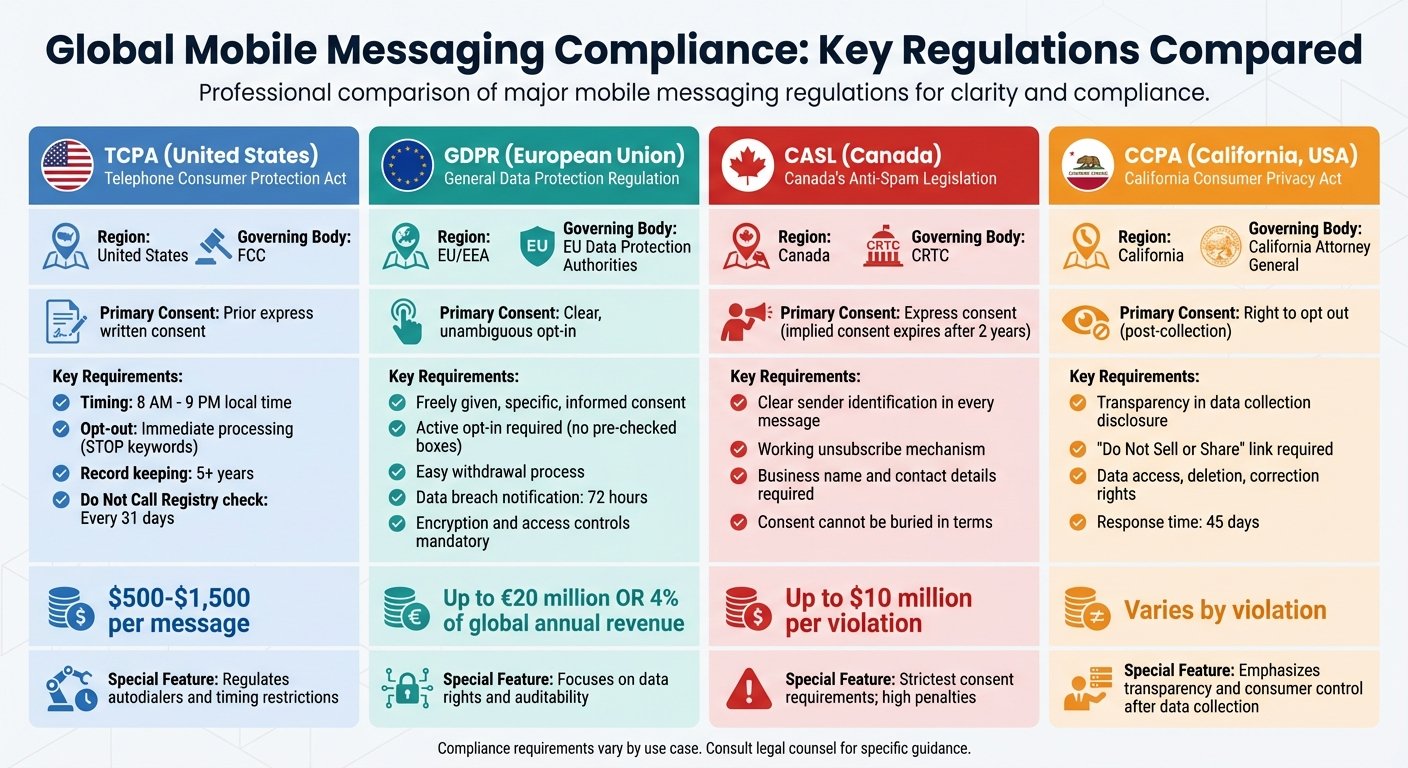
In-app messages generally do not need the notification permission that push does, but marketing messages are still subject to consent rules, and enforcement is real.
A correctly sourced example. An earlier version of this article stated that EE was fined “$122,000” for sending marketing without consent. The actual penalty was £100,000, issued by the UK Information Commissioner’s Office in June 2019, for sending unsolicited direct marketing text messages. The dollar figure was an unattributed conversion and has been corrected.
How to stay on the right side of this:
- Separate service messages from marketing. Telling a user their payment failed is not marketing. Telling them about an offer is. The rules differ, and conflating them in one system is how organisations get caught.
- Get consent for the marketing, and record it. You need to be able to show when and how it was given.
- Honour withdrawal immediately and across channels. The EE case turned on messages sent after consent had been withdrawn.
- Make opting out easy. A hard opt-out produces complaints, which is how regulators find you.
Some messaging vendors build consent handling into the product rather than leaving it to the app developer. Ask specifically how a prospective vendor records and enforces consent, and whether withdrawal propagates to your other channels.
This is a summary, not legal advice, and the applicable rules depend on where your users are. Take advice on your own programme.
Newer Tools and Methods
AI and Data Analysis
Automated systems are used in this channel for three things:
- Send-time selection: choosing when to show a message based on a user’s past activity patterns
- Content selection: picking which variant to show which segment
- Segmentation: grouping users by behaviour rather than by declared attributes
All three are real and reasonably well established. This article previously quoted specific improvement percentages from three vendors for these capabilities, along with a quotation from a named chief executive. None was linked to a study, and vendors reporting the performance of their own products is not evidence. All have been removed.
What to ask a vendor instead: can we run this against a holdout group, and will your reporting show us the difference? A vendor confident in the effect will agree. That answer is worth more than any figure in a brochure.
Cross-Platform Messaging
Users work across several apps, and tools exist to bridge them — Mio, for instance, connects messaging between platforms such as Slack and Microsoft Teams.
Product correction. An earlier version of this section recommended Highfive for cross-platform video meetings, in the present tense, with two percentage improvements attached. Highfive no longer exists as a product. Dialpad acquired the company in 2020 and the offering became Dialpad Meetings; Highfive itself is listed as discontinued. If it appears on a shortlist you inherited, that shortlist is at least five years old.
The percentage figures previously attached to Mio, Highfive and one analytics vendor in this section were unsourced and have been removed, including a claim of “63% better understanding of customer journeys”, which is not a measurable quantity.
Wrap-up
In-app messaging works because it reaches people who are already using your product, at a moment you can choose. That is a genuine structural advantage over email and push, and it needs no statistic to justify.
It also has a genuine limit: it cannot reach users who have stopped opening the app. If your problem is churn among lapsed users, this is the wrong channel.
What to do:
- Map where users get stuck, and message there rather than everywhere
- Trigger on behaviour, not on dates
- Cap frequency, and enforce the cap across every channel you use
- Keep service messages and marketing separate, with separate consent
- Measure against a holdout group, and build your own benchmarks
Reviewed August 2026.
FAQs
What is in-app messaging?
In-app messaging means communicating with users inside your app while they are using it. Unlike push notifications, it requires no separate permission, because the user is already present.
Common uses are onboarding new users, announcing features, prompting upgrades at the moment a limit is hit, and collecting feedback.
Its strength is timing: you can message someone precisely when the message is relevant. Its weakness is reach: it only works on users who are still opening the app.
Is in-app messaging more effective than push notifications?
They do different jobs, and comparing engagement rates between them is misleading. An in-app message reaches an engaged user who is already in your product; a push notification reaches someone who is not. Higher engagement on in-app messages partly reflects that difference in audience rather than a difference in the medium.
Earlier versions of this article carried several multipliers comparing the two. They were unsourced and have been removed. Use both, for different purposes, and measure each against your own holdout groups.
Do I need consent to send in-app messages?
For service messages relating to the user’s account, generally no. For marketing, generally yes, and the specifics depend on your users’ jurisdiction. The UK regulator fined EE £100,000 in 2019 for direct marketing texts sent without valid consent, which illustrates that enforcement in this area is not theoretical. Keep the two categories separate in your system, record consent, and honour withdrawal immediately.
More on this topic
Browse all 44 articles on Marketing & Growth, or jump straight to our buying guide: Best Marketing and CRM Tools for Small Businesses.