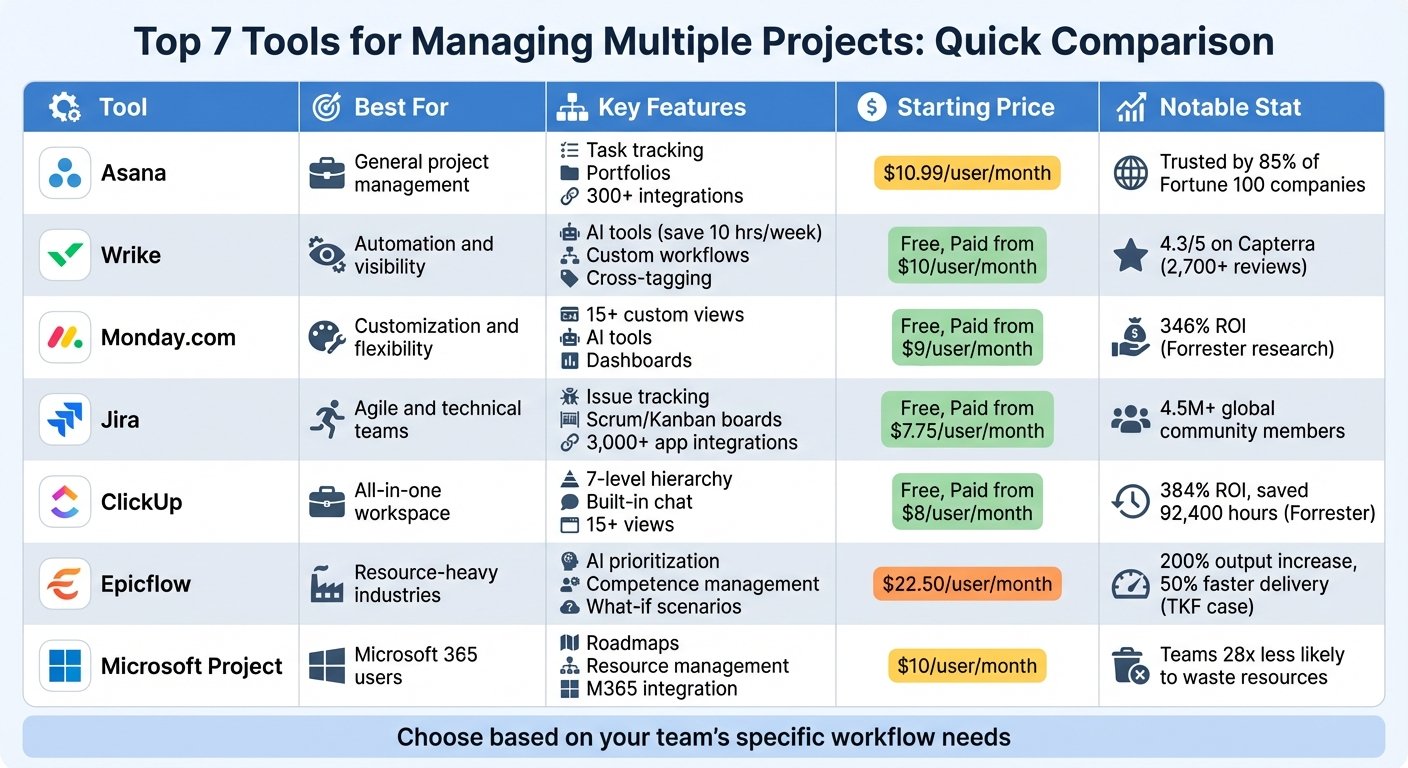

Monday CRM is a sales pipeline and customer management tool built on top of monday.com’s board-based work platform. Rather than starting from a rigid CRM data model, it starts from customisable boards, so deals, contacts and accounts are records you can reshape with your own columns, views and automations. That makes it unusually flexible for teams whose sales process does not look like a textbook, and familiar to anyone who already uses monday.com for project work. It covers the usual pre-sale and post-sale ground: pipeline stages, email tracking, activity logging and reporting.
What you can actually do with it
Everything sits on boards, which you can view as a table, kanban pipeline, calendar or chart.
- Track deals through a pipeline. Drag opportunities between stages, set deal values and close dates, and see where revenue is stuck at a glance.
- Keep contacts and accounts linked. Contacts, accounts, deals and activities connect to each other, so opening a company shows the people, open deals and history in one place.
- Sync email and calendar. Gmail and Outlook integration logs correspondence against the right record and lets reps send from within the CRM instead of switching tabs.
- Automate the admin. No-code automation recipes handle stage changes, task creation, reminders and notifications, which is where most of the time saving comes from.
- Build your own reporting. Dashboards pull from boards to show pipeline value, win rates, activity levels and forecast views without exporting to a spreadsheet.
- Use AI for the repetitive parts. Recent additions include call notes, email drafting and deal prioritisation, though treat these as helpful rather than decisive.
- Extend beyond sales. Because it shares a platform with monday’s work management products, handover into onboarding or delivery boards is straightforward.
Who it fits best
It suits small and mid-sized sales teams, roughly three to fifty people, who want a CRM they can shape themselves without a consultant: agencies tracking proposals, B2B service businesses with long consultative cycles, and companies already using monday.com elsewhere who want one login and a consistent interface.
It is less convincing for high-volume outbound teams who need deep sequencing and dialler functionality, or for organisations with complex quoting, territory and forecasting requirements. Those needs are better served by a dedicated sales platform.
Things worth knowing before you commit
- Billing is per seat with a minimum. Seats are sold in a bundle from a floor rather than one at a time, so a two-person team may end up paying for more seats than it uses. There is no free CRM tier, only a trial.
- Key features are tier-gated. Automation volume, number of dashboards, workspaces, and how many active contacts and deals you can hold all step up with the plan. Check the ceiling on records before you migrate a large database.
- Flexibility cuts both ways. Because you design the structure, a poorly planned setup drifts into inconsistent columns and duplicated boards. Someone needs to own the configuration.
- It is a general platform underneath. Sales-specific depth such as advanced forecasting, quoting workflows and native calling is thinner than in purpose-built CRMs.
- Costs grow with the stack. Adding monday’s other products, extra automation volume or AI usage on top of seats can push the total well past the initial quote.
Alternatives to compare it against
Pipedrive is the closest like-for-like: less flexible, but faster to set up and focused purely on selling. HubSpot is worth comparing if marketing and sales need to share one system and you value a generous entry tier, accepting that costs climb sharply later. Zoho CRM gives you more sales features for the money if you can tolerate a busier interface. If your real need is task and project tracking with a bit of client information attached, plain monday.com work management or Airtable may cover it without a CRM license at all.
Plan tiers, seat minimums and per-plan limits change regularly. Check monday.com’s own pricing page before you buy.
Further reading
- Cost Effective CRM for Small Business: Feature Analysis — helps weigh Monday CRM’s seat minimums against cheaper options for a small team.
- Best SME CRM: Integrating with Existing Workflows — directly relevant to fitting board-based deals alongside the tools you already run.
- Optimizing with Easy to Use CRM Software — covers keeping a configurable CRM tidy, which is Monday CRM’s main long-term risk.
- Lead Scoring: 10 Best Practices for B2B Sales 2024 — useful for the long consultative B2B cycles this CRM is aimed at.
Have you used Monday CRM?
One sentence is enough. Would you pick it again, and why or why not? We publish the critical reviews too — that is the point.