

A board portal is a private, permissioned workspace for the people who sit on a board: the papers, the agenda, the minutes, the resolutions, and the record of who saw what and when. It exists because the alternative, emailing a 200-page PDF to eleven directors and hoping nobody forwards it, is both slow and a genuine liability.
This guide covers the providers most commonly shortlisted, what actually separates them, and, more usefully, how to tell whether you need one at all. The shortlist below has been stable for several years; the board portal market consolidates slowly and the same names keep appearing, so treat this as a starting point for a demo list rather than a ranking that changes every quarter.
Why Choosing the Best Board Portal Provider Matters
A board portal isn’t just a secure storage space. It’s a comprehensive tool for governance and compliance. The right solution can help your organization:
- Enhance Security: Keep confidential data safe with encryption and strict access controls.
- Increase Efficiency: Simplify meeting preparation, agenda creation, and approval workflows.
- Support Remote Collaboration: Give board members access anytime, anywhere, on any device.
- Ensure Compliance: Maintain accurate records to meet legal and regulatory obligations.
Put concretely, the job it does is this. Board papers are the most sensitive documents most organisations produce: unreleased results, redundancy plans, litigation updates, acquisition talks. They are also circulated to a group of people who, unlike employees, are usually not on your network, do not use your laptops, and cannot be told to install your device management software. A board portal is the answer to that specific mismatch. It puts the documents inside a controlled application on the director’s own device, keeps a log of access, and lets you revoke everything the day someone steps down.
When You Do Not Need One
This is the part vendor comparisons leave out. A board portal is a recurring cost and an extra system for people who log in a handful of times a year, and for a lot of organisations it is not yet justified.
You can probably wait if most of the following are true: your board is under about six people, it meets quarterly, nobody outside the executive team is a director, your papers do not routinely contain regulated or market-sensitive information, and you have no external auditor or regulator asking to see an access trail. In that situation a locked-down folder in a tool you already pay for handles it. A permissioned shared drive in Google Workspace, a restricted team folder in Dropbox, or a governance-focused workspace in Box will do the document half of the job, and Notion is a reasonable place to keep the agenda, the action log, and the register of directors’ interests.
The cost of that approach is real and worth naming. You get no board-pack compilation, so somebody assembles the PDF by hand every cycle. You get no in-document annotation for directors. You get file-level audit logs rather than a governance record. And e-signature for written resolutions is a separate purchase, whether that is FlexiSign or another provider. If assembling the pack is eating a day of someone’s month, or if a regulator has asked who opened which paper, that is the point at which the portal pays for itself.
The Main Board Portal Providers
These are the platforms that turn up most often on shortlists, and what each is generally chosen for.
1. Board Intelligence
Best for: Strategic decision-making and data-driven governance
Board Intelligence combines secure document management with reporting and analytics. It goes beyond a traditional portal by putting structure around the papers themselves, which is aimed at organisations whose complaint is less “our documents are insecure” and more “our board packs are 200 pages of narrative nobody reads”.
Key Features:
- AI-driven analytics to surface risks and opportunities
- Interactive dashboards for performance and compliance tracking
- Secure document sharing with version control
- Mobile-friendly platform with offline access
- Advanced authentication and encryption
2. Diligent Boards
Best for: Enterprise-level organizations
Diligent is the incumbent in large-cap and global enterprise governance, and its platform extends beyond the board into entity management, compliance and risk. That breadth is the reason to buy it and also the reason not to: a small board will pay for a governance suite it uses one tenth of.
Key Features:
- Real-time analytics and reporting
- Built-in risk and compliance tools
- Secure mobile access and multi-factor authentication
- Enterprise-level scalability
3. BoardEffect
Best for: Nonprofits and smaller organizations
BoardEffect is designed for nonprofits and mid-sized organisations, where boards are larger, turnover is higher, and a good share of directors are volunteers who need something they can use without training. Its straightforward interface is the main draw.
Key Features:
- Task and action tracking
- Built-in meeting scheduling
- Secure file sharing
- E-signature capabilities
4. OnBoard
Best for: Remote and hybrid teams
OnBoard emphasizes collaboration and user experience, making it a common pick for organizations with geographically dispersed boards. It integrates with the video platforms most boards already meet on, including Zoom and Microsoft Teams, which matters more than it sounds when half your directors join remotely.
Key Features:
- Real-time document collaboration
- Secure video conferencing integration
- Training and onboarding support for board members
- Customizable dashboards
5. Aprio Board Portal
Best for: Regulated industries
Aprio focuses on compliance, which makes it a fit for sectors like healthcare, finance, credit unions and education, where the audit trail is not a nice-to-have and where boards often need to record votes formally between meetings.
Key Features:
- Detailed audit trails
- Secure voting and resolution tracking
- Compliance reporting tools
- 24/7 multilingual support
6. Nasdaq Boardvantage
Best for: Strategic oversight and enterprise-level boards
Nasdaq Boardvantage brings together governance and workflow automation, and sits alongside the rest of Nasdaq’s corporate governance stack. It suits organisations that already report into that ecosystem and want the board layer to match.
Key Features:
- Executive dashboards with real-time metrics
- Secure messaging and workflows
- Multi-device synchronization
- Enterprise-grade security protocols
Quick comparison
| Provider | Typical buyer | Main reason to shortlist |
|---|---|---|
| Board Intelligence | Mid-market to large, reporting-heavy boards | Improving the papers, not just storing them |
| Diligent Boards | Listed and global enterprises | Governance suite beyond the boardroom |
| BoardEffect | Nonprofits, associations, smaller boards | Ease of use for non-technical directors |
| OnBoard | Distributed and hybrid boards | Meeting experience and video integration |
| Aprio | Healthcare, finance, education | Audit trail, voting and resolutions |
| Nasdaq Boardvantage | Large enterprise boards | Fits an existing Nasdaq governance stack |
How to Choose the Right Board Portal Provider
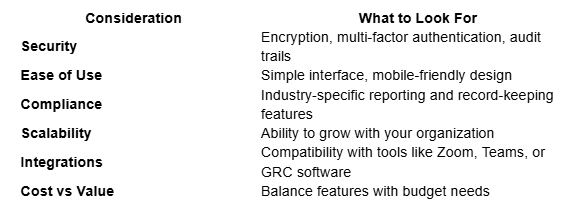
Most demos look identical, because every vendor shows you the same agenda builder and the same annotation tools. The differences show up in the questions below, so ask them early and ask for answers in writing.
1. Who administers it, and how long does the pack take?
The person who suffers or benefits most is the company secretary or executive assistant who builds the pack. Time a real cycle during the trial: import last quarter’s papers, reorder them, insert a late paper two days before the meeting, and repaginate. If that late insertion means rebuilding the whole pack, you have found the deal-breaker. Automatic repagination and last-minute paper swaps are the single biggest time saver in this category.
2. What exactly does the audit trail record?
“Full audit trail” means different things. Ask whether it logs opens as well as downloads, whether it records annotations, whether it timestamps who voted on a written resolution, how long the log is retained, and whether you can export it yourself without raising a support ticket. If a regulator or a litigator ever asks who read the paper about the incident, that export is the whole point of the product.
3. Access control at director level
Boards have committees, and committees have papers other directors should not see. Check that permissions work per document and per committee rather than per user group only, that you can grant an observer or an advisor time-limited access, and that offboarding a director removes local copies from their device rather than just their login. Remote wipe of the offline cache is the feature people assume exists and sometimes does not.
4. Security posture, evidenced
Ask for the current SOC 2 Type II report or ISO 27001 certificate, not a trust page. Confirm encryption in transit and at rest, single sign-on with SAML if you use it, and enforced multi-factor authentication. Confirm data residency if you have directors or obligations in the EU or UK, and ask where backups live, since that is often a different jurisdiction from the primary region.
5. Adoption by the least technical director
A portal only works if every director uses it. The realistic test is whether your least technical board member can find the papers on an iPad without calling anyone. Get one of them into the trial. If they cannot, the papers will go back to email within two cycles and you will be paying for a system nobody opens.
6. Exit terms and the archive
This is the clause that bites. Ask what happens to your minutes, resolutions and historic packs when you leave: what format the export comes in, whether the audit log is included, how long you have to retrieve it after termination, and whether there is a fee. Also read the renewal clause. Governance software is usually sold on annual or multi-year terms that auto-renew, with notice periods measured in months rather than days, so put the notice date in the diary, not the end date.
7. Onboarding cost, in your time
Migration is rarely included in the way you expect. Establish who loads the historic archive, whether that is chargeable, and how many hours of your team’s time the vendor assumes. A quote that looks competitive can turn expensive once someone internally spends three weeks tidying a decade of minutes.
What This Replaces in Your Existing Stack
Worth mapping before you buy, because a portal often overlaps with tools you already pay for. It typically replaces the ad-hoc board folder in your file store and the e-signature run for written resolutions. It usually does not replace your video conferencing, your general document collaboration, or your task management, and it should not: directors should not be asked to learn a new tool for work that already happens elsewhere. If you are still assembling the wider stack around it, our guides to the best collaboration tools for small teams and the best productivity tools for small teams cover the layer underneath.
FAQ
Can we just use a shared drive instead of a board portal?
For a small, low-risk board, yes, and plenty do. A restricted folder in Box, Dropbox or Google Workspace with strict permissions and MFA covers document security adequately. What you give up is pack compilation, director annotation, written resolutions with a recorded vote, and a governance-grade access log. The moment an auditor, regulator or insurer asks for that log, the workaround stops being cheaper.
What is the difference between a board portal and a virtual data room?
A data room is built for a transaction: a large set of documents, opened to a defined group of outsiders, for a fixed period, with granular tracking of who looked at what. A board portal is built for a permanent group and a repeating cycle of meetings, so it adds agendas, minutes, resolutions, voting and action tracking. Some vendors sell both, and if you are mid-deal you may genuinely need both.
How long does it take to roll one out?
Getting a single upcoming meeting into a portal takes days. Getting the historic archive in, agreeing retention and permission rules, and having every director actually using it usually spans two to three meeting cycles, which for a quarterly board is most of a year. Plan the launch around a meeting with a light agenda rather than the annual results.
More on this topic
Browse all 86 articles on Business Operations, or jump straight to our buying guide: Best Productivity Tools for Small Teams.