
Disclosure: This page contains commercial links. BizBot may earn a commission from qualifying purchases. Paid placements do not buy a better ranking. Read our affiliate disclosure.
AI-powered communication tools are changing how businesses execute strategies. Here’s what you need to know:
- The Problem: Strategy updates get lost between inboxes, chat channels and meeting notes, and the people who need them most read them last.
- The Solution: AI tools integrate data from emails, chats, and business systems into a unified view, automating tasks like summarizing messages, updating plans, and tracking progress. This boosts productivity, saves time, and ensures alignment across teams.
- Key Features:
- Summaries of long threads, channels and meetings.
- Drafting and tone matching against an approved style.
- Prioritization of messages by sender, context and deadline.
- Search across past decisions rather than past messages.
- Business Benefits:
- Less time spent reconstructing what was decided and by whom.
- Fewer duplicated efforts across departments.
- Consistent messaging, because answers are drawn from approved sources.
Key Features of AI Strategy Communication Tools
Modern AI platforms are designed to tackle communication challenges and keep strategic initiatives running smoothly. By understanding what these tools bring to the table, businesses can identify the features that best align with their goals. Let’s break down how these tools simplify everyday communications.
Automation of Routine Communication Tasks
AI takes over repetitive tasks, freeing up time for more critical work. Tools like Slack AI, Zoom AI Companion, and Otter.ai handle tasks such as summarizing lengthy email threads and channel conversations into actionable points, transcribing meetings with speaker identification, and pinpointing key discussion highlights. For team members who miss a meeting, these features mean catching up takes minutes, not hours.
AI writing assistants, including Grammarly Business and ChatGPT, help draft polished emails, reports, and messages. They also adjust tone and clarity to match your company’s preferred style. For customer-facing roles, tools like Emitrr automate phone tasks such as call routing, appointment scheduling, and even missed-call-to-text responses, ensuring prospects stay engaged around the clock. By handling these routine tasks, AI allows teams to focus on strategic priorities instead of administrative details.
Real-Time Insights and Analytics
Beyond automation, AI platforms offer real-time insights that drive smarter decisions. These tools monitor sentiment in comments, reactions, and surveys, helping organizations understand workforce morale. Sentiment tracking cuts through the noise, highlighting what truly needs attention. Treat it as a prompt to go and ask someone, not as a measurement.
Predictive modeling further enhances communication by identifying the best message formats and timing. Narrative mapping ensures that key themes – like innovation or sustainability – are consistently communicated and understood across all channels. Meanwhile, conversation intelligence tools analyze sales calls and customer interactions, giving leaders performance insights without requiring them to attend every meeting. These features transform communication teams from simple message broadcasters into creators of targeted, role-specific content tailored to location and context.
Customizable Communication Frameworks
AI tools are flexible, adapting to fit your organization’s unique structure instead of forcing a rigid approach. For example, businesses can design custom AI SMS or voice agents with specific names, roles, and functions that align with their needs. These agents connect to internal knowledge bases, website links, and historical communication data to deliver accurate, context-rich responses.
Modern platforms continuously improve their understanding of context and refine their response capabilities over time. They also ensure brand voice consistency by training AI to match your company’s tone across all communication channels. This means messages feel like they come from your team, not a generic bot. Additionally, omnichannel integration allows businesses to manage SMS, email, phone, and chat through a single AI-powered interface. This creates a unified communication experience that aligns with your company’s workflow and priorities. By tailoring communication to your organization, these tools reinforce brand identity and support strategic goals effectively.
Benefits of Using AI for Strategy Communication
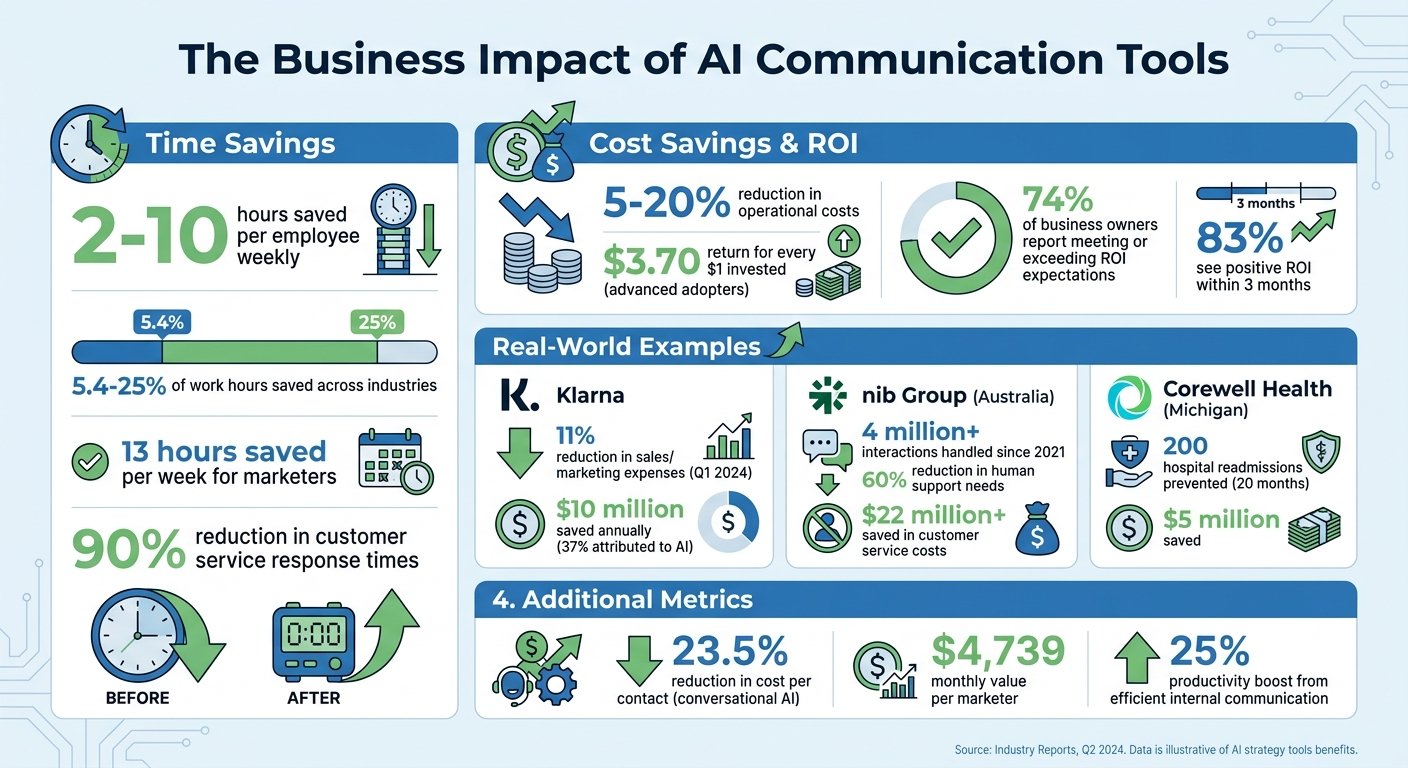
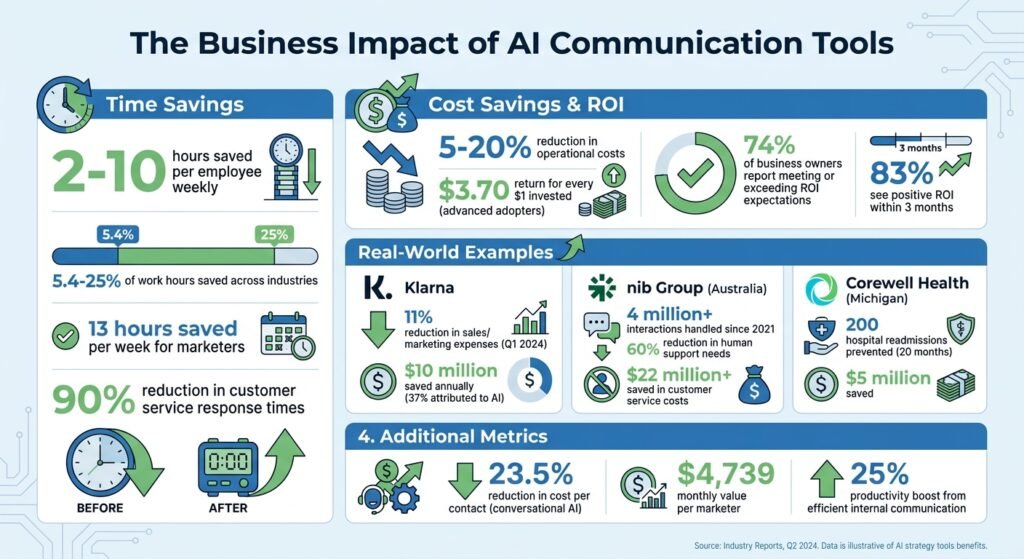
AI Communication Tools ROI and Time Savings Statistics
Once you grasp the potential of AI communication tools, the next question is straightforward: how can they benefit your business? The perks extend far beyond speeding up emails. These tools are changing teamwork, budget allocation, and the consistent delivery of strategic messages across entire organizations.
Better Team Collaboration
AI eliminates the bottlenecks that often slow teams down. By analyzing past messages, shared documents, and project timelines, these tools ensure conversations stay aligned with your strategic goals. If someone joins a project midway, automated summaries can distill lengthy discussions into the key decisions and action points, saving them from sifting through endless message threads. Smart prioritization highlights urgent updates based on context, sender importance, and relevance, helping teams focus on what truly matters instead of getting lost in routine noise.
The bigger shift is search. AI turns your communication history into a searchable knowledge base, so past strategic decisions are findable by meaning rather than by keyword, which reduces duplicated effort. Automated workflows also streamline handoffs between departments, breaking down silos and keeping teams – whether in marketing, engineering, or sales – aligned during execution.
Time and Cost Savings
Vendors and consultancies publish a lot of time-saved and ROI figures for AI communication tools. Most are self-reported, none are audited, and we have removed the ones we could not trace to a primary source. What follows is where the money actually moves.
The savings come from three places. First, work that used to be done by a person is done by software: triage, transcription, first-draft replies. Second, work that used to be done twice is done once, because the decision is findable. Third, work that used to wait for a person is not blocked, because the answer is in a knowledge base the tool can read. Only the first shows up as a headcount or agency line item, which is why the second and third are usually invisible in a business case.
One public example with a named source: Klarna says generative AI cut its marketing agency spend by about 25% and saves it roughly $10 million a year on marketing, mostly by producing images and copy in-house. Klarna is a large company that rebuilt its process around the tools. A ten-person team copying the headline number will be disappointed.
What usually goes wrong: the tool is bought, licences are assigned to everyone, and the process stays the same. Nothing is saved, because nothing was removed.
Improved Accuracy and Consistency
AI doesn’t just save time and money – it makes strategic messages more consistent. These tools standardize communications using company-approved content, maintaining a uniform tone and ensuring accuracy in strategy updates. Retrieval-Augmented Generation (RAG) technology, for example, pulls information directly from internal, approved sources like wikis and knowledge bases. This ensures responses are grounded in verified data rather than generic AI outputs.
“RAG-based AI chatbots retrieve and generate answers from company-approved sources, providing more relevant information than generic AI tools. They also standardize processes, supporting policy compliance and reducing errors.” – Slack
AI tools also act as a centralized “source of truth”, enabling employees to access accurate information instantly without waiting on replies from other departments. That only holds if the underlying wiki is current. Point a retrieval tool at a stale knowledge base and it will repeat last year’s policy confidently, in your brand voice.
Implementing AI Strategy Communication Tools in Your Business
Successfully rolling out AI tools involves identifying communication challenges, choosing AI-native solutions, and ensuring your team embraces the change.
Assessing Your Communication Needs
Start by pinpointing where communication is breaking down. Look at inbox volume, response times, and the time spent in meetings.
Talk to team leaders to uncover specific bottlenecks. For example, IT might be swamped with ticket requests, finance could be bogged down by lengthy invoice processes, or important updates might be getting lost in a sea of emails. These insights will help you determine where AI can make the biggest difference. Define your goals early – whether you need a tool to answer common questions, summarize meetings, or track progress – and decide whether it will serve employees, customers, or both.
Before committing to a tool, answer these questions honestly: what problem are you solving, how will it affect your bottom line, what risks are involved, is it practical to implement, does it fit your company culture, and is your data ready for AI. Answering these upfront can save you from costly mistakes.
Once you’ve identified your communication gaps, it’s time to choose the best AI tool to address them.
Selecting the Right Tools
Choose tools that align with your business goals and are built with AI at their core. Look for tools that combine multiple features – like summarizing, drafting, and prioritizing – to simplify processes and increase adoption.
Integration is another crucial factor. Make sure the tool connects to your existing systems, such as CRMs, ticketing platforms, or knowledge bases, and that it complies with your privacy and security requirements. Most business-grade AI tools land between roughly $4 and $30 per user per month, depending on tier and billing term. Checked against each vendor’s own pricing page in August 2026: Microsoft Teams Essentials is $4.00 per user per month paid yearly, and Microsoft 365 Business Basic is $7.00 per user per month paid yearly. Slack Pro is $7.25 per user per month billed annually, or $8.75 billed monthly. Otter.ai Pro is $8.33 per user per month billed annually, or $16.99 billed monthly, and Otter Business is $19.99 billed annually or $30 billed monthly. Confirm these before you budget.
If you’re still exploring options, BizBot offers a directory of business tools to help you compare platforms and find one that fits your needs.
Start small by targeting one process where even a slight improvement can make a noticeable difference – whether that’s reducing ticket response times or improving team morale. Set measurable goals early, and define them before you buy so the vendor is not the one grading the pilot.
Once you’ve chosen a tool, the next step is ensuring your team is ready to use it effectively.
Training Teams and Ensuring Adoption
Getting your team on board is critical. Address the obvious concern head-on: people assume these tools are a precursor to cutting jobs. If that is not the plan, say so specifically, and say what the freed-up time is for.
Begin with a phased training approach. Start with a pilot program, gather feedback, and expand from there. Customize training to each department’s needs – show sales teams how AI can draft proposals, HR teams how it answers policy questions, and IT teams how it can manage ticket backlogs. On launch day, provide a simple list of 1–3 tasks employees can try right away to build confidence.
Identify early adopters to act as internal champions. Set up weekly “AI Office Hours” where team members can get real-time help, and put AI on the agenda of meetings that already happen. Quarterly showcases can highlight successes and encourage ongoing learning. For employees who remain hesitant, one-on-one coaching can help them see the tool’s value in action.
Finally, monitor adoption through frequent feedback sessions instead of relying on annual surveys. Two gaps show up repeatedly: people have not been trained on the tool, and they have not been told what the company is trying to achieve with it. Close both by asking, not announcing.
Conclusion
Key Takeaways
AI is now built into most of the communication software businesses already pay for, so the decision is less about whether to adopt it and more about which claims to believe. Treat vendor ROI figures as marketing, run a narrow pilot, and measure it yourself.
This shift from traditional business software to AI-driven platforms is a real change in how work gets done. These modern tools don’t just automate tasks – they learn, adapt, and handle entire workflows with minimal human input. But as OCM Solution points out:
AI success isn’t just about the technology, it’s about how clearly and consistently you communicate it.
Most failed rollouts are not technology failures. They are rollouts where nobody explained what changed, so people kept doing the old thing alongside the new tool.
AI performs best when paired with human involvement. While it excels at scaling operations and managing repetitive tasks, humans are still needed for brand nuance, complex exceptions, and judgement. The aim isn’t to replace people but to extend what they can cover.
Next Steps for Your Business
With these insights in mind, now is the time to act. Start small by focusing on a single, high-impact use case where even modest improvements can deliver measurable results. Lucas Correia, CEO & Founder of BizAI GPT, offers sound advice:
The most expensive tool is the one you stop using. Prioritize adoption ease and clear ROI over a checklist of fancy features.
If you’re ready to explore AI communication tools, check out BizBot, a directory of business administration tools. The real risk is treating AI as a one-off project instead of embedding it into how the business actually runs.
FAQs
How do I pick the best first AI communication use case?
To make the most of AI, start by targeting areas where it can simplify communication and save time. Think about tasks that are repetitive, prone to errors, or take up too much of your day. For instance, managing emails or handling customer messages are prime examples.
Consider use cases that tackle specific challenges while aligning with your goals. For example:
- Automating Replies: AI can craft quick, accurate responses to common inquiries, reducing response times.
- Scheduling Assistance: AI tools can handle meeting bookings or calendar management, eliminating back-and-forth emails.
- Boosting Personalization: AI can tailor messages based on recipient data, making interactions more engaging and relevant.
The key is to focus on areas that not only save time but also enhance the quality of your communication.
What data do these tools need to work well?
AI communication tools rely on historical communication data – like past emails, chat logs, and meeting transcripts – to grasp context and tailor their responses effectively. They also tap into calendar details to assist with scheduling and use task management information to generate actionable items. Given the sensitive nature of business information, security and privacy play a central role, making strong data protection measures absolutely essential for handling this data safely.
How can I roll this out without hurting trust or adoption?
To introduce AI tools effectively and maintain trust, prioritize clear, transparent, and role-specific communication. Create a detailed plan to deliver timely updates tailored to the needs of executives, managers, and end-users. Engaging stakeholders early and providing continuous support helps minimize resistance. Be sure to clearly outline the purpose, advantages, and potential effects of the tools to foster trust and promote widespread adoption within the organization.
More on this topic
Browse all 20 articles on AI & Automation, or jump straight to our buying guide: Best Automation and Integration Tools.





