Want to let employees use their own devices for work? Here’s how to set up a Bring Your Own Device (BYOD) policy:
- Define allowed devices (e.g. iOS, Android, Windows)
- Set security requirements (encryption, MDM software, etc.)
- Create clear usage rules and data ownership policies
- Establish device management procedures
- Train employees on security best practices
- Plan for lost/stolen device scenarios
Key benefits, with the caveats attached:
- Managers report getting time back. In Frost & Sullivan research commissioned by Samsung, 500 US managers and executives said smartphones gained them 58 minutes of work time a day and put their productivity up 34%. That is self-reported, it is vendor-funded, and it is about smartphones generally rather than BYOD programmes specifically.
- Hardware and support costs fall. Cisco’s own IT case study reports eliminating US$500,000 a year of company-paid phone spend and avoiding roughly $850,000 a year in device upgrades, with per-user support costs down 25% between 2011 and 2013.
Main challenges:
- Security risks. IBM’s 2020 Cost of a Data Breach report put the average breach at $3.86 million across the companies it studied.
- Compliance with data protection laws
- Managing diverse devices/systems
A solid BYOD policy balances flexibility and security. Use MDM software, encrypt data, require strong authentication, and clearly communicate expectations to employees.
Why Use BYOD
BYOD isn’t just a trendy acronym. The case for it is real, though thinner than most vendor material suggests:
- Productivity: People work faster on devices they already know. The best-known number here is the Frost & Sullivan 34% figure cited above. Read it as evidence that managers feel more productive, not as a measured output gain.
- Money: Companies cut hardware and support costs. Cisco’s published figures are the most detailed example, and note their scale: hundreds of thousands of dollars a year at a company with tens of thousands of staff. Scaled down to a twenty-person business, the saving is a few phone contracts.
- Employee preference: Most people would rather carry one phone than two. This section used to quote a Gartner survey saying 45% of employees felt more productive on their own devices. We could not find that survey, so the number is gone.
What to Think About First
Before you jump on the BYOD bandwagon, pause and consider:
Security Risks: Personal devices can be like open doors to your network. And those doors can be expensive: IBM’s 2020 report put the average breach cost at $3.86 million across the companies studied. That average is dominated by large enterprises, so do not read it as your exposure, but the direction is clear enough.
Legal Stuff: BYOD policies need to work with data protection laws like GDPR and CCPA. Under GDPR Article 83(5), the upper tier of fines runs to EUR 20 million or 4% of total worldwide annual turnover, whichever is higher.
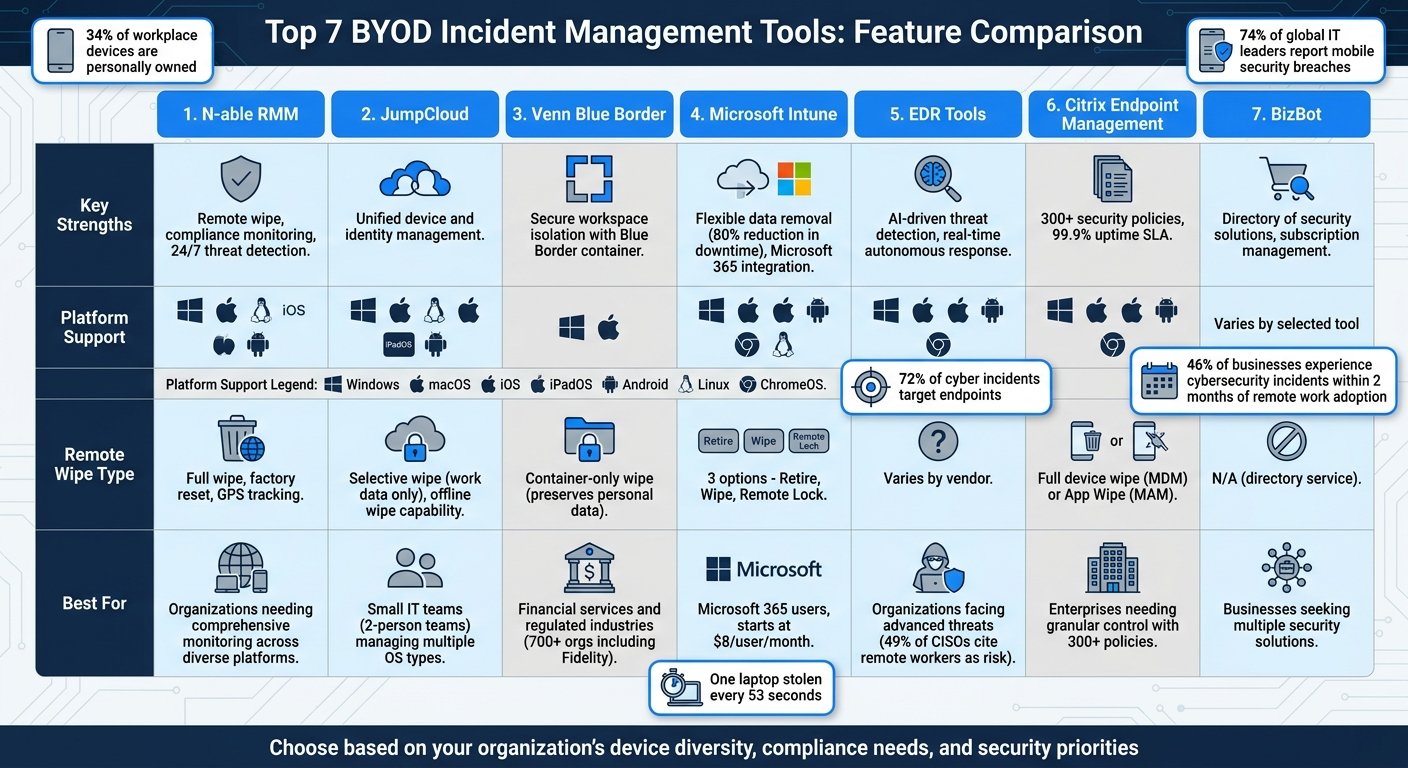
Device Management: How will you handle all those different devices and operating systems? Microsoft’s Enterprise Mobility + Security suite is one way to tackle this challenge.
Who Pays for What?: Figure out how to handle costs like data plans or software licenses. A flat monthly stipend is the usual answer because it is simple to administer and does not require anyone to file receipts.
BYOD can be great, but it’s not a decision to make lightly. Think it through, plan carefully, and you could be on your way to a more flexible, productive workplace.
BYOD Basics
What is BYOD
BYOD stands for Bring Your Own Device. It’s a policy where companies let employees use their personal gadgets for work. We’re talking smartphones, tablets, laptops – you name it.
Why’s it catching on? Cost, mostly, plus the fact that people dislike carrying two phones and will quietly use one anyway. A policy makes that official and lets you secure it.
Pros and Cons
BYOD isn’t all sunshine and rainbows. Let’s break it down:
The Good Stuff:
- Saves Money: Fewer company-bought handsets, lower support load. See Cisco’s published figures above for what that looks like at scale.
- Gets More Done: People work better on devices they know inside out.
- Fewer Devices to Carry: One phone instead of two is a genuine, if unglamorous, benefit.
The Not-So-Good Stuff:
- Security Headaches: Personal devices run older operating systems, carry more apps, and get lent to family members.
- Legal Maze: BYOD policies need to play nice with laws like GDPR and CCPA.
- IT Juggling Act: Imagine managing a zoo of different devices and systems.
Who’s in the BYOD Game?
BYOD isn’t a one-person show. It takes a village:
1. IT Department
These are your tech wizards. They:
- Set up Mobile Device Management software
- Make sure lost devices can be wiped remotely
- Keep the virus-busting software up to date
2. Human Resources
HR’s got their hands full:
- Spreading the word about BYOD rules
- Dealing with rule-breakers
- Teaching everyone BYOD best practices
3. Legal Team
The law folks make sure:
- Everything’s above board with device use laws
- Company secrets stay secret
- Everyone knows who owns what data
4. Management
The big cheeses decide:
- Who gets to use their own devices
- Which gadgets and apps make the cut
- Who pays for what (data plans, software, etc.)
5. Employees
The BYOD users need to:
- Stick to the company’s device rules
- Report a missing device immediately
- Not use the thing while driving
Main Policy Parts
A solid BYOD policy protects company data while giving employees flexibility. Here are the key elements.
A note first. This section previously illustrated each element with a one-line example attributed to a named company: IBM’s approved device list, Salesforce’s MDM requirement, Cisco’s ban on personal cloud storage, Google’s use of containerization, VMware’s device stipend. None of those had a source, and none could be confirmed from company documentation, so they have been removed. The elements themselves are sound, and what follows is the reasoning behind each.
Which Devices to Allow
Define permitted devices. This affects security, support, and system compatibility.
The trade-off is straightforward: every operating system you allow is another set of security baselines to write and another support queue to staff. Small companies usually settle on current iOS and Android, with a minimum OS version and no jailbroken or rooted devices. Write the minimum version as a rule, not a number in a document you will forget to update.
Required Safety Measures
Outline must-have security measures for BYOD devices:
- Strong passwords or biometric authentication
- Regular software updates
- Company-approved antivirus software
- Work data encryption
MDM enrolment is the mechanism that makes the rest enforceable. Without it you are relying on people to have configured their own phone correctly, which is not a control.
Rules for Device Use
Set clear guidelines for using personal devices at work:
- Acceptable use of company resources
- Data and app access restrictions
- Device use rules in specific situations
The rule that matters most is where work files are allowed to live. If you do not name an approved place to put a document, people will use whatever cloud drive is already signed in on their phone, and you will not know which one.
Data Rights and Privacy
Tackle data ownership and employee privacy:
- Company’s data access rights on personal devices
- Device usage monitoring policies
- Personal data handling during device wipes
Containerization is the standard answer: work apps and data sit in a managed space the company can erase, and everything outside it stays untouched. Say plainly, in writing, what you can and cannot see. Employees assume the worst otherwise, and a policy people distrust is a policy people route around.
Who Fixes What
Define device maintenance, repair, and support responsibilities:
- Who pays for repairs or replacements
- IT support level for personal devices
- Handling software conflicts
The common split is that the employee owns the hardware and its upkeep, and IT supports only the work software running on it. Put the boundary in writing before someone’s cracked screen becomes an argument.
Setting Up Security
Let’s talk about protecting your company’s data when you let employees use their own devices for work. It’s a big deal, and you need to get it right.
Login Security
First up: make it tough for the bad guys to get in. Use multi-factor authentication (MFA) on all BYOD devices. It’s like adding a second lock to your front door.
Microsoft’s security team put the case bluntly in a post titled “One simple action you can take to prevent 99.9 percent of attacks on your accounts”: enabling MFA makes an account more than 99.9% less likely to be compromised. The figure covers automated attacks on accounts, which is the overwhelming majority of what any small company will face.
Data Protection
Next, encrypt your sensitive stuff. It’s not optional. Encrypt data when it’s sitting still and when it’s moving around.
Pro tip: Get your team to use VPNs. They’re great for keeping things safe, especially when someone’s working from a coffee shop Wi-Fi.
Network Safety
Be picky about who gets on your network. Use Network Access Control (NAC) to keep out devices that shouldn’t be there.
This section used to credit Cisco with a 50% drop in incidents from unauthorised devices after deploying NAC. That figure is not in Cisco’s published material and we could not source it, so it is gone. The argument for NAC does not need it: an unmanaged device on your network is a device you cannot patch, cannot audit, and cannot wipe.
Device Management Tools
Mobile Device Management (MDM) software is your new best friend. It lets you:
- Keep tabs on all the devices on your network
- Make sure everyone’s following the rules
- Wipe work data if a device goes missing
Check that the wipe is selective before you buy. A tool that can only erase the entire phone will not survive its first encounter with an employee who paid for it.
Security Problem Response
When things go wrong, you need a plan. Here’s the quick version:
1. Act fast: If there’s a breach, kick that device off the network right away.
2. Size it up: Figure out what got hit and how bad it is.
3. Contain it: Use your MDM to wipe work data from the problem device.
4. Spread the word: Tell everyone who needs to know – the device owner, IT folks, maybe even the legal team.
5. Learn from it: Once it’s all over, take a good look at what happened and make your security even better.
Rolling Out the Policy
Implementing a BYOD policy isn’t just about writing rules. It’s about getting your team on board. Here’s how to make it happen:
Telling Employees
Don’t just fire off an email and hope for the best. Here’s how to spread the word:
- Hold a company-wide meeting to explain the benefits and tackle concerns head-on
- Follow up with smaller group sessions for specific questions
- Create a detailed FAQ document
The question everyone actually wants answered is what the company can see on their phone. Answer it first, in specific terms, or the rest of the meeting is wasted.
Required Learning
Your team needs to know their stuff, especially when it comes to cybersecurity. Set up a solid training program:
- Cover the basics: password hygiene, spotting phishing attempts, and safe browsing
- Offer device-specific training for iOS, Android, Windows, and Mac
- Do a deep dive into the BYOD policy, explaining the “why” behind each rule
Three short quotations that used to sit in this section – from a hybrid work consultant, from SimpleMDM, and from a communications firm – said nothing that the surrounding text did not already say, and none could be traced to a published source. They have been cut.
How to Sign Up
Make joining the BYOD program a piece of cake:
1. Self-Service Portal
Set up an online platform where employees can easily register their devices.
2. IT Support Hours
Have IT staff available at specific times to help with enrollment.
3. Guided Setup
Create step-by-step guides for installing necessary security software.
Checking Compliance
Trust your team, but keep an eye on things:
- Use Mobile Device Management (MDM) software for regular compliance checks
- Set up your MDM to automatically flag non-compliant devices
- Schedule quarterly check-ins to discuss policy adherence and iron out any issues
Expect problems in the first months and plan for them. Enrolment failures, one person’s ancient handset, an app that will not install. Deal with those quickly and the programme sticks; leave them and people stop enrolling.
Using BizBot for BYOD
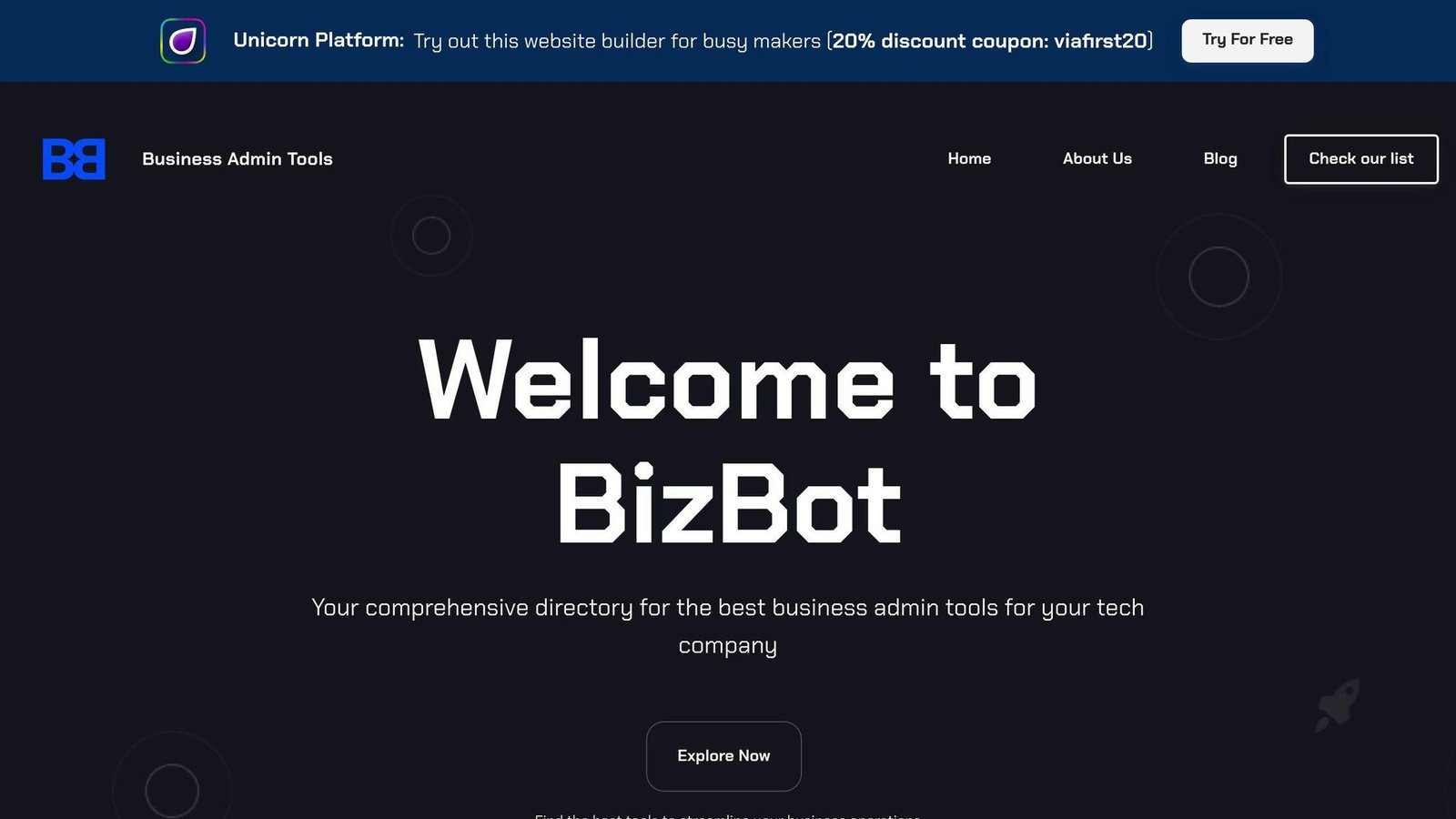
BYOD policies can be tricky. But with the right tools, you can make it work. That’s where BizBot comes in.
BizBot is a directory of business tools that can help you manage your BYOD setup. It’s packed with software for accounting, banking, HR, legal stuff, and more. And the best part? These tools are easy to use, whether you’re a freelancer or running a growing company.
So, how can BizBot help with your BYOD policy? Let’s break it down:
1. Device Management
BizBot lists Mobile Device Management (MDM) tools. These help you keep tabs on employee devices and make sure they’re following your BYOD rules.
2. Security
You’ll find security software on BizBot to protect sensitive data on personal devices. Think antivirus programs, VPNs, and encryption tools.
3. HR Tools
BizBot’s HR systems can track who’s using BYOD and manage related training.
4. Legal Resources
Need to make sure your BYOD policy follows data protection laws? BizBot’s got legal services for that.
5. Expense Management
Use BizBot’s accounting software picks to track BYOD expenses like stipends or reimbursements.
6. Subscription Management
BizBot can help you keep an eye on software license costs for BYOD devices.
Wrap-Up
Let’s recap the key points for setting up a solid BYOD policy:
Define Your Scope
Be clear about which devices and operating systems you’ll allow, and set a minimum OS version. Every extra platform is another support queue and another baseline to maintain.
Lock It Down
Your company’s data is precious. Protect it. Microsoft’s figure, cited above, is that MFA makes an account more than 99.9% less likely to be compromised. Make MFA a must for all BYOD devices.
Set Clear Rules
Spell out how devices should be used, who owns what data, and how privacy works. Name an approved place for work files, or people will pick their own.
Use Management Tools
Mobile Device Management software helps you keep an eye on BYOD devices and keep them secure. Network Access Control does the same job at the network edge, keeping unmanaged devices off it entirely.
Train Your Team
Don’t just hand out a policy – explain it. As John Martinez, Technical Evangelist at StrongDM, puts it:
“With the right policies and security actions, you can let your employees take advantage of the convenience of their own devices while ensuring strong BYOD security.”
Be Ready for Trouble
Have a game plan for security breaches. Know how to quickly boot compromised devices off your network and stop data leaks in their tracks.
Keep It Fresh
Your BYOD policy isn’t set in stone. Review it regularly. As tech and work habits change, your policy should too. Listen to what your employees have to say and stay on top of new security threats.
FAQs
How to build a BYOD policy?
Building a solid BYOD policy isn’t rocket science. Here’s what you need to do:
1. Define the scope
Be crystal clear about which devices and operating system versions are allowed, and say what happens to a device that falls below the minimum.
2. Lock it down
Use mobile device management (MDM) software. It is what lets you remove company data from a device you do not own, which is the whole problem BYOD creates.
3. Set the rules
Make it clear how devices should be used and what data can be accessed. Name the approved place to store work files and say which services are off limits.
4. Plan for the worst
What happens when a device goes missing? Have a game plan ready. This might include remote wiping and cutting off network access ASAP.
5. Talk money
Be upfront about who pays for what. A flat stipend with the employee covering repairs is the simplest arrangement to administer.
How to implement a BYOD policy?
Putting a BYOD policy into action isn’t just about writing it down. Here’s how to make it happen:
1. Get legal on board
Make sure you understand the legal side of BYOD in your area. You don’t want any nasty surprises down the road.
2. Team up with HR
Work with your HR folks to tackle employee privacy concerns and stay on the right side of data regulations.
3. Bring in the IT crowd
Your IT team knows the security ins and outs. Get their input on what’s needed to keep employee devices safe.
4. Train, train, train
Don’t just hand out the policy and hope for the best. Make sure everyone knows the rules and how to follow them.
5. Use the right tools
MDM solutions help you keep an eye on BYOD devices and keep them secure.
6. Plan for goodbyes
When employees leave, you need a clear process for removing company data and access from their devices.
How to write a BYOD policy?
Writing a BYOD policy doesn’t have to be a headache. Here’s what to include:
1. Set the boundaries
Spell out which devices and operating systems are allowed. No room for confusion here.
2. Address the elephant in the room
Privacy is a big deal. Explain how you’ll keep personal and company data separate, and state what the company can and cannot see.
3. Talk security
What security measures are required? Think encryption, multi-factor authentication, and the like.
4. Set expectations for support
What kind of IT help can employees expect for their personal devices? Make it clear.
5. Stay legal
Make sure your policy plays nice with data protection laws and industry rules.
6. Make it easy to join
Create a simple process for employees to sign up for the BYOD program.
7. Write it down
Get everything on paper before you roll it out. It’ll save you headaches later.
What considerations must be made for a BYOD policy?
When you’re cooking up a BYOD policy, keep these things in mind:
1. Security is king
Protect your company data properly. Multi-factor authentication is the highest-value single control, on Microsoft’s own numbers.
2. Respect privacy
Find the sweet spot between protecting company interests and respecting employee privacy. Containerization is the usual technical answer.
3. Support matters
Be clear about what IT support you’ll provide. This might include rules on keeping devices updated and which apps are okay for work.
4. Stay on the right side of the law
Make sure your policy plays nice with data protection laws like GDPR and CCPA. Legal trouble is the last thing you need.
5. Money talks
Be upfront about who pays for what. Clear guidelines on reimbursement can prevent a lot of headaches.
6. Keep control
Use tools like Mobile Device Management (MDM) software to keep an eye on BYOD devices.
More on this topic
Browse all 39 articles on IT, Cloud & Integrations, or jump straight to our buying guide: Best Collaboration Tools for Small Teams.