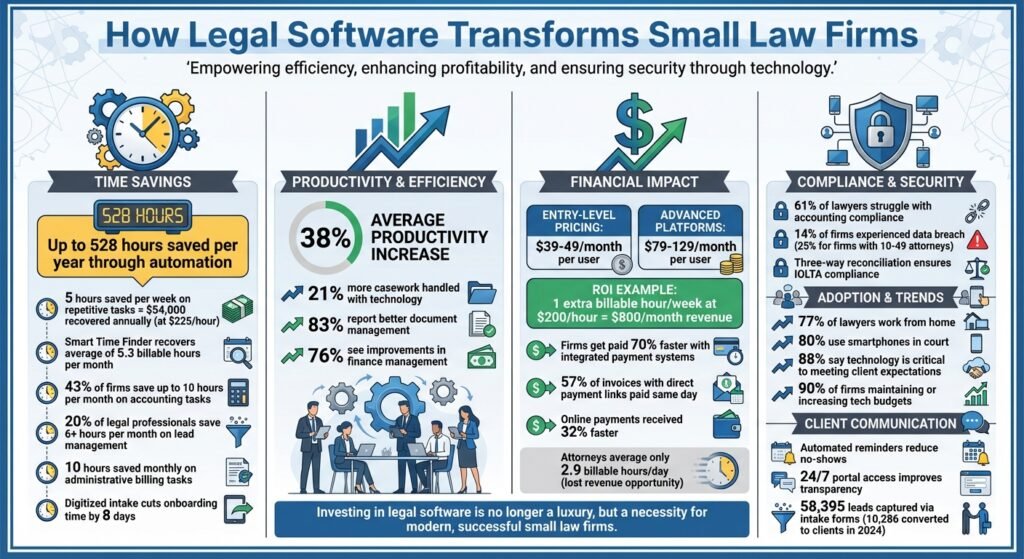
Legal software simplifies case management for small law firms by combining tools like document organization, billing, time tracking, and client communication into one platform. It helps attorneys save time, reduce administrative burdens, and improve compliance with regulations like trust accounting rules. Cloud-based case management starts at about $49 per user per month — that is Clio’s Starter tier and PracticePanther’s Solo tier on annual billing, and MyCase Basic is $50 on annual billing. Prices were checked against vendor pricing pages in August 2026; confirm them before budgeting.
Key Benefits for Small Firms:
- Time Savings: Automating tasks like billing, scheduling, and document management removes repeated manual entry. We have removed the hours-saved figure that used to sit here because no vendor or survey we could find supports it.
- Improved Compliance: Built-in tools ensure adherence to IOLTA trust accounting rules and secure client data with encryption.
- Better Client Communication: Features like client portals and automated updates enhance transparency and reduce missed appointments.
- Predictable pricing: entry-level plans start at roughly $49 per user per month on annual billing. Monthly billing costs about $10 more per seat.
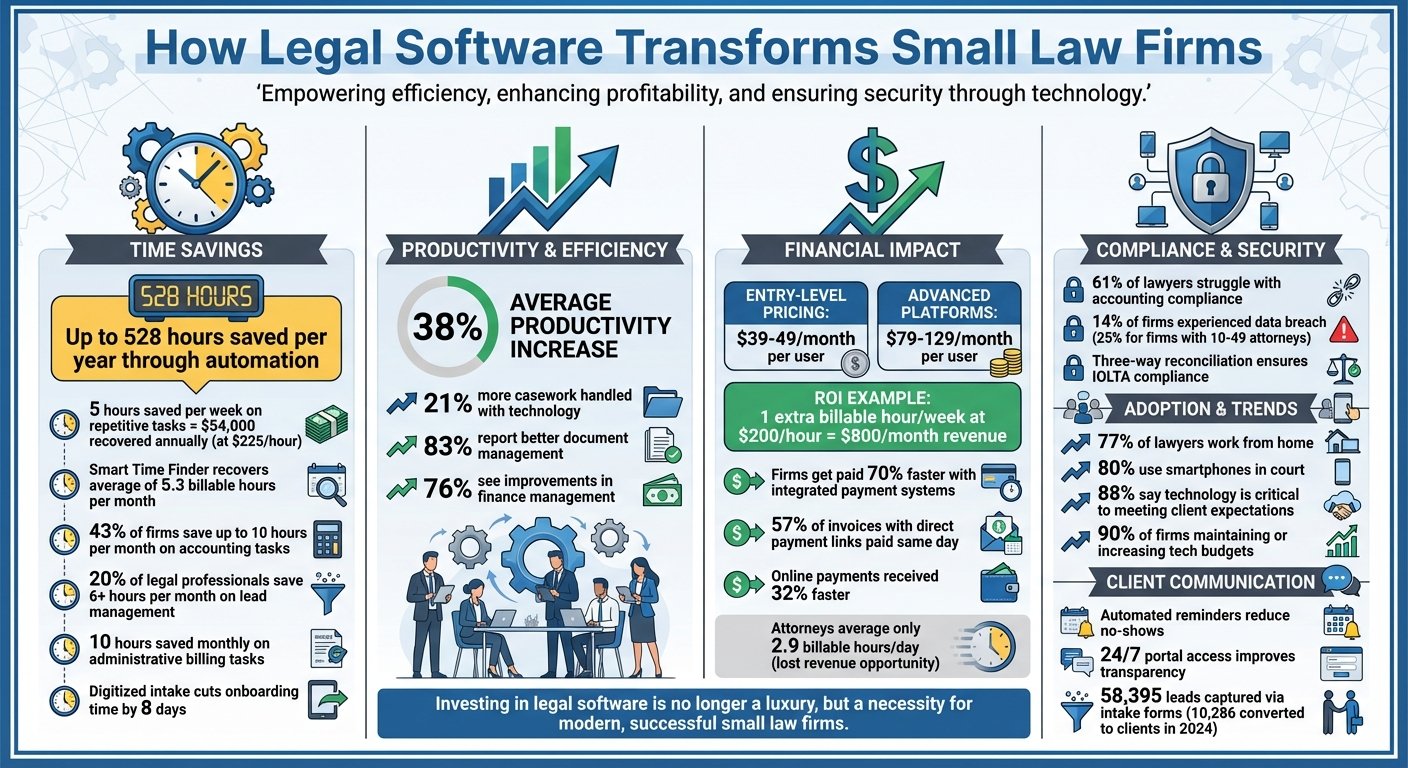
Legal Software Benefits for Small Law Firms: Time Savings, Cost & ROI Statistics
Assess Your Firm’s Case Management Needs
Identify Workflow Problems
Take a close look at where your current system falls short. Are files getting misplaced? Is tracking deadlines a manual headache? Or are you drowning in endless email threads? These are clear signs that legal software could make a difference. Pinpoint specific trouble spots – are you spending time copying data between systems or struggling to access important files while at court or working remotely? If your team is losing hours reconciling case details across spreadsheets, it’s time to rethink your process.
Inefficiency shows up in revenue before it shows up anywhere else. Time reconstructed at the end of the week is time under-billed, and unpaid invoices with no reminder attached sit longer than invoices with one. Frequent no-shows and slow collections are the usual symptoms. We have removed the percentages that previously appeared here — they were quoted without a source and we could not find one. Work from your own numbers instead: pull last quarter’s billed hours against hours worked, and your average days-to-payment. Those two figures tell you which features to prioritise.
Define Key Features for Small Firms
Focus on tools that solve your specific workflow problems. A centralized system that organizes documents, contacts, and case details in one place can significantly cut down on non-billable tasks. Automated client intake forms that sync directly with your CRM can also save time and reduce errors.
Integrated billing and payment systems are a must to avoid juggling multiple platforms, and they ensure compliance with trust accounting rules. Document automation tools that auto-fill case details – like names, dates, and case numbers – remove the retyping that produces most drafting errors. If anyone in your firm works from home or needs a file while standing in a courtroom, cloud-based mobile access matters; if everyone works from one office on one network, it matters much less. For secure communication, client portals with encryption provide a safer way to share sensitive files compared to standard email.
Set a Realistic Budget
Start from published rates rather than a rule of thumb about technology spend as a share of revenue; we removed the one that used to appear here because it was unsourced. Checked in August 2026: Clio Starter is $49 per user per month, and Clio does not publish rates for its Core, Signature or Elite tiers. MyCase runs $50 per user per month billed annually for Basic, $100 for Pro and $130 for Advanced; monthly billing adds $10 to $20 per seat. PracticePanther Solo is $49 billed annually or $59 monthly, rising to $114 or $124 for Business Pro. So the realistic floor is about $49 per seat, and a full-featured tier is closer to $100 to $130. Prices were checked against vendor pricing pages in August 2026; confirm them before budgeting. On return on investment, do the arithmetic with your own billing rate: one extra billable hour a week at your rate, times four, is the monthly figure the software has to beat.
Don’t forget to account for the total cost of ownership. Beyond subscription fees, consider expenses like implementation, data migration, third-party integrations, and training. Cloud-based solutions often come with predictable monthly costs and automatic updates, while on-premise systems may require pricey IT support, hardware upgrades, and steep upfront licensing fees. To keep costs manageable, start with the basic features you need and expand as your practice grows. This approach ensures scalability without overwhelming your budget.
Configure Legal Software for Better Efficiency
Standardize Case Templates and Data Fields
Using custom matter templates can significantly speed up case creation while keeping data consistent across the board. Start by defining essential fields like Case ID, Start Date, Case Owner, and Description. Then, include fields tailored to your practice area – such as medical liens for personal injury cases or custody details for family law matters. Organizing templates into key sections can also help. For example:
- Cases: ID, owner, description
- Contacts: Witnesses, opposing counsel, judges
- Clients: Linked contacts
- Accounts: Billing status
- Tasks: Assignees, deadlines
By mapping digital intake forms directly to these fields, client responses populate case profiles and nobody retypes them. We removed a caseload-increase percentage from this paragraph because it carried no source. The real benefit is duller and easier to check: every field that arrives populated is a field nobody has to key in twice, and templates give document management and scheduling automation something consistent to work from.
Organize Document Management Systems
A centralized, cloud-based document system can eliminate versioning issues and make retrieving files much faster. To keep everything organized, adopt a clear naming convention. For instance:
“2025-12-20_Smith_MotionToDismiss_v2”
This format includes the date (YYYY-MM-DD), client name or case ID, document type, and version number.
The convention matters more than which convention you pick. Search only works if names are predictable, and a firm that half-adopts a naming scheme ends up worse off than one that never had one.
To protect document integrity, set up role-based permissions. For example, allow intake teams to upload files, paralegals to edit and tag documents, and reserve deletion or archiving rights for partners. Incorporating tools like searchable PDFs with OCR and Bates numbering can also make it easier to find specific clauses or sections. Additionally, maintaining a library of templates for frequently used motions or clauses saves drafting time and ensures uniformity across documents.
Set Up Calendars and Task Automation
Integrated calendars can consolidate all case-related events, meetings, and deadlines into one view. Automating deadline calculations from local court rules is the feature most worth paying for. Tools like LawToolBox populate critical dates from the rule set, which removes the arithmetic that produces missed deadlines. To stay on top of tasks, set up multi-stage reminders – such as notifications 30 days, 7 days, and 24 hours before a deadline.
Automated task lists tied to matter templates keep the same checklist running on every matter of a given type. A worked example that used to appear here — five hours a week saved, multiplied out to an annual figure — has been removed, because the five hours came from nowhere we could trace. Syncing with Outlook or Google Calendar keeps one set of dates rather than two, and handles time zones for remote staff.
Automate Routine Tasks to Save Time
Simplify Client Intake
Online intake forms equipped with conditional logic can cut down on the time spent entering data. These forms adapt based on a client’s responses – asking only the necessary follow-up questions. For instance, if a client selects “Divorce”, the form might then request spouse details. This keeps forms short and relevant. Lead and conversion counts attributed to a vendor’s own user base previously sat here; we removed them because the post did not link to the report they came from. What is worth knowing is structural: if intake feeds the case management system directly, the client record is created once and stays in one place.
Adding AI chatbots to your website can further enhance lead capture. These bots work around the clock, qualifying potential clients, answering basic questions, and even scheduling consultations. Built-in e-signature lets engagement letters and fee agreements be signed without a print-and-scan round trip. Two survey figures about response times and hours saved have been removed from this paragraph as unsourced. Response speed is still the variable to watch, and it is one you can measure yourself: log the gap between first enquiry and first reply for a month.
Automate Billing and Payments
Tracking billable hours from memory at the end of the day loses revenue; the daily-average figure that used to support that claim has been removed as unsourced. Time tracking built into the case management system lets attorneys record hours as they work, on mobile or desktop. Once the hours are logged, automated billing features generate invoices on a consistent schedule, whether weekly, bi-weekly, or monthly. Including direct payment links in digital invoices removes the step where a client has to find their chequebook or your bank details. Payment-speed percentages have been removed from this paragraph because they were quoted without a source.
Automated reminders chase unpaid fees without anyone having to remember to. Measure the effect on your own days-to-payment rather than trusting a headline number. Automating document workflows saves time in the same undramatic way.
Use Templates for Common Documents
Reusable templates cut repetitive drafting. Frequently used documents like client correspondence, fee agreements, and court-specific motions are ideal starting points. Legal software lets you build templates with variable fields and conditional logic, populated from the client and case data captured at intake. Survey percentages about extra billable hours have been removed here as unsourced.
For specialized practices, templates can be tailored to specific needs. Examples include medical lien tracking and demand letters for personal injury cases, court date scheduling for criminal defense, or LEDES-coded invoices for insurance defense. One caution on templates: an attorney quotation that appeared here was attributed to one person but praised a different product, so we removed it as unverifiable.
Templates not only standardize language and formatting but also reduce errors, speeding up case processing and improving overall efficiency.
Improve Compliance, Security, and Client Service
Legal software does more than just streamline your daily operations – it also strengthens compliance, boosts security, and enhances how you interact with clients.
Ensure Trust Accounting Compliance
Managing client trust accounts is where small firms get into disciplinary trouble. Legal software helps by automatically tracking transactions and keeping trust and operating accounts separate, ensuring there’s no commingling of funds. A key feature is three-way reconciliation, which aligns trust, client, and bank records to meet IOLTA requirements. That keeps the firm audit-ready without a monthly reconstruction exercise; an hours-saved figure has been removed from this paragraph as unsourced.
The other safeguard worth insisting on is low-balance alerts, which stop the overdraft that would breach state bar rules. Keeping financial and case data in one system removes the reconciliation between two. An attorney testimonial and a second hours-saved percentage have been removed here because neither linked to a source. Compliance is not only financial, though – client data matters just as much.
Improve Data Security
Keeping client information secure is a professional obligation, not an IT preference. Breach-rate percentages that used to open this section have been removed as unsourced. Legal software addresses the risk with bank-grade encryption that protects data both at rest and in transit. Role-based permissions ensure staff only access what they’re authorized to see, while audit logs track all changes for accountability.
Cloud platforms store data redundantly across locations, and they patch themselves. That last point is the real argument against on-premise for a small firm: an unpatched server in a cupboard is a worse bet than a vendor whose full-time job is patching. Two quotations making that case, one attributed to a vendor and one to the American Bar Association, have been removed because the post did not link to either source.
Encrypted client portals keep sensitive exchanges out of ordinary email. With that in place, the next thing to improve is client communication itself.
Improve Client Communication
Secure client portals provide 24/7 access to case updates, documents, and invoices. This level of transparency builds trust, as clients can monitor their cases in real time. Two-way business texting lets attorneys message from a dedicated business number instead of a personal mobile, which is the practical reason to use it. A client testimonial about text reminders has been removed here as unsourced.
Automated reminders for court dates, meetings and unpaid invoices reduce no-shows and shorten collection. Percentages claiming a specific payment-speed advantage and specific satisfaction rates have been removed as unsourced — see finance management for how to measure the effect yourself. Centralised, encrypted logs of client contact also protect privilege, which matters if a fee dispute ever turns into a complaint.
Use Curated Directories to Choose Legal Tools
Once you’ve streamlined your internal processes, the next step is finding the right legal software to support your operations. This can feel overwhelming with so many options available. That’s where curated directories come in – they simplify the decision-making process by organizing tools into easy-to-navigate categories, making it simpler to compare features side by side.
Explore Business Tool Directories
Platforms like BizBot categorize business tools into sections such as legal, accounting, HR, and management. This structure makes it easier to evaluate tools and find ones that align with your needs. For small firms managing multiple tools – like email platforms, document management systems, and bookkeeping software – these directories are a lifesaver. They also highlight integrations that eliminate repetitive tasks, such as manual data entry. Clio’s own pricing page cites 300-plus integrations in its app directory, for instance, so the connections you need may already exist. Checking that before you buy is cheaper than building it afterwards.
Focus on Small-Firm Needs
When building your tech stack, it’s crucial to focus on tools designed for small firms. Not every legal software solution is a good fit for solo practitioners or small teams. Use filters to find software tailored to your firm’s size, and prioritize options with modern, user-friendly interfaces. Cloud-based tools give you remote access and automatic updates without an upfront licence and a server. A statistic about how many lawyers work from home has been removed here as unsourced; the question that matters is how many of your people do.
Manage Software Expenses
Running multiple tools can quickly add up in subscription costs. BizBot, for instance, offers subscription management features to help you track spending and avoid paying for underused tools. Directories also flag software with unclear or high pricing, helping you make informed decisions. Look for all-in-one platforms that combine case management, billing, and document services to reduce the need for multiple subscriptions. Features like e-signatures and payment processing, included at no extra cost, can further stretch your budget. Since cloud-based tools often use predictable monthly or annual subscription models, directories make it easy to compare costs and choose solutions that grow with your firm – without requiring expensive overhauls. By keeping expenses in check, small firms can build a tech stack that improves case management without breaking the bank.
Conclusion
Legal software streamlines operations, automates time-consuming tasks, and boosts client satisfaction. By consolidating case files, calendars, billing, and contact details into one accessible dashboard, firms create a centralized system that simplifies daily workflows and ensures critical information is always within reach.
The efficiency gain is real but hard to quantify honestly, so we have removed the productivity percentage and the recovered-hours average that used to appear here; neither was sourced. MyCase does ship a Smart Time Finder feature that surfaces unbilled activity, and features of that kind are worth trialling on your own matters.
To get started, evaluate your firm’s specific needs. Pinpoint workflow bottlenecks – whether it’s missed deadlines, delayed invoicing, or disorganized client intake – and focus on software that directly addresses these challenges. Standardize case templates, organize document management systems, and automate calendars and task assignments. This setup allows you to spend more time practicing law instead of managing administrative tasks.
Digitised intake forms shorten onboarding because the client fills in the fields once and the firm never retypes them; a specific days-saved figure has been removed as unsourced. Automated billing and document templates recover time lost to repetition.
Security and compliance should be top priorities when selecting a platform. Look for features like bank-grade encryption, role-based access controls, and built-in trust accounting safeguards. These measures are essential for maintaining client trust and meeting professional standards.
When upgrading your tech stack, consider using resources like BizBot to compare legal tools tailored for small firms. These directories help you compare features, keep track of what you are paying, and check that a tool connects to what you already run. A statistic about firms’ technology budgets has been removed from this paragraph as unsourced. Buy for the bottleneck you actually have, and be willing to conclude that your current setup is good enough.
FAQs
How does legal software help small law firms comply with trust accounting rules?
Legal software takes the headache out of trust accounting compliance by automating key tasks like tracking client funds, logging transactions, and producing precise reports. These tools create separate trust ledgers for every case, ensuring that every deposit, withdrawal, or transfer is accurately recorded and balanced. This not only minimizes the chances of errors but also helps law firms stay in line with state bar regulations.
Many of these platforms also come with built-in safeguards, such as alerts to flag policy violations (like mixing client funds with operating funds) and workflow rules to ensure proper fund management. On top of that, the software can produce audit-ready reports, streamlining external reviews and saving valuable time. For small law firms, adopting these tools can mean fewer costly mistakes, more time saved, and more energy to focus on what matters most – serving their clients.
What costs should small law firms consider when adopting legal software?
Subscription fees are charged per user. Checked against vendor pricing pages in August 2026: entry tiers are $49 per user per month for Clio Starter and PracticePanther Solo on annual billing, and $50 for MyCase Basic on annual billing. Fuller tiers run $100 to $130 per user per month — MyCase Pro is $100 and Advanced is $130, PracticePanther Business Pro is $114. Clio does not publish rates above Starter. Monthly billing adds roughly $10 to $20 per seat per month. Confirm current rates before budgeting.
Beyond subscription costs, it’s smart to budget for training, integration with existing tools, and optional add-ons like payment processing or advanced reporting. Cloud subscriptions include updates and hosting, so there is no separate maintenance line. BizBot’s legal-software directory is a starting point for comparing tiers and trials, but check the vendor’s own pricing page before you commit.
How can legal software improve client communication and protect sensitive data?
Legal software offers small law firms a way to streamline and secure client communication. With features like built-in client portals, clients can easily access updates, download documents, and exchange messages in a protected environment. This eliminates the risks associated with unencrypted emails or casual messaging apps. Additionally, automated reminders for invoices, meetings, and important deadlines improve efficiency and demonstrate professionalism, which helps establish trust with clients.
When it comes to security, modern legal tools are designed to protect sensitive case information. They utilize encryption, firewalls, and secure cloud storage to keep data safe. Many platforms also include role-based access controls and continuous monitoring to prevent unauthorized access. These measures not only help firms comply with privacy laws like GDPR and CCPA but also fulfill ethical obligations. By automating these safeguards, small firms can minimize risks, save valuable time, and maintain the confidentiality their clients expect.
More on this topic
Browse all 86 articles on Business Operations, or jump straight to our buying guide: Best Productivity Tools for Small Teams.