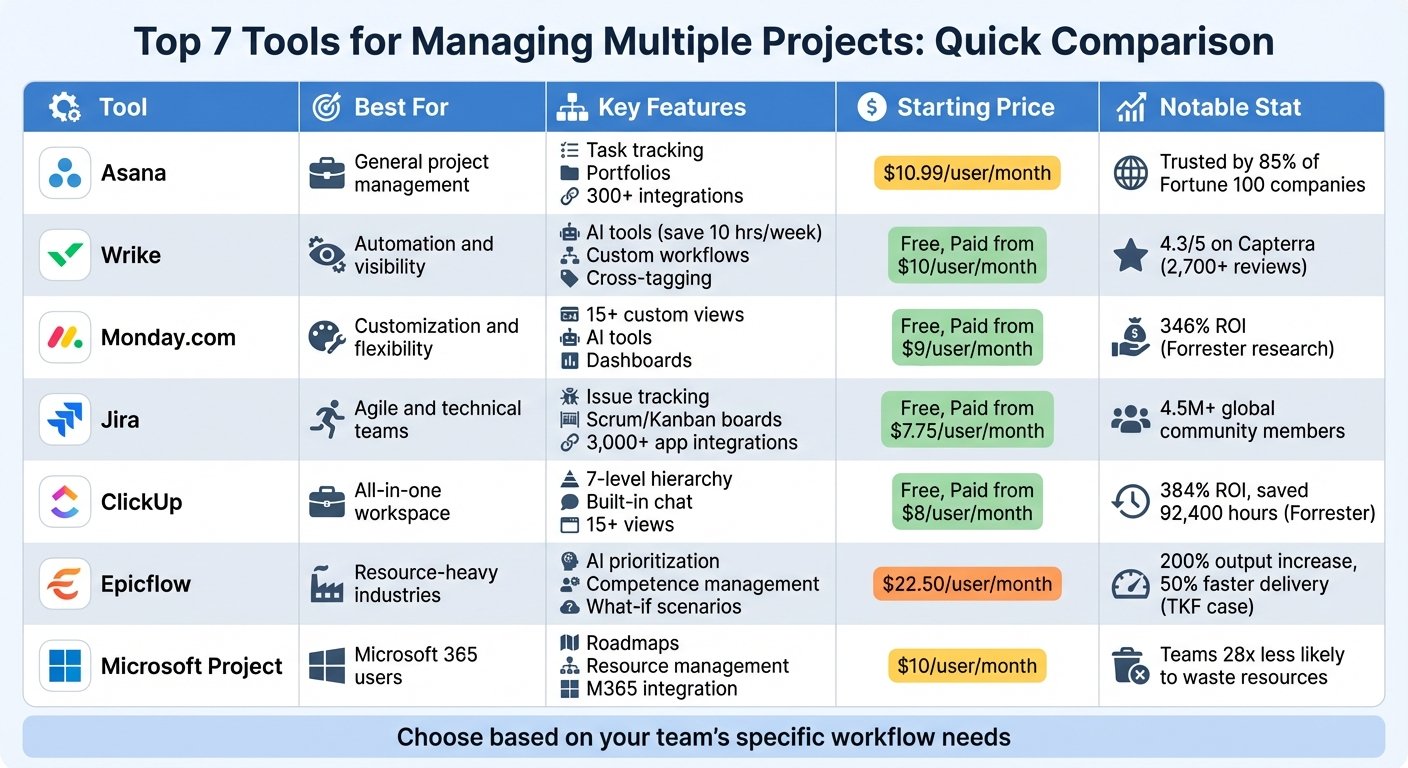
Wrike is work management software for organizations that have outgrown simple task lists and need structure across several teams at once. It handles projects, requests, approvals, workloads and reporting in one system, and it is aimed higher up the market than most tools in this category — marketing departments, PMOs, creative studios and professional services groups inside larger companies. The trade-off is familiar: more capability than a lightweight tracker, and correspondingly more setup before it feels natural.
What you can actually do with it
Wrike’s real strength is handling work that arrives from elsewhere in the business and has to be triaged, assigned, reviewed and reported on.
- Take requests through structured forms. Dynamic request forms with conditional logic ask different questions depending on the answers, then create the right project or task from a template automatically.
- Plan in the view that suits the work. Tables, boards, calendars and interactive Gantt charts with dependencies, plus custom fields and custom item types so a “campaign” or a “deliverable” can be modelled as its own object.
- Proof creative work in place. Reviewers comment directly on images, PDFs and video with markup and versioning, and approvals are recorded — which removes a whole genre of email chaos for design teams.
- Balance workloads across teams. Resource views show effort against capacity so you can see who is overloaded before a deadline slips, not after.
- Automate the routine. Rules move items through statuses, assign owners, trigger approvals and send notifications when conditions are met, and blueprints let you spin up a standard project shape repeatedly.
- Report to people who do not use the tool. Dashboards and analytics roll up progress, time and effort across many projects, which is usually why leadership sponsors the purchase in the first place.
- Use AI assistance. Wrike has added an assistant and AI agents that summarize work, draft content and handle routine steps inside workflows.
Who it fits best
Wrike lands best in mid-sized and larger organizations where a few dozen to a few hundred people share the same delivery process — a marketing department fielding requests from the wider business, a PMO tracking a portfolio, a creative team that lives on review cycles, or a services team juggling many client projects.
It is overkill for a small team of a handful of people who just need shared to-do lists and a board. It is also a poor fit for software engineering teams working in sprints against a code repository, who will be better served by a purpose-built issue tracker.
Things worth knowing before you commit
- There is a genuine learning curve. The folder, project and space hierarchy is powerful but not obvious, and teams that skip the setup phase end up with a messy structure that is painful to unpick later.
- Key features are tier-gated. Custom fields, proofing depth, automations, resource management and advanced analytics are distributed across plans. Write down your must-haves and confirm which tier includes each one.
- Some capabilities are paid add-ons. Things like advanced security controls and deeper integration tooling are sold separately from the base subscription, so the real total can exceed the headline per-user figure.
- Seat bands can bite. Lower tiers cap how many users you can have, and crossing that line pushes you into a more expensive plan rather than simply adding a seat.
- Adoption is the risk, not the software. Wrike rewards organizations willing to standardize how work is requested and tracked. If teams keep working in email and spreadsheets alongside it, you get cost without the visibility.
Alternatives to compare it against
If you want something lighter that people adopt without training, Asana, Trello or Monday.com are easier entry points, though they thin out at portfolio scale. If your work is client-billable and margin visibility matters more than request intake, Teamwork.com or Scoro fit better. If you are already committed to Microsoft, Planner and Project inside Microsoft 365 may cover enough at no extra licence cost. Wrike is the right pick when many teams must follow the same process and leadership needs reporting across all of it.
Plan tiers, user limits and pricing change regularly — check Wrike’s own pricing page before you commit.
Further reading
- 7 Key Features of Top Resource Scheduling Software — what to test in Wrike’s workload views, which sit in the upper tiers.
- 5 Best Marketing Resource Management Software for Small Business 2024 — aimed at the marketing-request-intake use case Wrike is most often bought for.
- 10 Best Gantt Chart Software for Project Management 2024 — compares the interactive timeline and dependency handling against rival tools.
- The 7 Best Project Management Software for Businesses in 2024 — the lighter Asana and Monday.com options worth ruling out before taking on Wrike’s learning curve.
Have you used Wrike?
One sentence is enough. Would you pick it again, and why or why not? We publish the critical reviews too — that is the point.