Quick facts
| Best for | Small teams and departments running visual, roughly linear, stage-based work. |
|---|---|
| Category | Project Management |
| Pricing from | USD 5 per user/month if billed annually |
| Free plan | Yes |
| Team size | solo, 2-10, 11-50 |
| Last verified | 18 August 2026 — how we verify |
Quick verdict
Consider it if: Non-technical people need to adopt a tracker with almost no training and one board per process.
Look elsewhere if: You run large programmes needing dependencies, resourcing, cross-board rollup or formal leadership reporting.
Compiled from the vendor’s own documentation and pricing pages, checked on the date above. We have not tested this product hands-on. How we evaluate software.
Compare Trello with Asana and monday.com · Not sure what you need?
Trello is a kanban board app: cards move across lists, and that is the whole mental model. A board represents a workflow, each list is a stage such as To do, Doing and Done, and each card is a piece of work carrying its checklist, due date, attachments and comments. Almost nobody needs training to use it, which is why it spreads through small businesses faster than more capable tools. Owned by Atlassian, it now adds calendar and table views, automation and a large plugin library on top of that simple core.
What you can actually do with it
Teams typically build one board per process — a sales pipeline, a content calendar, a hiring funnel, a client project — and refine it over time.
- Drag cards through a visual workflow. Status is obvious at a glance because it is literally the column a card sits in, which is the main reason non-technical teams adopt it.
- Put detail on the card. Checklists, due dates, assigned members, labels, custom fields, file attachments and a comment thread keep the context with the work.
- Automate with Butler. Built-in rules, card buttons and scheduled commands can move cards, assign people, set dates and post reminders without any code.
- Extend with Power-Ups. Hundreds of integrations and add-ons connect Slack, Teams, Google Drive, Jira, Confluence and time tracking or reporting tools to a board.
- Other views when a board is not enough. Calendar, table, timeline and dashboard views show the same cards by date, in a grid or as a chart, on the relevant plans.
- Capture work from elsewhere. The inbox and planner features turn emails and messages into cards and let you block calendar time against them.
- Start from a template. A large public template gallery covers common processes, so you rarely have to design a board from a blank page.
Who it fits best
Trello is a strong choice for small teams and departments running visual, stage-based work: a marketing team tracking content, an office manager handling facilities requests, a small agency moving client jobs through production, a founder keeping a simple sales pipeline. It also works well for individuals who think spatially and dislike lists.
It fits best when the number of active cards is manageable and the process is roughly linear. It is a weaker choice for large programs of work with dependencies, resourcing questions and formal reporting to leadership.
Things worth knowing before you commit
- It does not scale gracefully. Boards with hundreds of cards become hard to scan, and there is no strong cross-board rollup on lower plans, so multi-project reporting is a real weakness.
- Free plan caps matter. The free tier limits boards per workspace, automation runs and file sizes, and the extra views are reserved for paid plans. Check the current limits against how you plan to use it.
- No dependencies or workload management. Nothing links one card to another as a blocker, and nothing tells you a person is over-allocated.
- Power-Ups add cost and fragility. Some are free, some are paid subscriptions from third parties, and a workflow built on several of them depends on vendors you did not choose carefully.
- Reporting is thin. Beyond basic dashboards, most teams end up exporting data or adding a reporting Power-Up.
Alternatives to compare it against
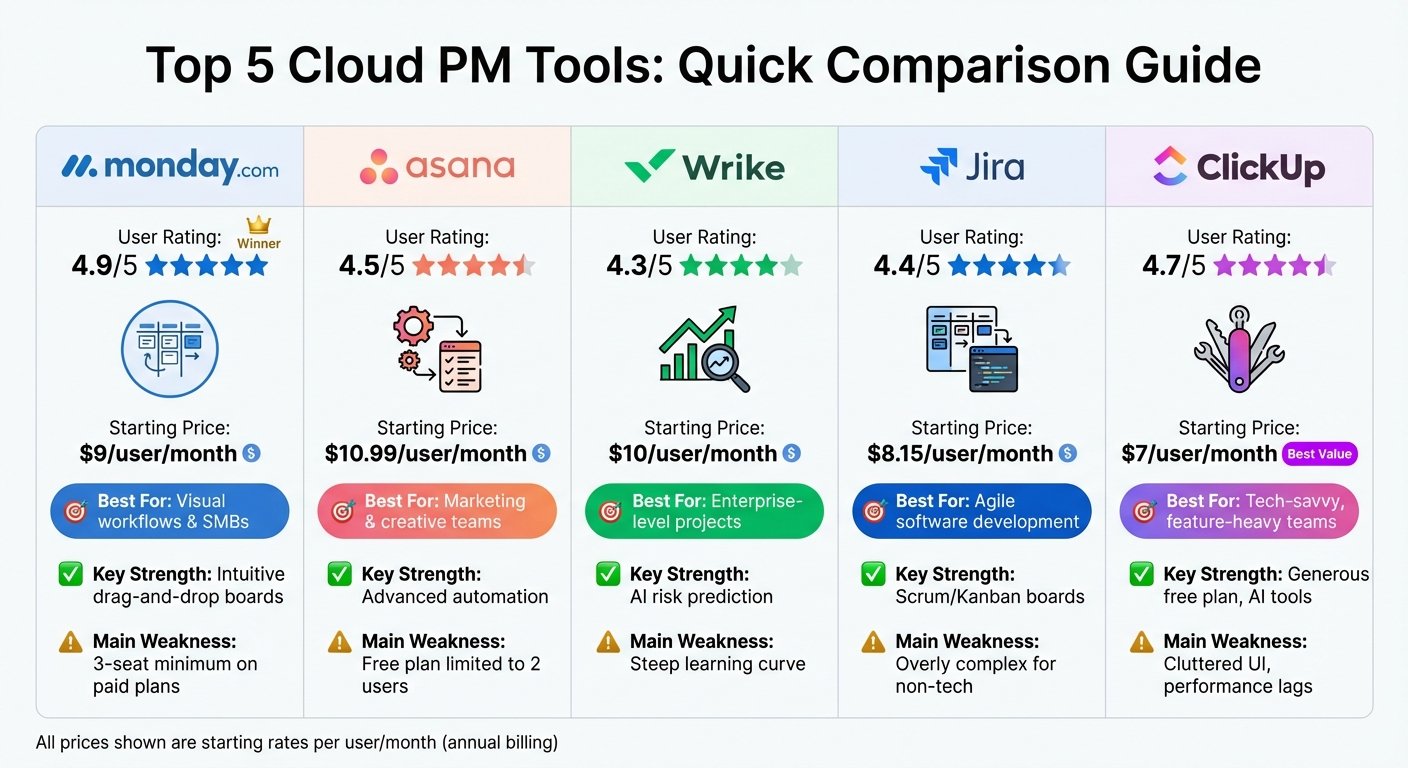
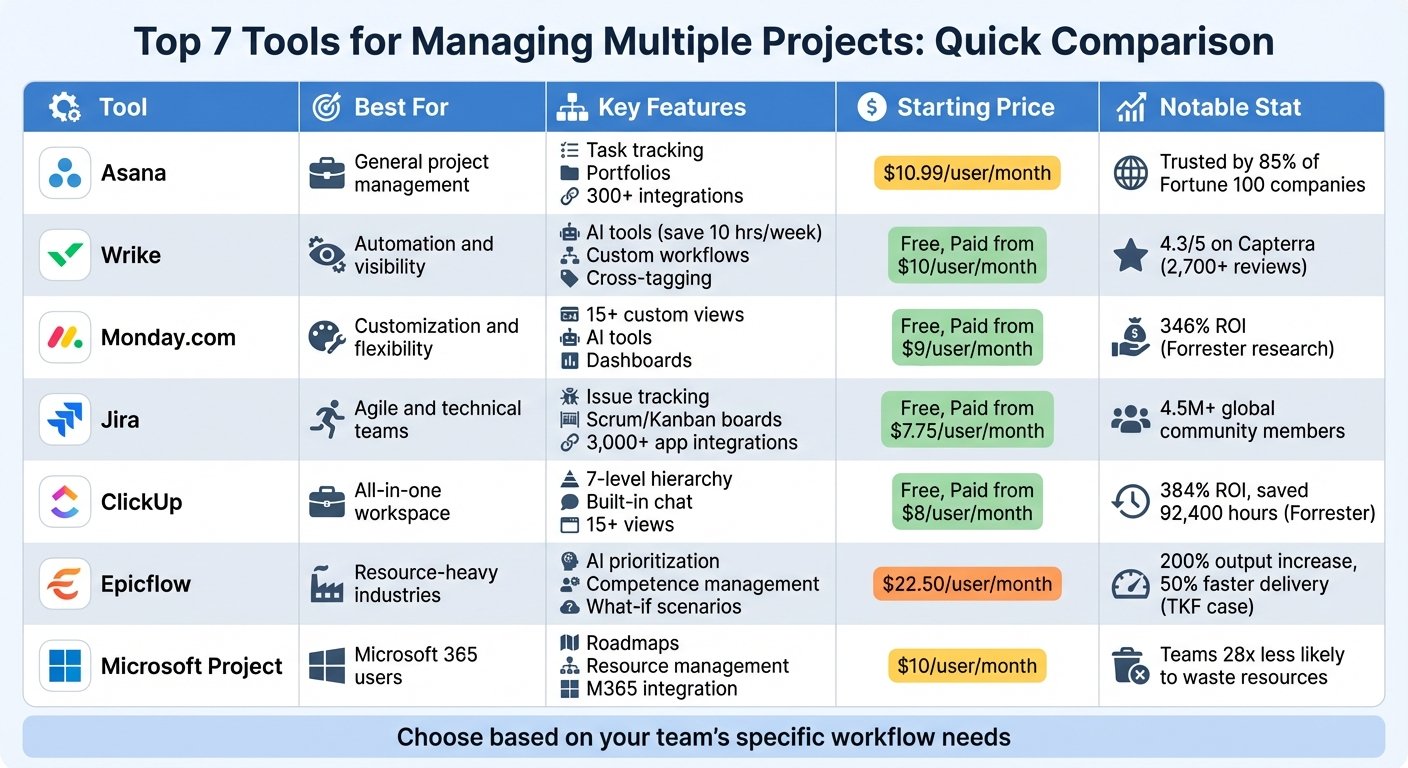
If you outgrow the board and need timelines, portfolios and reporting, Asana or Monday.com are the usual next step, and Atlassian’s own Jira is the choice for software teams. If your data is really a structured list rather than a workflow, Airtable models it better while still offering a kanban view. If you are already paying for Microsoft 365 or Google Workspace, check what Planner or a shared task list gives you free before adding another tool. And for a personal system, a task app like Todoist is lighter than a board.
Plan limits, per-user pricing and which views and automations are included change regularly — check Trello’s own pricing page before you decide.
Further reading
- The 7 Best Project Management Software for Businesses in 2024 — covers the Asana, Monday.com and Jira step-ups for when a board stops scaling.
- Easy to Use Project Management Software: A Guide — speaks directly to the low-training-required appeal that drives Trello adoption.
- 8 Best Task Management Tools 2026 — useful if a shared board is more structure than your team actually needs.
- Project Management Calendar: How to Create in 2024 — relevant to running a content calendar through Trello’s calendar view.
- 10 Best Gantt Chart Software for Project Management 2024 — what to reach for given Trello has no dependency or blocker modelling.
Have you used Trello?
One sentence is enough. Would you pick it again, and why or why not? We publish the critical reviews too — that is the point.